tojock@126.com
USB port: only support 2.0 USB flash drive (Max 128G) and USB HDD (Max
8TB).
When you use the USB HDD to play videos, you'd better plug a charger on the
USB HDD to power the USB HDD, or your DVD player will not be able to
recognize USB HDD.
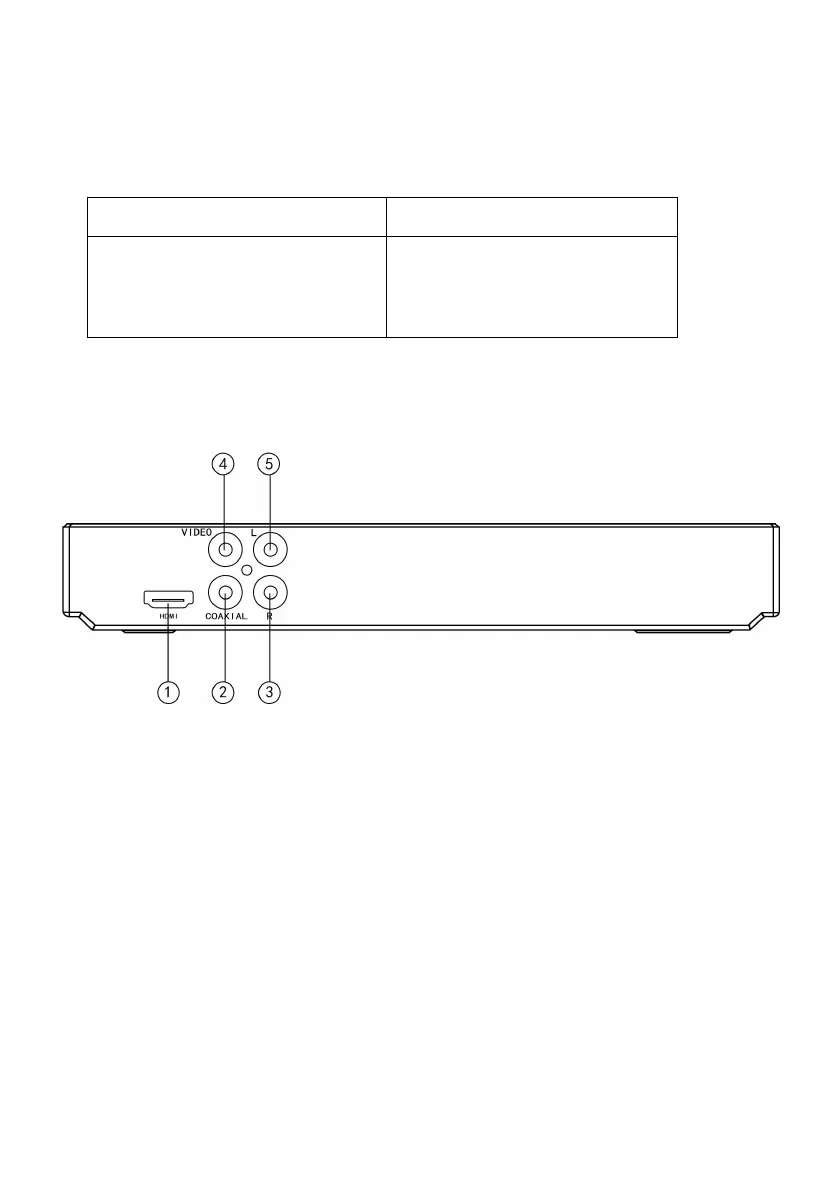
5.2 REAR PANEL
1. HDMI Output Jack
2. Coaxial Digital Output Jack
3. Audio Right Output Jack
4. Video Output Jack
5. Audio Left Output Jack
6. Remote Control
6.1 Remote Control Definition
(1) OSC: To access OnScreen Control Menu
(2) Power: Turn on/off the player or restore the player to standby mode.
Loading a disc.
Blu-ray disc is recognized.
Setup menu is displayed


 To Next Page