tojock@126.com
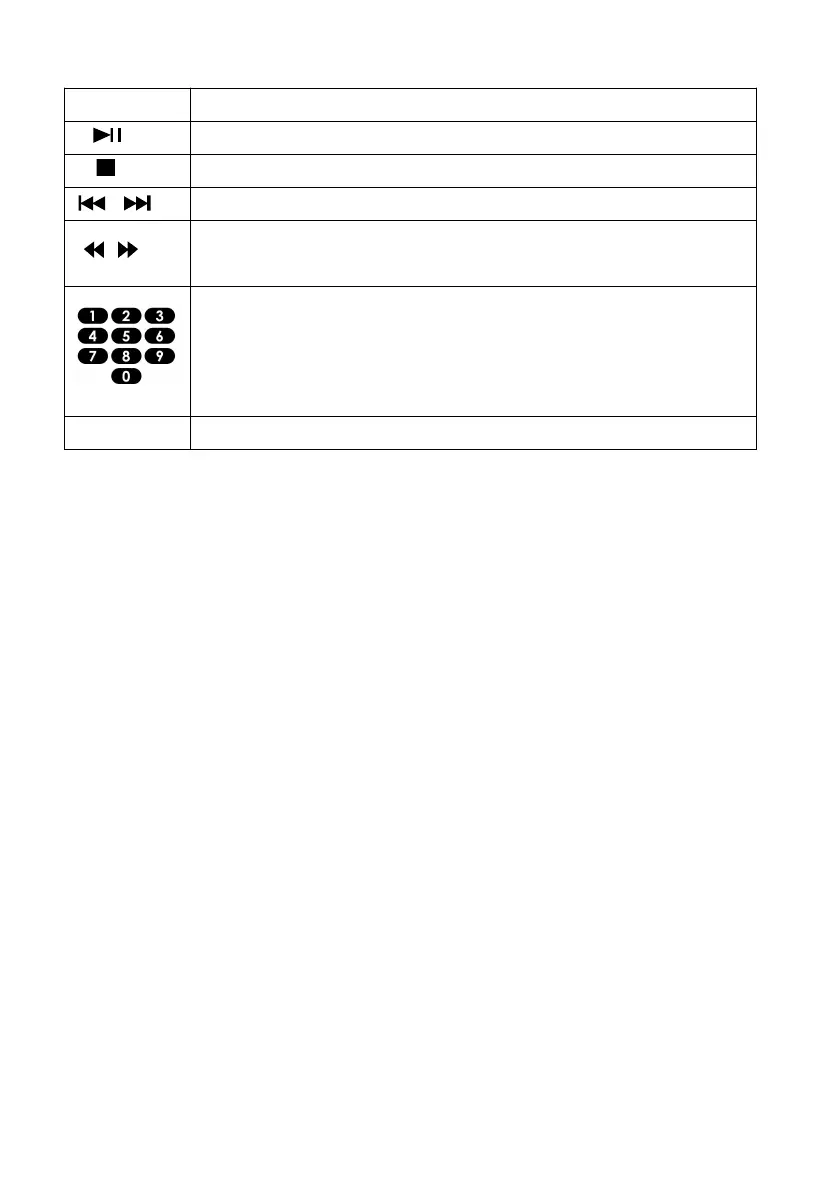
Use the remote control to control the playback for the audio files.
8.6 Play a photo slideshow
You can play JPEG on the player as a slideshow.
1. Insert a disc or USB device that contains JPEG files
2. Select a Photo folder, then press OK to open.
To select a Photo, use the Navigation buttons.
To enlarge the selected Photo and start the slideshow, press OK.
Note:
It may require more time to display the disc content on your TV if there is a
large number of songs/ photos compiled onto one disc.
This product can only display digital camera Pictures in the JPEG-EXIF
format, typically used by almost all digital cameras. It cannot display Motion
JPEG, or Pictures in formats other than JPEG, or sound clips associated
with Pictures.
Folders/files that exceed the supported limit of this product cannot be
displayed or played.
Start or resume play / Pause play.
Skip to a previous or next title or chapter
Search fast-backward or fast-forward. Press repeatedly to
change the search speed.
Select or turn off repeat mode


 To Next Page