02
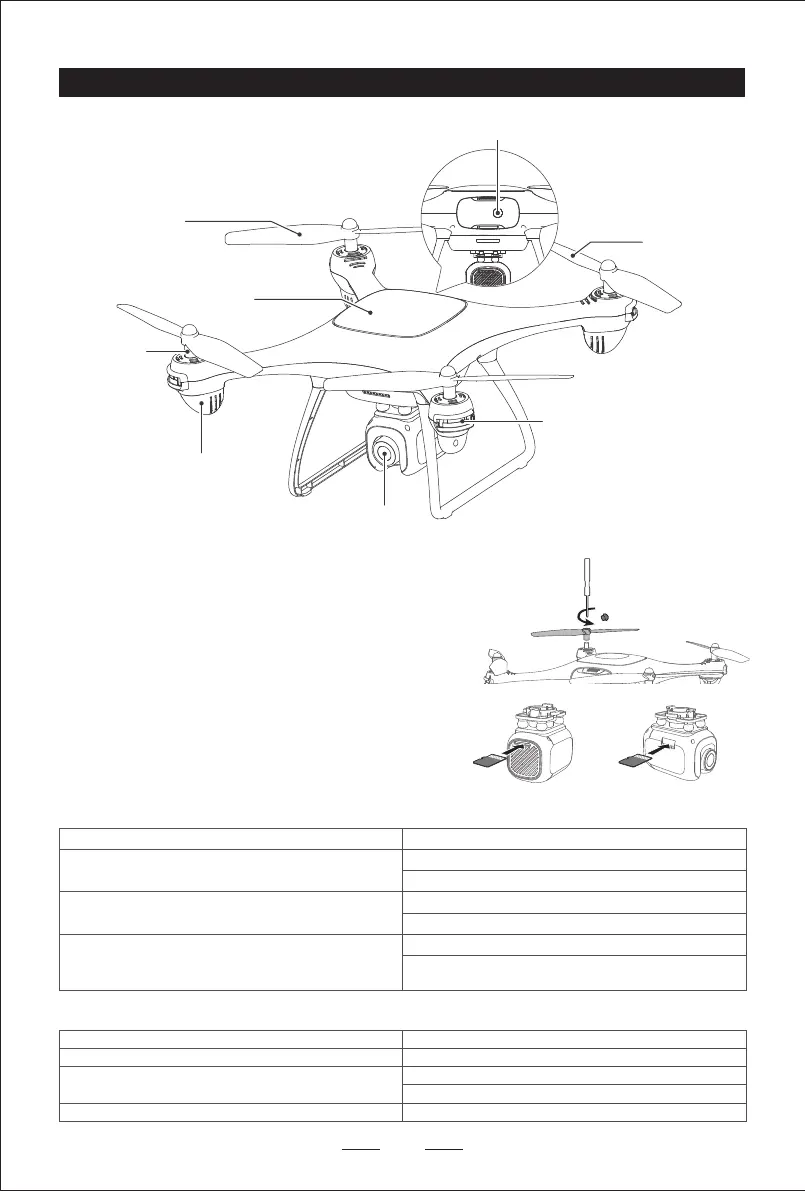
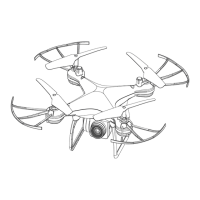
Indicator light
WIFI cam
Body
Motor
Blade B
Blade A
Guard circle socket
Drone Overview
Power switch
Replace the blades
TF Card Slot
1. Insert the TF card into the slot of the camera. The minimum capacity of
TF card is 4GB and the maximum is 128GB. All images and video files
will only be recorded on the TF card, not saved in the App or your
phone. You can manually upload from the gallery to your phone. The
package list does not contain TF card.
2. Before using TF card, please format it in FAT32 format on the computer.
The drone only supports TF card in FAT32 format.
1. Replace with a new blade at the corresponding position. Blade A should
be installed on position A, while blade B should be installed on position
B. If the blades are installed on the wrong position, the drone will be
unable to be operated or controlled.
2. Bland A rotates clockwise and blade B rotates anticlockwise while flying.
GPS mode (default)
Headlights (red lights) and rear lights (blue lights) keep on
Headlights (red lights) keep on
Rear lights (blue lights) blink slowly and alternatively
Headlights (red lights) keep on
Rear lights (blue lights) blink slowly at the same time
Headlights (red lights) blink slowly
Rear lights (blue lights) keep on (Attitude mode)
Rear lights (blue lights) keep on (GPS mode)
Headless mode
(Good GPS signal is available only in open outdoor places)
Attitude mode
GPS search condition
Emergency Stop or Rollover (Motor stopped)
Four lights blink slowly
Four lights blink quickly
Horizontal calibration: left lights blink slowly, right lights keep on
Vertical calibration: left lights keep on, right lights blink slowly
Four lights blink quickly
Drone Low Power
Drone Disconnected
Geomagnetic Calibration
Under the Normal Situation
Warning and Abnormal
DSDR05C DSDR05A


 To Next Page