Take photos / Videos Short press headless mode
Speed gear adjustmentSteering gear adjustment
03
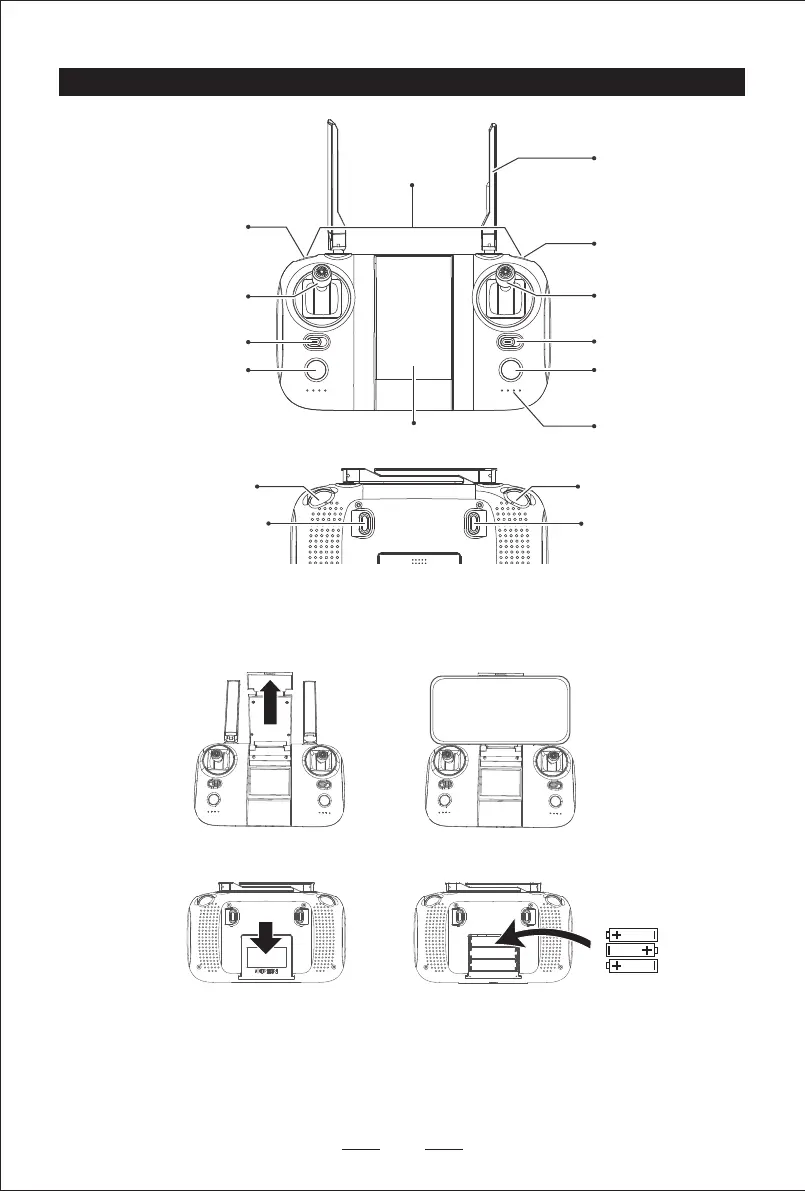
Remote Control Diagram
One Key Hovering/
One Key Returen
Ascent and descend /
Turn left / right
Antenna
GPS mode /
Attitude mode
Forward / Backward /
Slide left / Slide right
On / Off
Long press one key to
take off / One key to land
Indicator light
Press the buttons
simultaneously for
one-button emergency
Cell phone clip
Level calibration
Mode 1 / Mode 2
Push the phone holder upwards as shown in the figure, insert one side of the phone into the bottom slot of the phone holder, and
then pull the phone holder lever upwards until the phone is inserted.
After taking out the mobile phone, the stretching part of the mobile phone clip will automatically retract the mobile phone clip, and
then put the mobile phone clip into the remote controller.
Three AAA batteries required in the remote controller (Please purchase the battery separately).
a. The remote control uses 3 “AAA” non-rechargeable batteries, or “AAA” rechargeable batteries. (sold separately)
b. Pay attention to the polarity of the battery when installing or replacing the battery.
c. Non-rechargeable batteries are not rechargeable and can only be used with the same or the same battery as the
recommended battery.
d. Do not mix old and new or different types of batteries.
e. Exhausted batteries should be removed in time, and discarded batteries should not be thrown.
f. If you do not use it for a long time, please remove the battery to avoid damage to the product caused by battery leakage.


 To Next Page