05
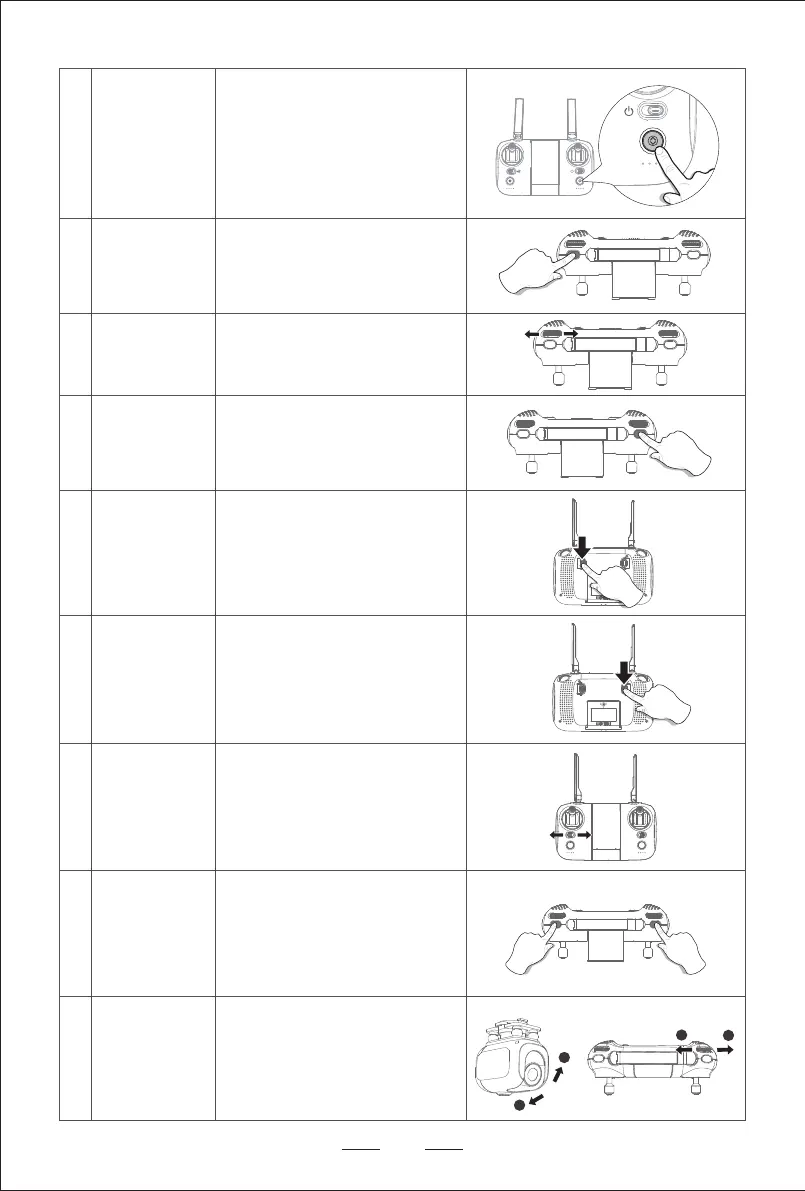
Long press 1S as shown in the picture to enter
one key to take off/one key to land function.
When flying in GPS mode, short press this
button to enter the one key hovering function,
the aircraft will exit the current flight state and
keep hovering in place. / Long press 1S to
enter the return function, and the aircraft will
exit the current flight state and return.
Three gear of high, medium and low speeds to
adjust, turning thumbwheel to the left is
downshift, turning thumbwheel to the right is
shift up.
Long press 1S to switch GPS mode or attitude
mode, the default is GPS mode. When entering
GPS mode, the remote control makes a “beep”
sound; when entering attitude mode, the remote
control makes two “beep” sounds.
One key to take off /
one key to land
One Key Hovering/
One Key Returen
Speed thumbwheel
GPS mode /
Attitude mode
1
1
2
2
4
5
6
7
As shown in the picture, short press the
camera button, the drone will take a photo.
Long press the camera button, and the drone
will record a video. Long press or short press
the camera button again to exit the photo/video
mode.
Turn the switch to the left for Mode 1
(Left-hand throttle).
Turn the switch to the right for Mode 2
(Right-hand throttle)
Photo / Video
Switch mode
Emergency stop
In the headless mode, the operator does not
need to recognize the position of the drone
nose. It only needs to control the drone
according to the direction of the joystick of the
remote controller.
Headless mode
8
9
10
11
When the drone encounters obstacles or
emergencies, press and hold the two keys 2S
as shown in the figure at the same time to
conduct emergency stop.
Steering gear
adjustment
12
Turn the thumbwheel left or right to adjust the
angle of camera when the drone is in flight.


 To Next Page