5
2. Dialing In Your Sound
2. Dialing In Your Sound2. Dialing In Your Sound
2. Dialing In Your Sound
The Falcon is capable of a surprisingly wide range of tones, and the Voicing knob is the
key to accessing the Falcon’s tonal palette. Each selection of the voicing knob is
intended for a specific use, and it’s important to know the intention of each voicing in
order to get the most out of the Falcon.
“Rhythm” Voicing
“Rhythm” Voicing“Rhythm” Voicing
“Rhythm” Voicing
The "rhythm" voicing is intended to give you more or less a blackface Fender sound.
In order to get this kind of sound, however, you need to set the volume and tone controls
a certain way. This setting is a good starting point:
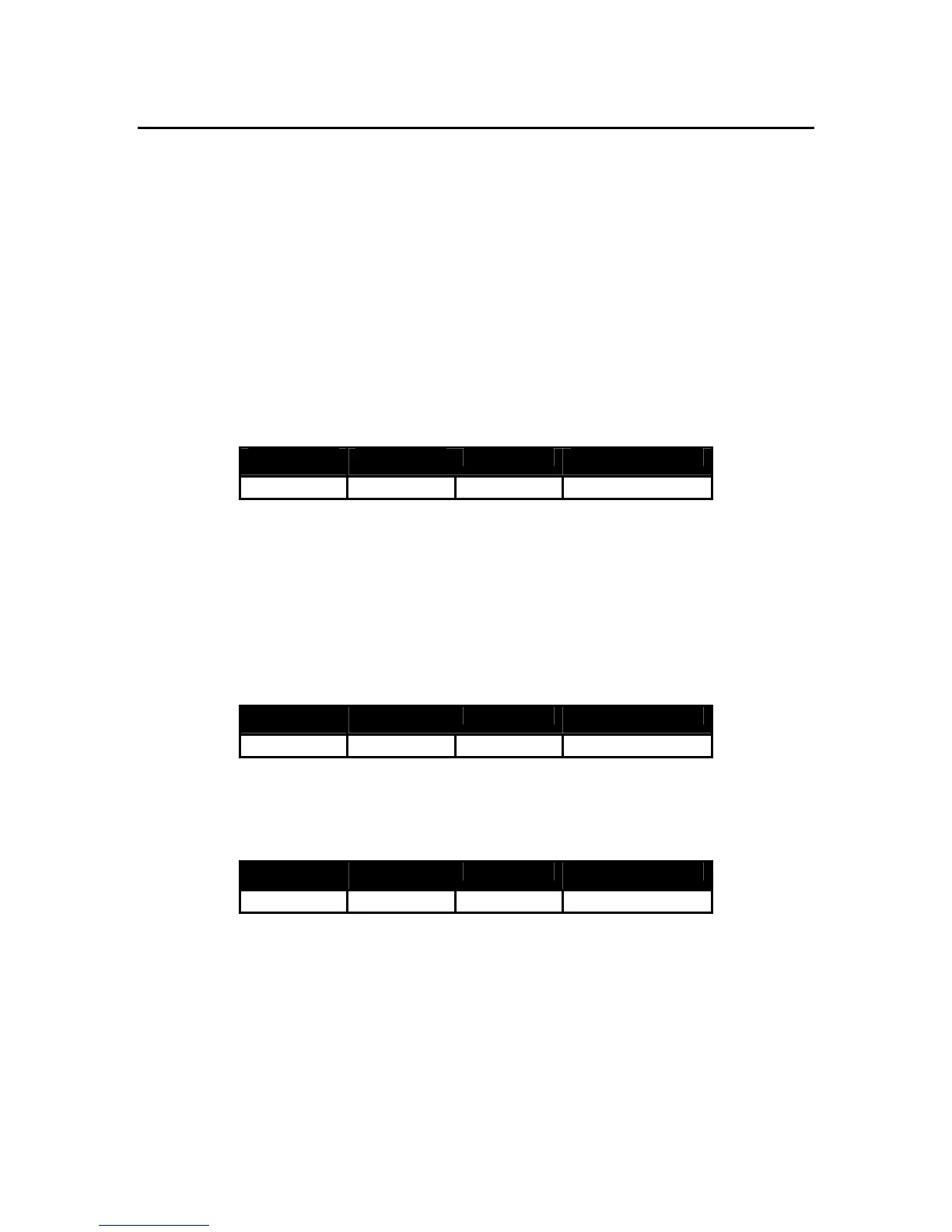
Input Volume Tone Voicing
LO
3 3
Rhythm
“Tweed” Voicing
“Tweed” Voicing“Tweed” Voicing
“Tweed” Voicing
The "tweed" voicing gives you roughly the same preamp voicing as a vintage tweed
deluxe. There are two main uses for this channel. The first is a fat clean sound with a
nice rounded top end, which you can find with the following settings:
Input Volume Tone Voicing
LO
3 8
Tweed
The second use for this channel is a thick tweed style overdrive, which can be had at
the following settings:
Input Volume Tone Voicing
HI
9 7
Tweed


 To Next Page