7
3. Back Panel Controls
3. Back Panel Controls3. Back Panel Controls
3. Back Panel Controls
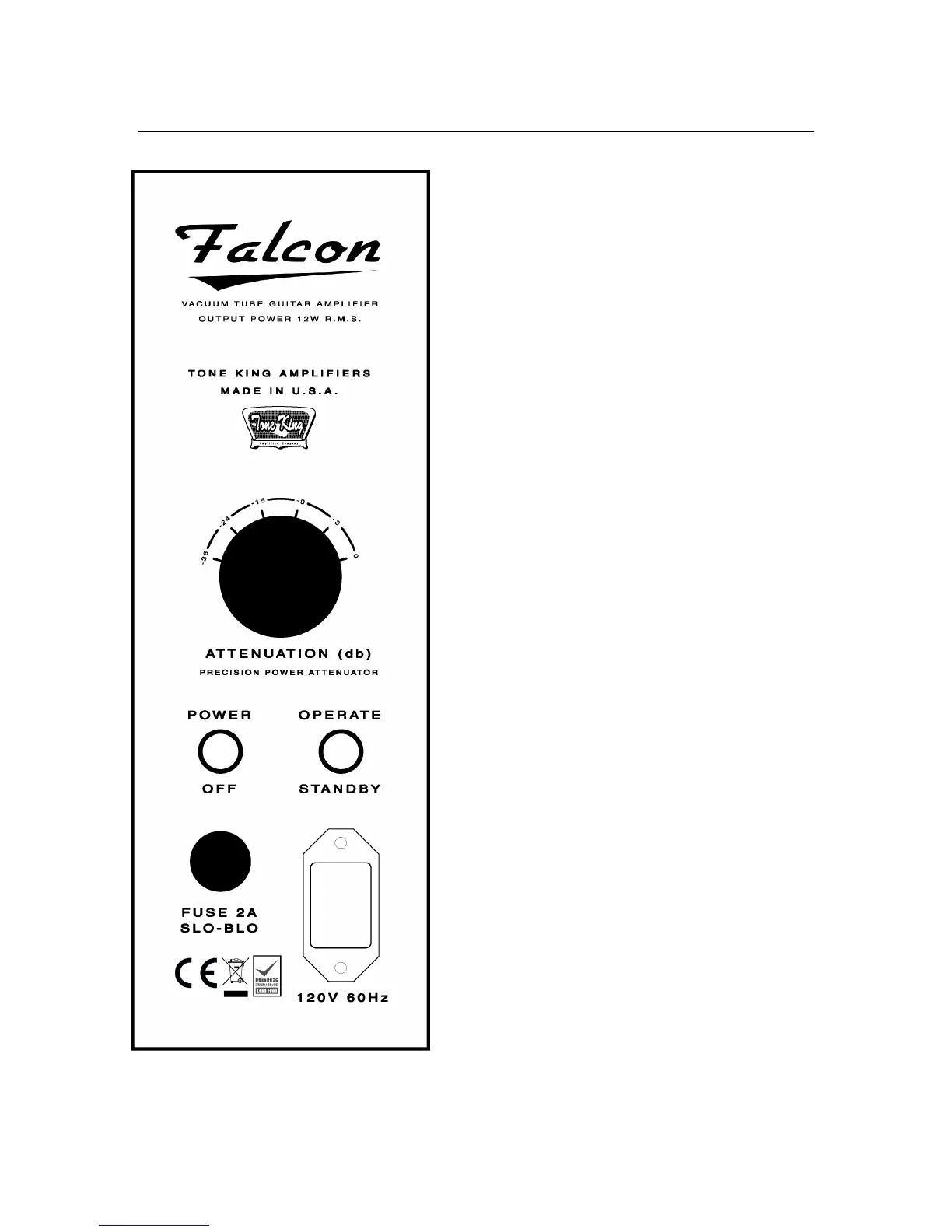
AC Power
AC PowerAC Power
AC Power
Always use a grounded AC cord, and make sure
that a proper ground connection is supplied to
the amp. Never attempt to lift or defeat the
ground connection to the amp.
Fuse
FuseFuse
Fuse
A standard 2A slo-blo fuse (style 3AG) should be
used.
Power Switch, Standby Switch
Power Switch, Standby SwitchPower Switch, Standby Switch
Power Switch, Standby Switch
When powering up the amp, you should start
with the Power switch OFF, and the Standby
switch in the "STANDBY" position.
First, turn on the Power switch. This will apply
power only to the tube filaments only.
After turning on the Power switch, allow the
tubes to warm up for about 1 minute, then
toggle the Standby switch to the “OPERATE”
position.
The power-down sequence is not as important
as the power-up sequence. When turning the
amp off, you may turn Power off before
Standby, or turn Standby off before Power, or
turn them both off at the same time.
Speaker Jack
Speaker JackSpeaker Jack
Speaker Jack
The speaker jack is located on the side of the
chassis, and is not labeled. It is a standard ¼”
mono jack. The output impedance of the
amplifier is 8 Ohms. If you wish to use the
Falcon with an extension cabinet, it’s best to
use an 8-ohm cabinet. You can connect it with
a standard ¼” mono speaker cable by pulling
out the plug from the internal speaker, and
plugging the cable into the speaker jack.



 To Next Page