35
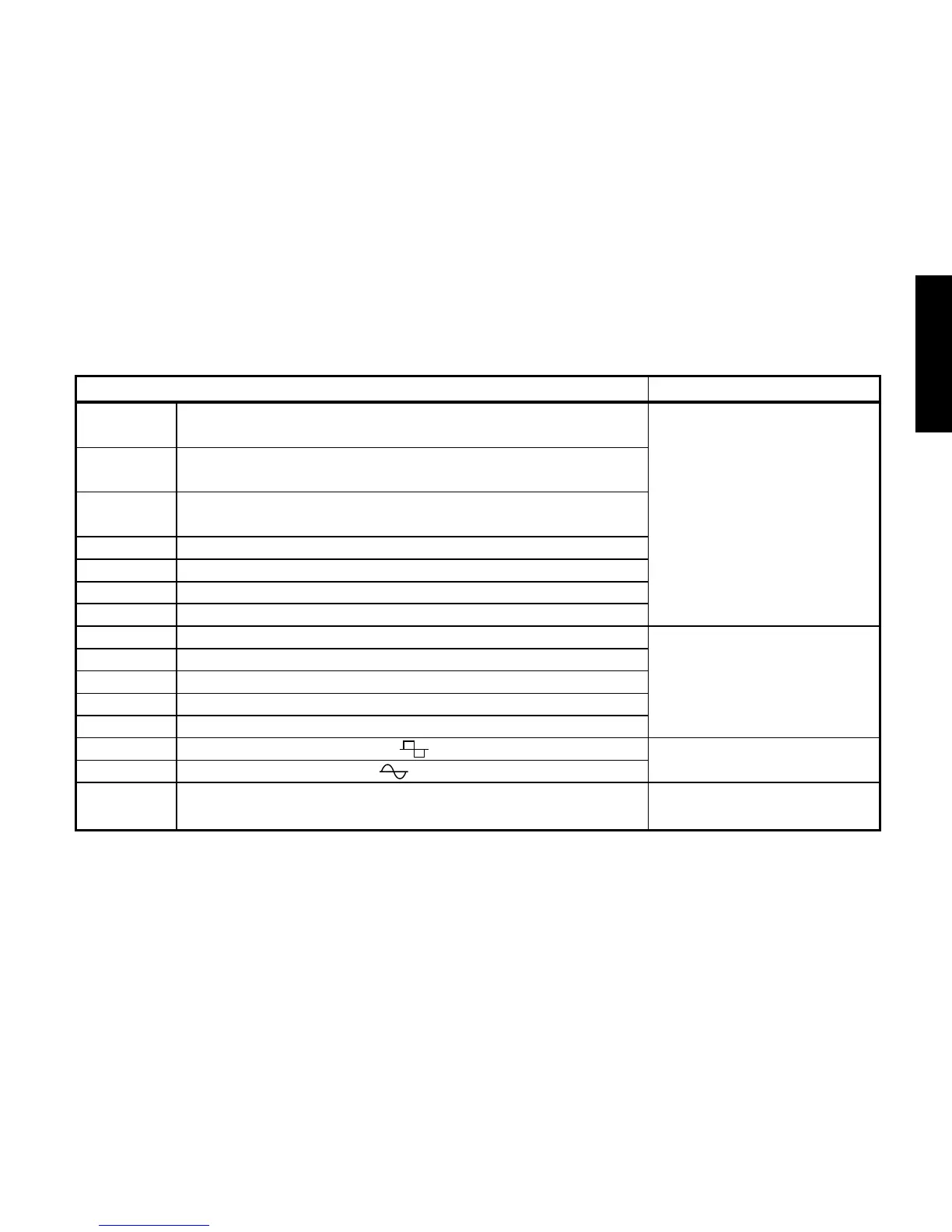
MOD (Modulation & Filter Effect Modeling)
TYPE (π/† button) VALUE
(Value Dial)
CHORUS1 Vintage chorus in which the effect sound is output to the
left and the direct sound to the right
CHORUS2 Vintage stereo chorus that inverts the phase of the effect
sound between left and right, creating more spaciousness.
FLANG Vintage flanger with a distinctive sound (1, 2, 3 have Adjusts modulation speed
1, 2, 3 feedback amounts of 0%, 22%, and 60% respectively) (0.1...10.0 [Hz])
FLANG4 Vintage flanger that inverts the phase of the feedback
PHASER1 A popular four-stage vintage phaser
PHASER2 A four-stage vintage phaser with a thick mid-range
PHASER3 A ten-stage vintage phaser with a mild effect
U-VIBE1 Simulation of a pedal vibe set to chorus mode
U-VIBE2 Simulation of a pedal vibe set to vibrato mode Adjusts modulation speed
TREM1 Smooth tremolo (1.0...10.0 [Hz])
TREM2 Tremolo built into a guitar amp
TREM3 Strong and deep tremolo
AT PAN1 Auto Pan (LFO:square wave ) Adjusts modulation speed
AT PAN2 Auto Pan (LFO:sine wave ) (0.1...10.0 [Hz])
ROTARY1 Rotary speaker simulation Adjusts modulation speed
(1.0...10.0 [Hz])



 To Next Page