10
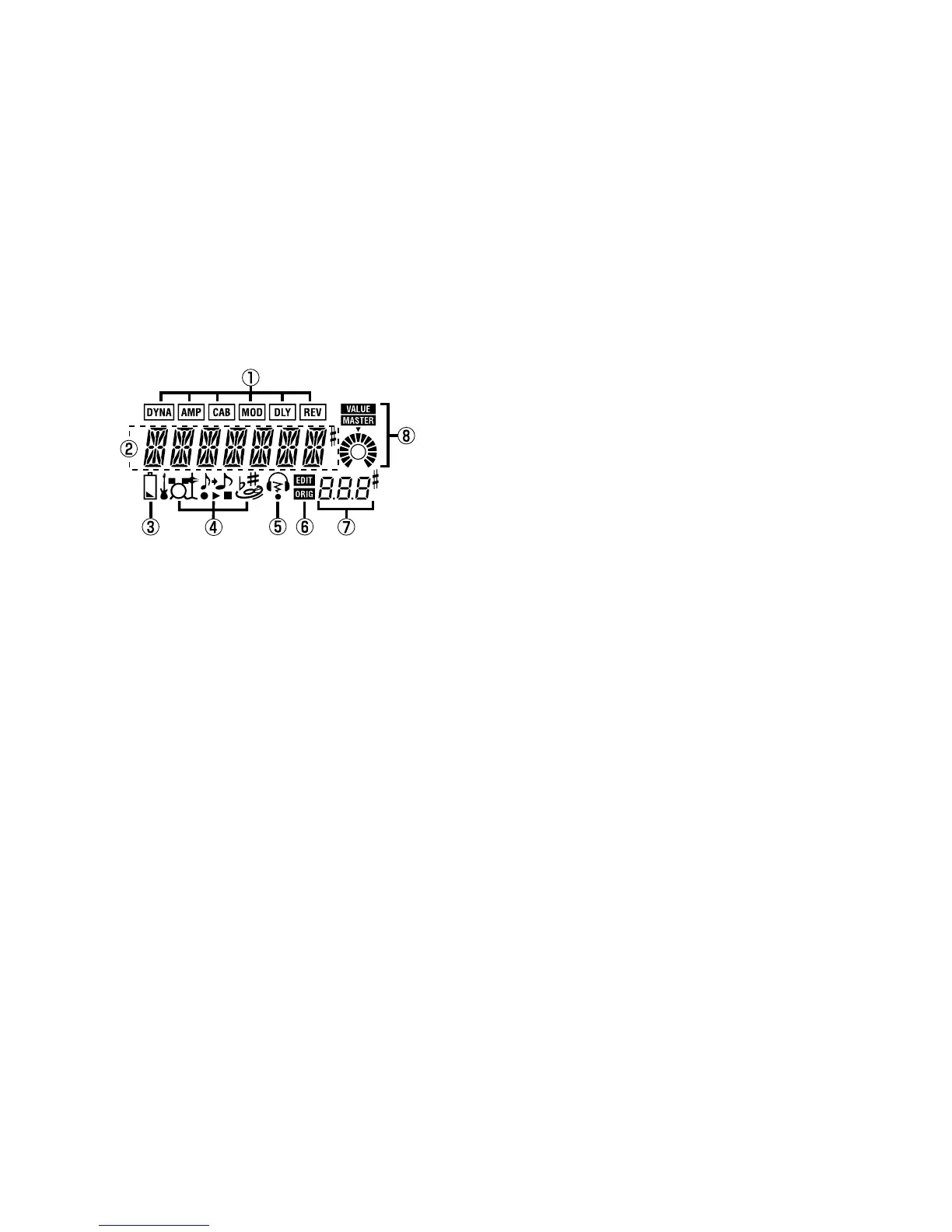
LCD screen
1 Effect chain
This area indicates the on/off status of the
DYNA, AMP, CAB, MOD, DLY, and REV ef-
fects
2 Program name/Effect type display
This area shows the program name or effect
type. When the PX4 is bypassed or muted, this
will function as the tuner.
3 Low Battery icon
This icon will light when the batteries run down.
4 Mode icons
These icons will light when you are in AUX
Pitch, Phrase Trainer, or Rhythm & Bass
modes.
5 Infrared transmitter icon
This icon will light when the infrared transmit-
ter is on.
6 Edit/Original icons
The EDIT icon will light when you enter Edit
mode. If the parameter or value being edited
matches the value that is written in the pro-
gram, the ORIG icon will light.
7 Program number / value display
This displays the program number.
When you change the Master Level, its value
will be displayed here for several seconds.
During editing, this displays the parameter
values.
8 Master/Value icons, bar graph
When MASTER is lit, the master level of the
program is indicated graphically. When VAL-
UE is lit, the value of the parameter is indicat-
ed graphically.



 To Next Page