INSTALLATION AND USER MANUAL
2.3 operation mode:
The working state can be controlled by these two buttons(UP/DOWN)
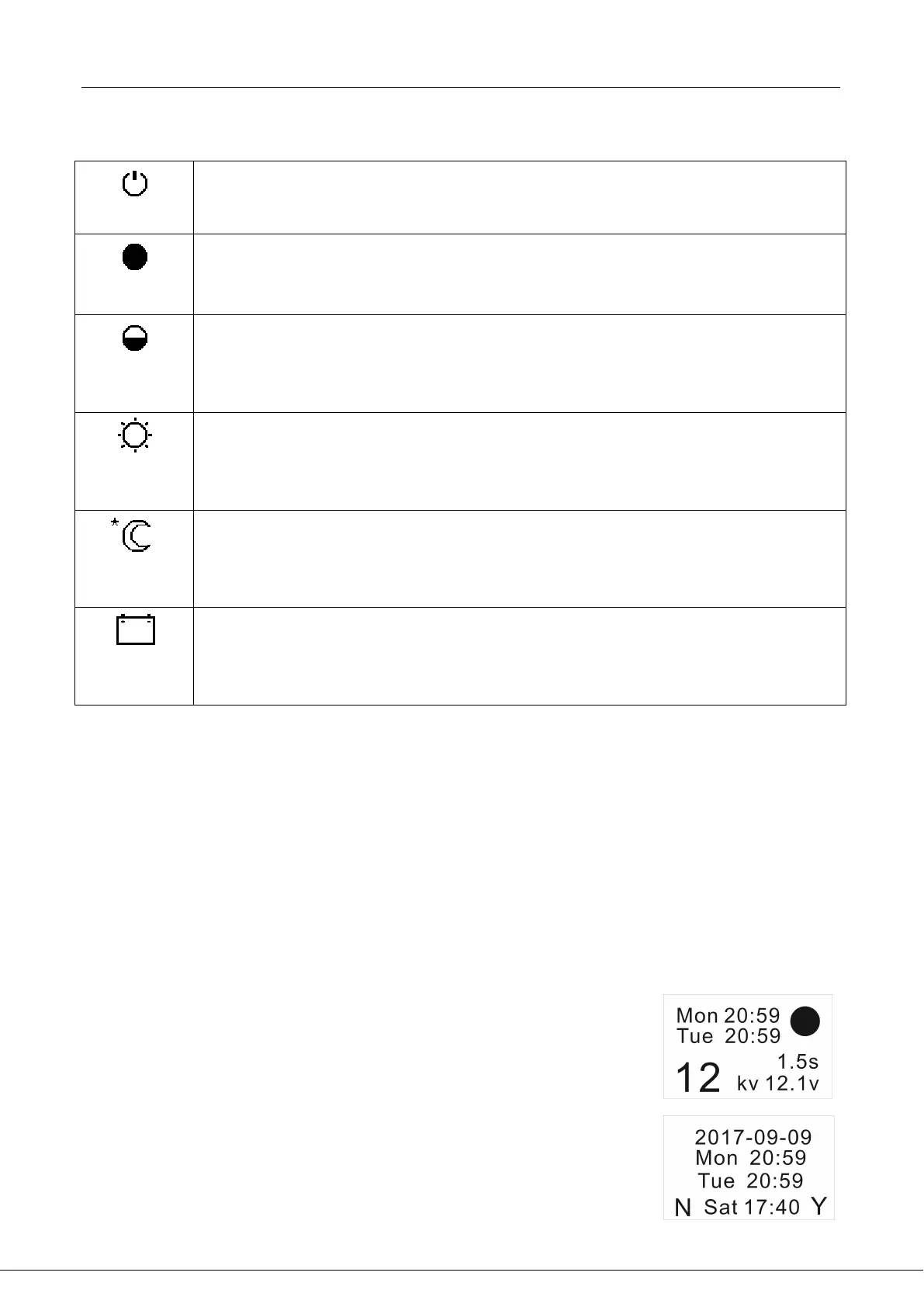
Hold-on mode: The Power LED indicator should be blue. Digital display will show
Output Voltage at 0kv and the Input Power Voltage. Status LED indicator should not
be lit. When in the On-Hold mode, the energizer will not generate a pulse.
Full energy mode: Energizer pulse will be every 1.2 seconds. The Power LED
indicator should be blue. Status LED indicator should be red. Digital display will
show Output Voltage at the energizer as well as the Input Power Voltage.
Reduced Energy Mode: Energizer power is reduced by 25%. The energizer pulse will
be every 1.2 seconds. The Power LED indicator should be blue. Status LED indicator
should be red. Digital display will show Output Voltage at the energizer as well as
the Input Power Voltage.
Short-day, long-night mode : Daytime pulse will be every 1.2 seconds, night pulse
will be every 2 seconds. The Power LED indicator should be blue. Status LED
indicator should be red. Digital display will show Output Voltage at the energizer as
well as the Input Power Voltage.
Long-day, short-night mode : Daytime pulse will be every 2 seconds, night pulse will
be every 1.2 seconds The Power LED indicator should be blue. Status LED indicator
should be red. Digital display will show Output Voltage at the energizer as well as
the Input Power Voltage.
Battery Saving Mode: Energizer power is reduced by 25%. The energizer pulse will
be every 2 seconds. The Power LED indicator should be blue. Status LED indicator
should be red. Digital display will show Output Voltage at the energizer as well as
the Input Power Voltage.
When this energizer is plugged into a standard 110v-240v outlet power source, the Power Voltage
display will read close to 12.6v. When the energizer is attached to a 12v deep cycle battery,
the Power Voltage should read between 12.2 and 13.6 volts. If the voltage of the battery reads
lower than 12.2volts that indicates it is time to recharge the battery.
2.4 Timer
There is extra function for some customer – timer
This timer is base on weekly , we can set the timer using the buttons “UP” “DOWN”.
1. Timer without setting : None stop working
2. Start and stop in the same day but different time, means repeat daily working
3. Start and stop in different day , means repeat weekly working
(More setting operation please refer to our technology support and Reseller)
Setting
1. Push “UP” to Hold-on mode
2. Push “DOWN” 5 Seconds,and enter setting interface.
3. Push “UP” to modify the value, and DOWN to move to next setting bit.
4. “Y” submit the setting ,”N” cancel the setting
Top two rows is the current time


 To Next Page