Home
ToolKitRC
Test Equipment
M8P
Page 29 (Measure signal)
ToolKitRC M8P - Measure signal
44 pages
Manual
Save Page as PDF
To Next Page
To Next Page
To Previous Page
To Previous Page
Loading...
@T
oolkiRC 202
3
29
2.
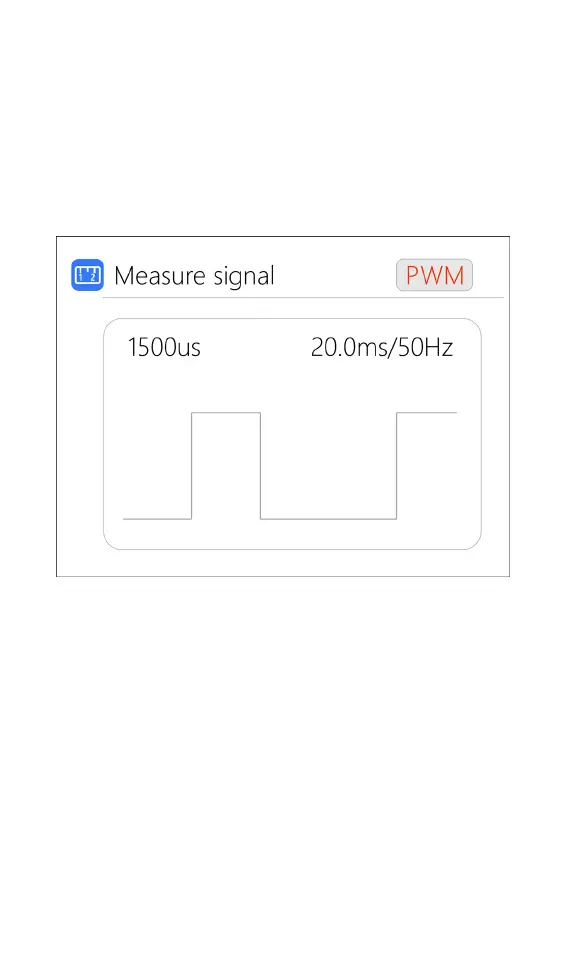
Measure signal
Move t
he cur
s
or t
o
meas
ure signa
l,
shor
t press
the
[
Scroll Wheel] to enter th
e signal test inter
face.
Sc
ro
l
l
the
[Scr
oll wheel] to select the
signal type
.
Sele
ct P
WM,
as show
n bel
ow:
Sele
ct PPM,
as sh
own bel
ow:
28
30
Table of Contents
Main Page
Introduction
2
Key Points
2
Further Information
2
Safety
3
Table of Contents
4
Contents
4
M8P Layout
7
Quick Start
8
Charge and Discharge Settings
9
Battery Type Setting
9
Cell Setting
12
Work Mode
13
Discharge Mode
14
Max Input Voltage
15
End Voltage Setting (TVC)
16
Current Setting
17
Nimh Setting (Peakv)
18
Cycle Setting
19
External Load Setting
21
Smart Battery Setting
22
Charge and Discharge Work
23
Accessibility
28
Signal Output
31
ESC Test
35
Power
36
System Settings
37
Other Functions
42
Specifications
44
Related product manuals
ToolKitRC MC8
19 pages
ToolKitRC ST8
20 pages


 To Next Page