@ToolkiRC 2023
to be tested. Choose PWM.
Scroll the [Scroll Wheel], move the cursor to
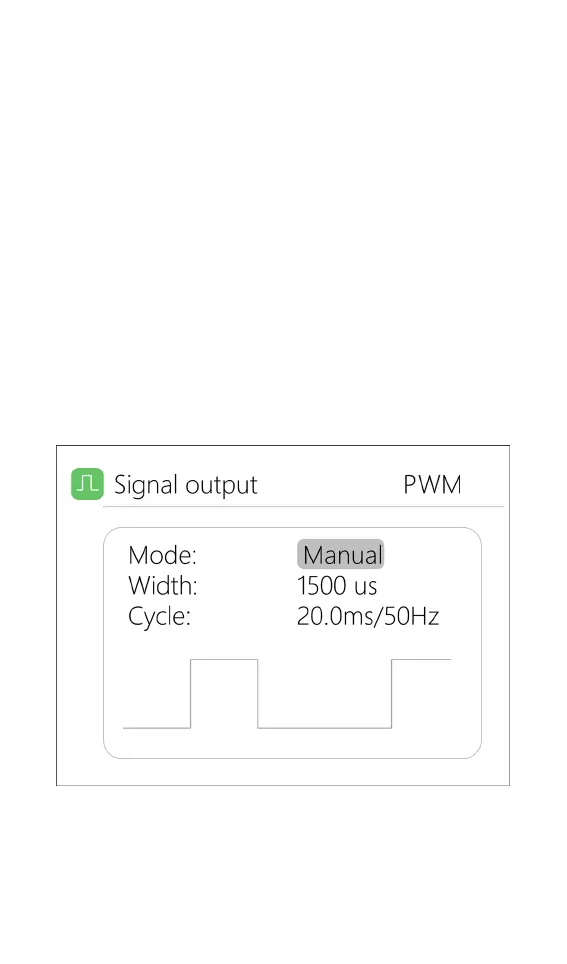
[Manual], short press the [Scroll Wheel] to set the output
mode, which can be set to manual, auto 1, auto 2, and
auto 3.
In manual mode, you can change pulse width and
cycle values by using the cursor.
When set to auto 1, 2, 3, the pulse width value of
output PWM will automatically change at 3 different
speeds.
The width can be set from 800 to 2200us.
The cycle can be set between: 2.5ms (400hz) to
50.0ms (20hz). As shown below:
Select PPM, scroll the [Scroll wheel] to move the
cursor to the value of the channel to be modified. Short
press the [Scroll Wheel] to modify the output pulse


 To Next Page