Service
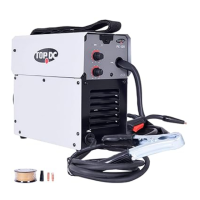
Thank you for purchasing our mig welder. Your purchase includes our free 1-year
limited warranty. If you have any questions or issues about your product, Welcome to
contact us at
topacdc01@gmail.com
Please have your order number available when asking for support.
TROUBLE SHOOTING
Be certain to shut off the welder, disconnect if from power, and discharge the flux gun to
ground before adjusting, cleaning, or repairing the unit
Possible Cause Likely Solutions
When switched
on, power indicator
lights but welder
does not function
1) Tripped thermal protection
device
2) Faulty or improperly
connected trigger.
3) Machine is in low- or over -
voltage protection
1) If the alarm indicator is illuminated without an error
code, welder has overheated and shut down. Stop
and wait with the power switch ON for the welder to
cool. Reduce duty cycle to help reduce wear on the
welder.
2) Ensure the gun connection is properly seated on the
machine.
3) If the alarm light is illuminat
ed, check input voltage
an
d ensure it falls within the specified range. If input
voltage is correct, turn the welder off and back on.
Power ON indicator
does not light when
switched on
1) Unit is not connected to outlet
properly
2) Outlet is unpowered
3) Circuit supplies insufficient
input voltage or amperage
4) Plug does not have correct
rating.
5) Input power cord is not seated
properly
1) Verify the voltage at the outlet and the connection to
the outlet.
2) Check circuit breaker, if any is tripped, determine and
remedy cause before resetting.
3) Verify that the circuit is designed to supply the
required input volt
age and amperage as detailed.
4
) Make sure installed plug is correct rating.
5) Ensure the input power cord is fully secured.
Wire feeds,
but arc does
not ignite
1) Improper ground connection
2) Improperly sized contact tip
3) Excessively worn contact tip
4) Dirty contact tip.
1) Make sure that the workpiece is contacted properly by
the ground clamp and that the workpiece is properly
cleaned near the ground clamp and the welding
location.
2) Verify that contact tip is the proper size of the welding
wire. If needed, replace contact tip with proper size
and type.
3) Check that the hole in the tip is not defo
rmed or
en
larged. If needed, replace contact tip with proper
size and type
4) Properly clean contact tip.
Porosity in
the weld metal
1) Dirty workpiece
2) Gun is being used too far
away from workpiece
3) Dirty welding wire is
introducing contamination
into the weld
1) Clean workpiece down to bare metal.
2) Check contact tip to work distance for the proper
procedure.
3) Make sure that welding wire is clean and free of rust
and residues.
Problem
9


 To Previous Page
 Loading...