OPERATING INSTRUCTIONS
2) Make sure the machine is transported securely. If the machine must be moved,
always disconnect the power cable from the electrical outlet. And do not touch
live electrical parts.
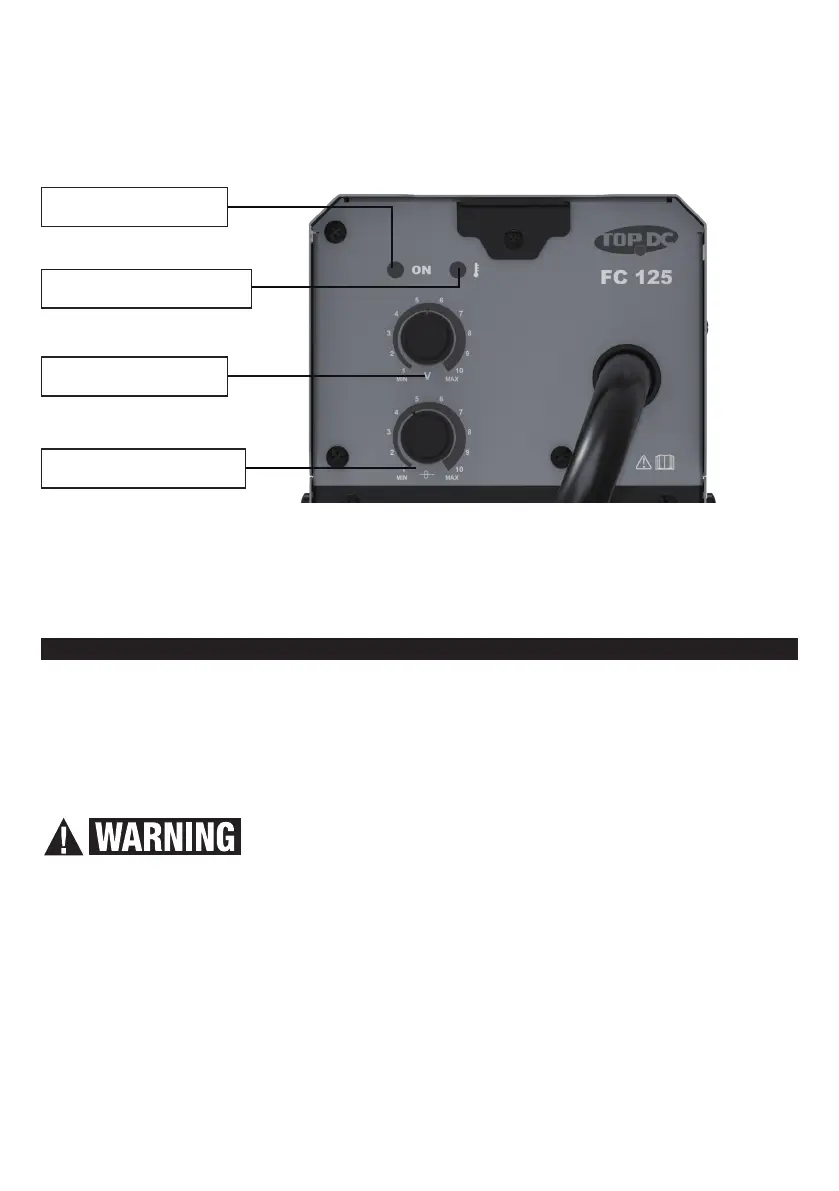
CONTROLS & INDICATORS
Voltage knob
1. Power Indicator turns on when Power Switch is ON.
2. Overload Indicator turns on when the machine working time exceeds rated duty cycle.
3. Voltage Knob and Scale: Turn the knob to adjust output voltage.
4. Wire Feed Speed Knob and Scale: Turn the knob to adjust wire feed speed.
5
Read the entire Important Safety Information section at the beginning of this manual
including all text under subheadings therein before set up or use of this product.
To prevent serious injury from accidental operation:
Turn the Power Switch to “OFF” or “0” position before performing any inspection,
maintenance, or cleaning procedures.
1 Work Piece and Work Area Setting Up
Prevent eye injury and burns. Wearing personal protective
equipment to reduce the risk of injury.
1) Designate a work area that is clean and well-lit. The work area must not allow
access by children or pets to prevent injury and distraction.
2) Route the Power Cord along a safe route to reach the work area without creating a
tripping hazard or exposing the Power Cord to possible damage. The Pow
er Cord must
r
each the work area with enough extra length to allow free movement while working.
3) There must not be hazardous objects, such as utility lines or foreign objects, nearby
that will present a hazard while working.
4) A barrier, such as a welding curtain or welding shroud should be put up to protect
others in the work area and limit the spray of sparks.


 To Next Page