255
33. CHANGING THE SETTINGS
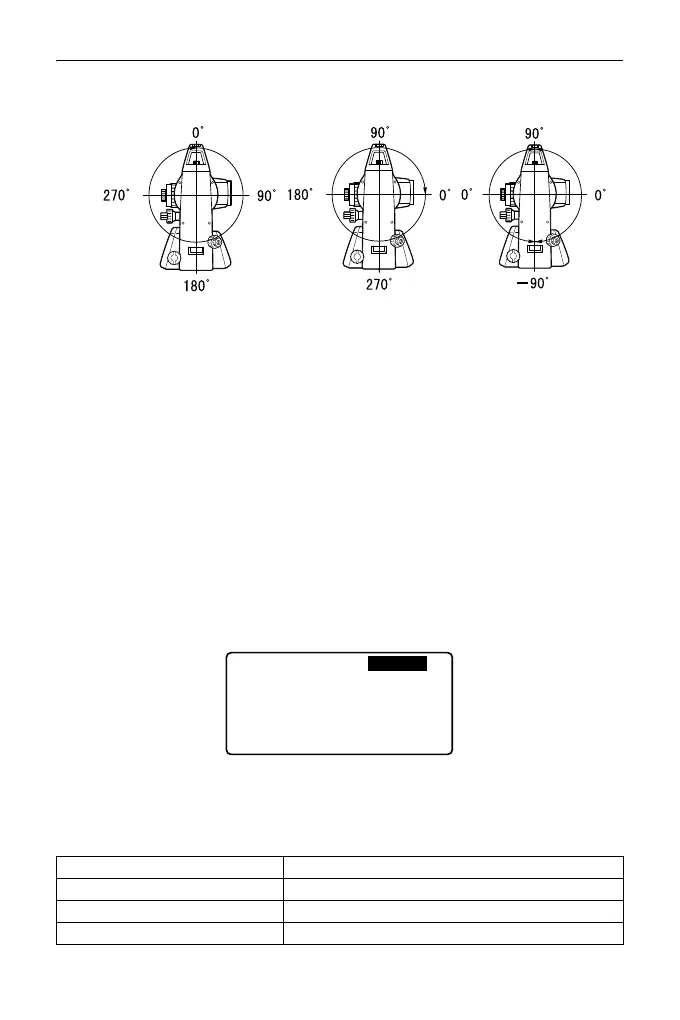
V obs. (vertical angle display method)
Sheet mod (Selecting target)
The target can be changed by selecting the option under "Target" in the
EDM Settings, or by pressing {SHIFT} in the screen where the target
symbol is displayed. The selection items can be preset to "Prism/Sheet/N-
prism (reflectorless)" or "Prism/N-prism (reflectorless)".
Ofs V ang
Select whether the vertical angle is fixed in the angle offset measurement.
Input order
The input order of point name and code in recording screens can be
selected.
Instrument Configuration
Select “Instr. Config” in Config mode
• "Guide pattern" is displayed only when guide light is selected.
Items set and options (*: Factory setting)
Power off 5min, 10min, 15min, 30min*, No
Reticle lev 0 to 5 level (3*)
Contrast 0 to 15 level (10*)
Resume On*, Off
Power off
Reticle lev
Contrast
Resume
EDM ALC
Guide pattern
: 30min
: 3
: 10
: On
: Free
: 1



 To Next Page