19
How to enter grade
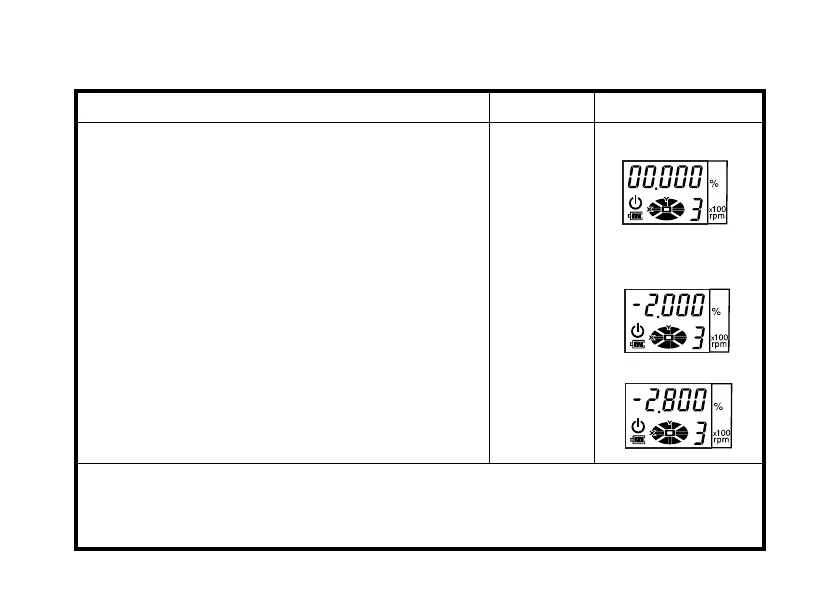
Setting example: Grade toward X-axis -2.8%
Operating procedure Operation Display
1
Turn the instrument on by pressing the power con-
trol pad. Auto-leveling will start.
2
Press the [ X] key to activate grade entry.
The position of the second figure to the left of the
decimal point will blink.
Power ON
[X]
3
Press the [
▲
] or [
▼
] key to set "-" (negative grade).
4
Press the [X] key to activate the first figure to the
left of the decimal point.
5
Press the [
▲
] key twice to set ‘2’.
[
▲
]or[
▼
]
[X]
[
▲
]twice
6
Press the [X] key to activate the first figure to the
right of the decimal point.
7
Press the [
▼
] key twice to set ‘8’.
8
Press the [ENT] key to accept the X-axis grade.
[X]
[
▼
]twice
[ENT]
• Grade range: Single axis, -5.000% to 10.000% grade.
• After grade entry is completed, it will take about two minutes for the beam to reset and
rotation to begin. DO NOT touch or tilt the instrument during automatic leveling as it will
disturb the precision of the leveling.


 To Next Page