17
NOMENCLATURE
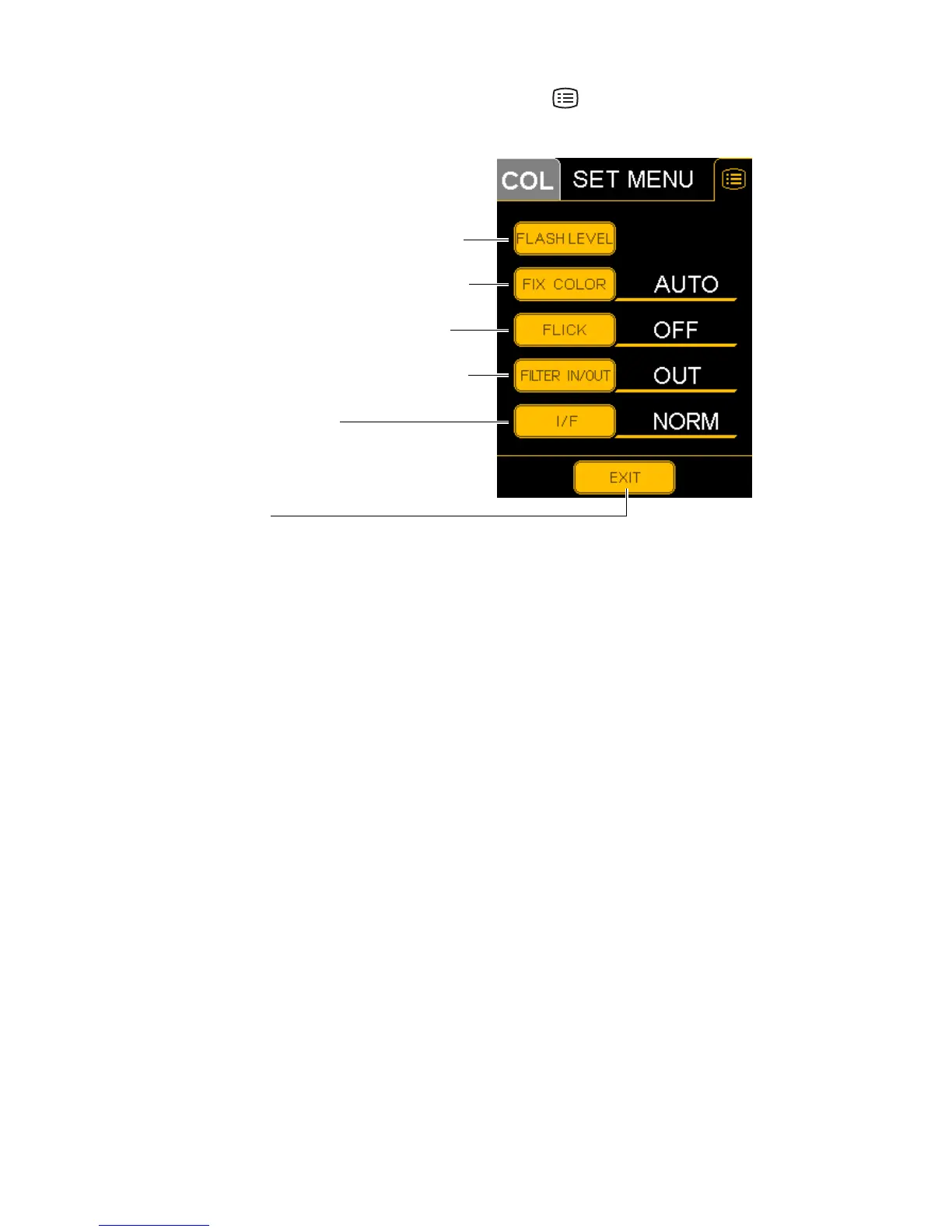
SET MENU display
Carries out a variety of settings. Press the MENU button on the setting operation display, and
"SET MENU" will be displayed. Refer to "SETTING ON THE SET MENU DISPLAY" on page 23.
FLASH LEVEL (Flash level standard setting) .... Sets the flash intensity level standard value for
each photography mode.
FIX COLOR (External fixation color selection)... Selects the color of the external fixation lamp,
"AUTO" (automatic), "GREEN" or "RED".
FLICK (External fixation blinking selection)........ Selects the status of the external fixation lamp,
"ON" (blinking) or "OFF" (lighting)
FILTER IN/OUT (Filter link operation method) ... Selects the link operation method for the photog-
raphy switch and Ba (barrier) filter.
I/F (Interface) switch........................................... Changes the interface.
EXIT switch ........................................................ Returns to the setting operation display.
FLASH LEVEL (Flash level standard setting)
FIX COLOR (External fixation color selection)
FLICK (External fixation blinking selection)
FILTER IN/OUT (Filter link operation method)
I/F (Interface selection)
EXIT switch


 To Next Page