28
BASIC OPERATIONS
BASIC OPERATIONS
PREPARATION FOR PHOTOGRAPHY
1 Check the connection of the power cord. Refer to "CONNECTING THE POWER CORD"
on page 20 for the connection procedure.
2 Set each POWER SWITCH on the instrument and the external record device to the "ON"
(I) position.
3 Make sure that the instrument is positioned horizontally.
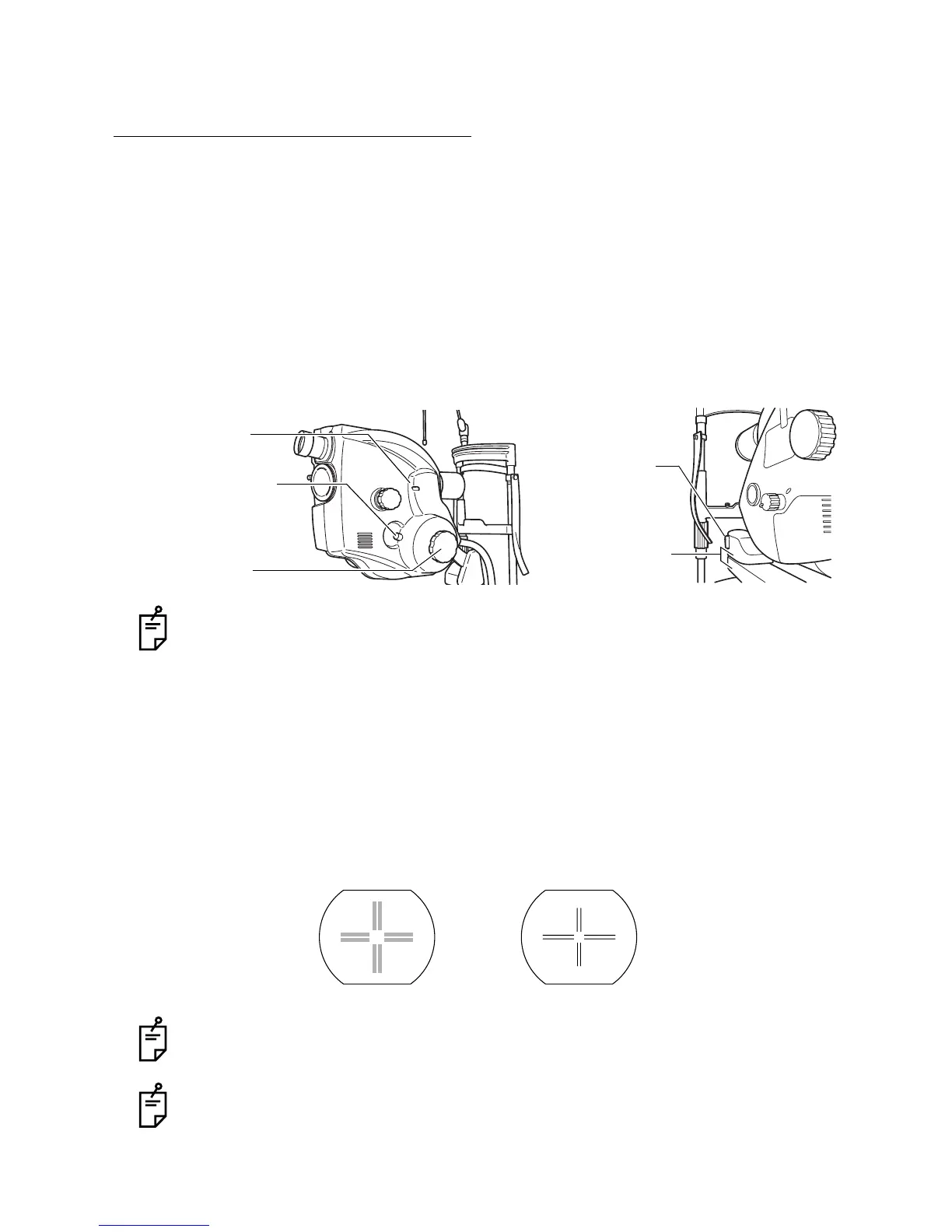
If the instrument is not set horizontally, incline it up and down until the "Horizontal" index
window is red. Swing the instrument right and left and stop it where the direction of the 1st
arm is fit to that of the 2nd arm. Refer to "PHOTOGRAPHY BY INCLINATION AND
SWINGING" on page 42.
To fix the instrument, tighten the inclination brake knob and swing arm locking lever.
4 Adjust the dioptric power of the optical finder.
How to adjust the dioptric power:
Place a white paper in tight contact with the objective lens barrel. (Be careful not to touch
the lens.)
Turn the eyepiece lens counterclockwise to put it out fully. Then, gradually turn the eye-
piece lens clockwise and, when the reticles (double cross-hairs) are seen clearly, stop
turning.
Inaccurate dioptric power adjustment results in unfocused photos.
Refer to "NAMES IN OPTICAL FINDER" on page 18.
"Horizontal" index
Inclination brake knob
Inclination handle
Swing arm
locking lever
window
Fit the direction of
1st arm to that of
2nd arm.
Dioptric power of optical finder
Out of focus In focus


 To Next Page