70
OPTIONAL ACCESSORIES
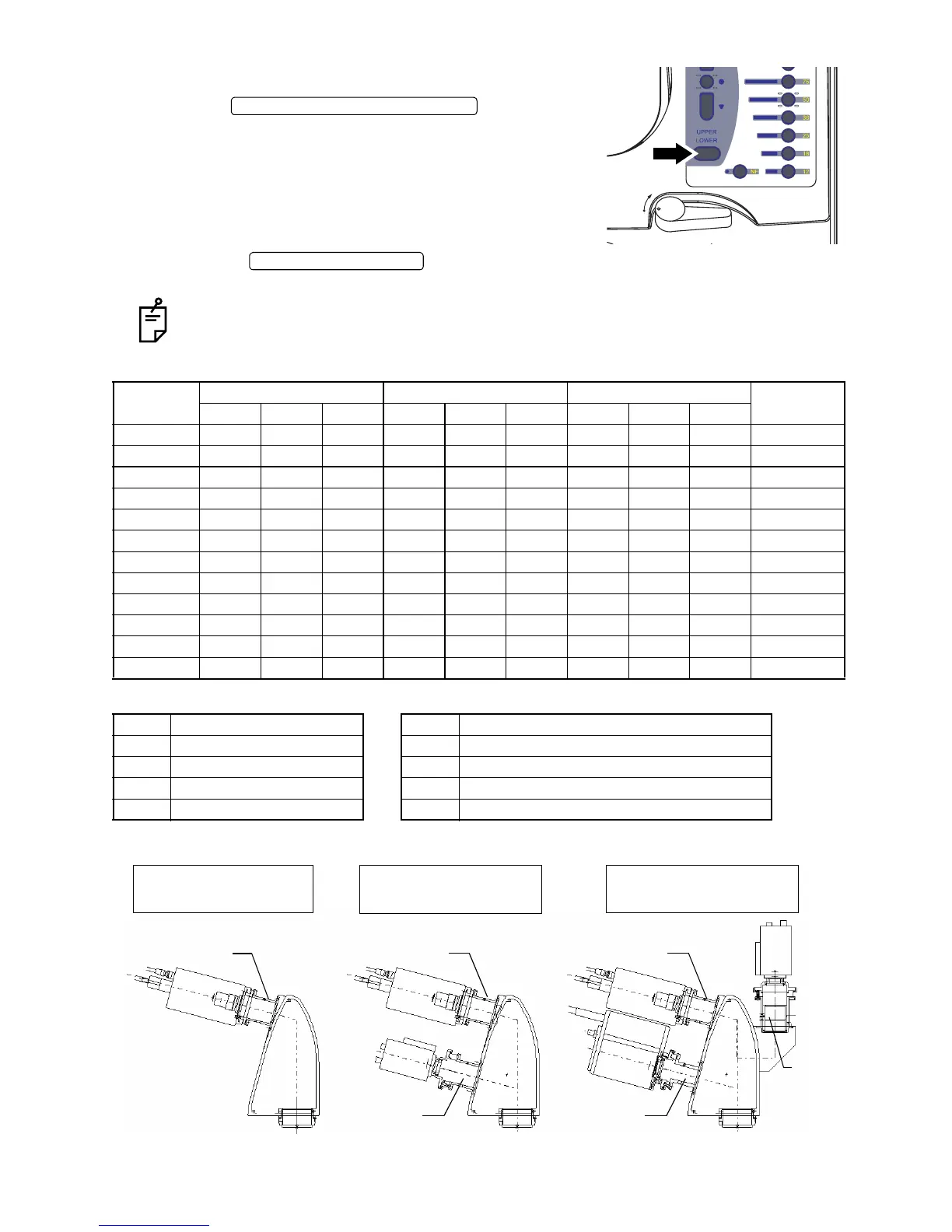
• How to take a picture
1 Set the to "UPPER" on
the control panel.
2 Perform alignment and photography for retina in the
same procedure as "COLOR PHOTOGRAPHY", "FAG
PHOTOGRAPNY" or "ICG FLUORESCEIN PHOTOG-
RAPHY".
Press the on the joystick, and the retinal image is recorded in the
image recorder.
Set the shutter speed to "1/30 sec." for the F mount single-lens reflex digital camera (a
product in the market).
TV relay lens list
(*1) (*2)
Consult your dealer for the camera.
Model
Type of photography (*1) Mount Video camera (*2) Size (mm)
W×D×H
1PORT 2PORT 3PORT 1PORT 2PORT 3PORT 1PORT 2PORT 3PORT
TL-207 C, G, F F F 85×124×234
TL-208 C, G, F Bayonet B 85×145×238
TL-209 F, G, (I), A C D 85×140×236
TL-210D C G, F, (I), A Bayonet C B D 85×173×238
TL-211 C, G, F F F 85×123×228
TL-230T C G, F, I, A I Bayonet C C B D A 85×226×255
TL-231 I C A 85×161×246
TL-232D C, G, F I Bayonet C B A 85×185×238
TL-233D I G, F, I, A C C A D 85×173×246
TL-234D C, G, F, I I C C C A 85×185×234
TL-235T C G, F, I, A I F C C F D A 85×226×255
TL-236D C, G, F I F C F A 85×198×228
C COLOR A 1/2 C mount single-plate infrared camera
G GREEN (RED FREE) B 1/2 three-plate bayonet mount
F FAG C 1/2 C mount three-plate type
I ICG D 2/3 C mount single-plate type
A AUTO FLUO F F mount single-lens reflex digital camera
FREE FREE
LOCK LOCK
UPPER/LOWER SELECTOR SWITCH
PHOTOGRAPHY SWITCH
1PORT
1PORT
1PORT
2PORT 2PORT
3POR
One electronic photography Two electronic photography Three electronic photography
device can be connected. devices can be connected. devices can be connected.


 To Next Page