4.2 Video and audio settings 17
4.1.2 Audio language
Set the First Audio option and the Second Audio option to your
desired languages. When you watch a programme, if the pro-
gramme has an audio track of the language that is specified
for the First Audio, it will be output. If the first language is not
available but the second language is, the audio of the second
language will be output.
Apart from this setting, you can select an audio track with the
button. See §5.2.3 for a detailed description.
4.2 Video and audio settings
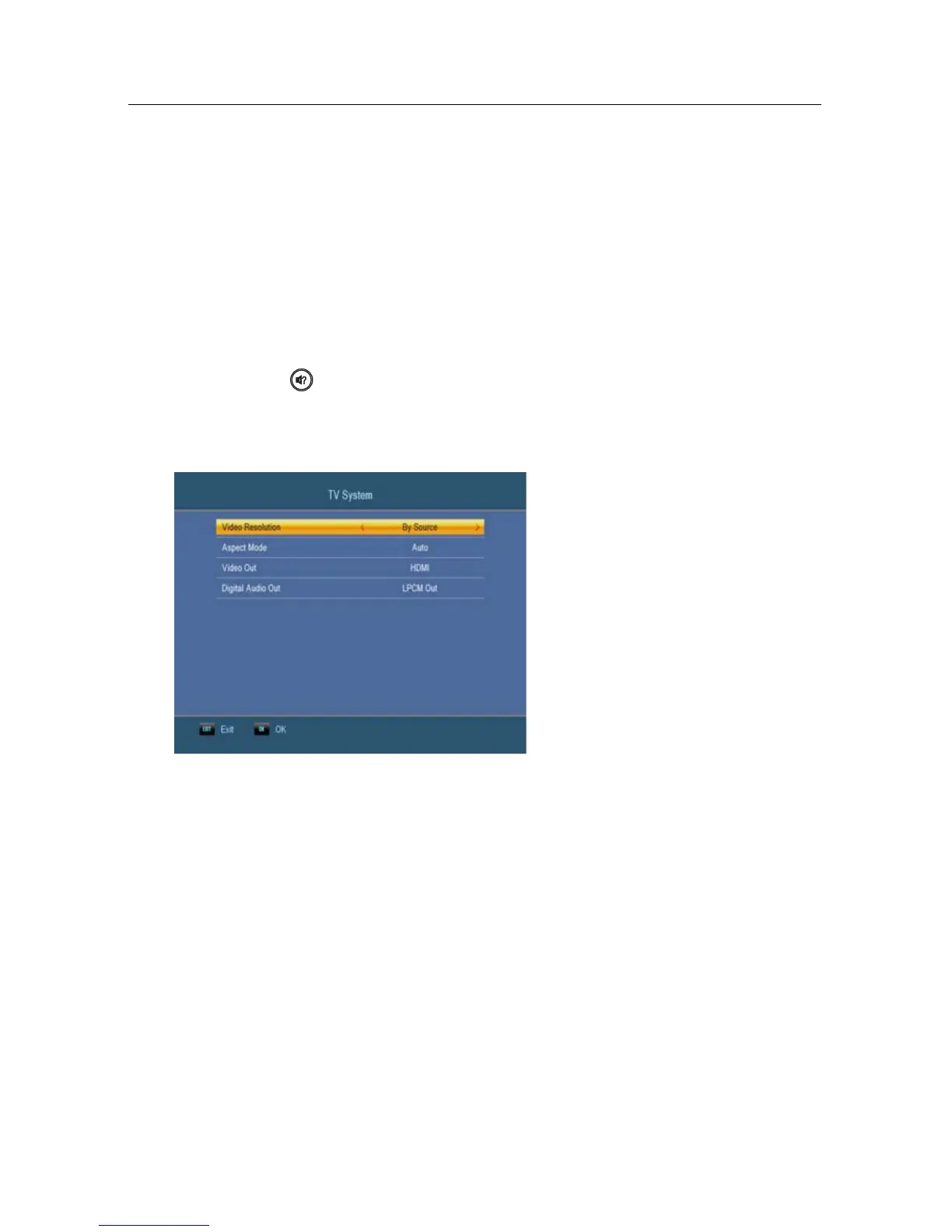
You have to configure the video
and audio settings appropriately
for your television set and other
devices. Select the System
Setup > TV System menu. You
should see a screen like the left
figure.
4.2.1 Video Resolution
The digital receiver supports various video resolutions from
576 to 1080. In general, a resolution of 720 or more is consid-
ered high definition. The higher the resolution is, the better
the quality is. However, if your television set does not sup-
port high definition, you cannot enjoy high definition quality
picture.
Set the Video Resolution option as you desire. If you set this
option to 576P, the digital receiver will present even high defi-
nition programmes in resolution of 576. On the contrary, if you
set it to 1080I, the digital receiver will present even standard
definition programmes in resolution of 1080.


 To Next Page