8.2 Configuring the wireless network settings on the digital receiver 69
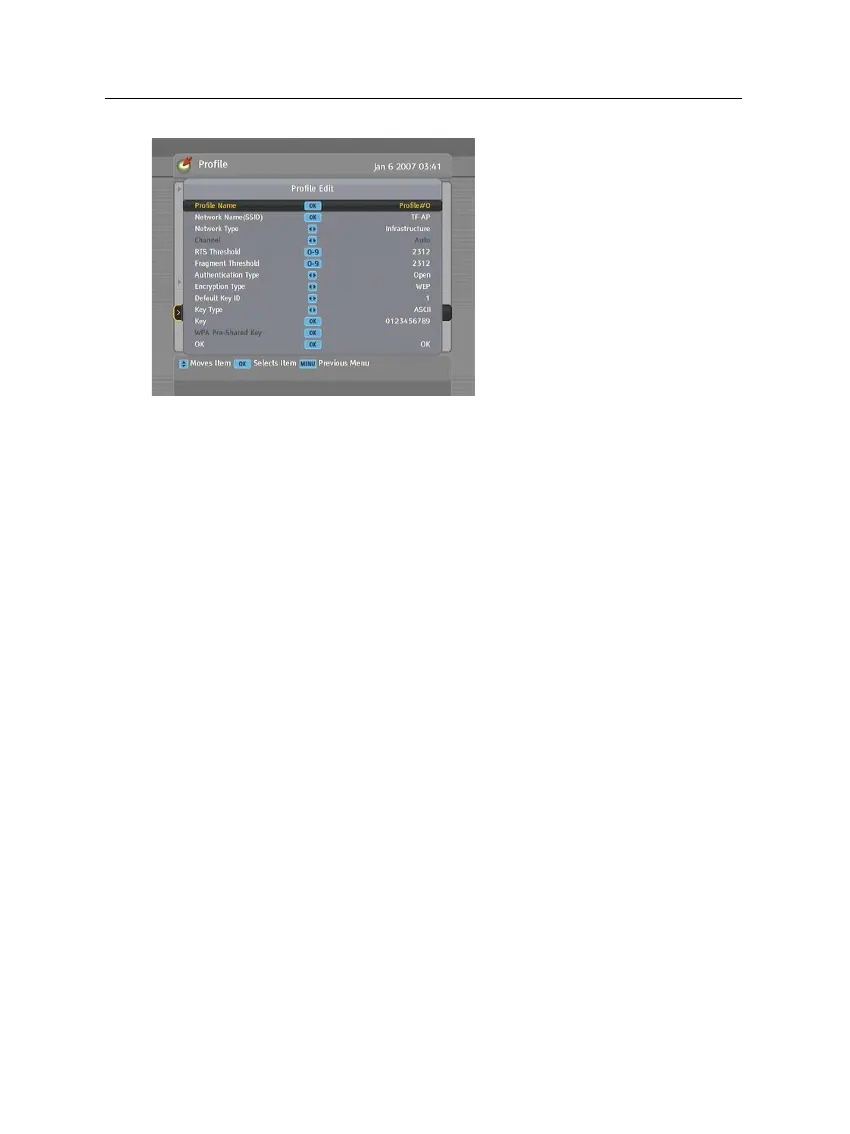
To view or edit a profile, choose
your desired profile at the Profile
Name option and select the Edit
Profile item.
A profile consists of several op-
tions. The available values of
each option are as follows:
Channel: 1 to 14 depending on the value of the Country Re-
gion option only if the Network Type option is set to Ad
Hoc.
Authentication Type: Open or Shared
Encryption Type: Not Use or WEP
Default Key ID:
1 to 4 only if the Authentication Type option
is set to WEP.
Key Type:
ASCII or HEXA only if the Authentication Type
option is set to WEP.
Key:
26 hexadecimal characters or 13 ASCII characters only
if the Authentication Type option is set to WEP.
To save a profile, select the OK item.














 To Next Page