10.2 From your computer via USB port 77
NOTE
You can only update with firmwares of which system identifi-
cation is identical to that of yours. Otherwise you will fail in
firmware update.
10.2 From your computer via USB port
You can transfer a new firmware to the digital receiver from
your computer by connecting them with a USB cable. You
need TFDN USB, a firmware transfer utility for this, which is
available from the web site, http://www.i-topfield.com.
To update the firmware with this method, perform the follow-
ing steps:
1.
Download a new firmware applicable to
your digital receiver from the Topfield
web site.
2.
Plug one end of a USB cable into the USB
port on the digital receiver, and the other
end into the matching port on your com-
puter.
3. Turn on the digital receiver.
4. Run TFDN USB.
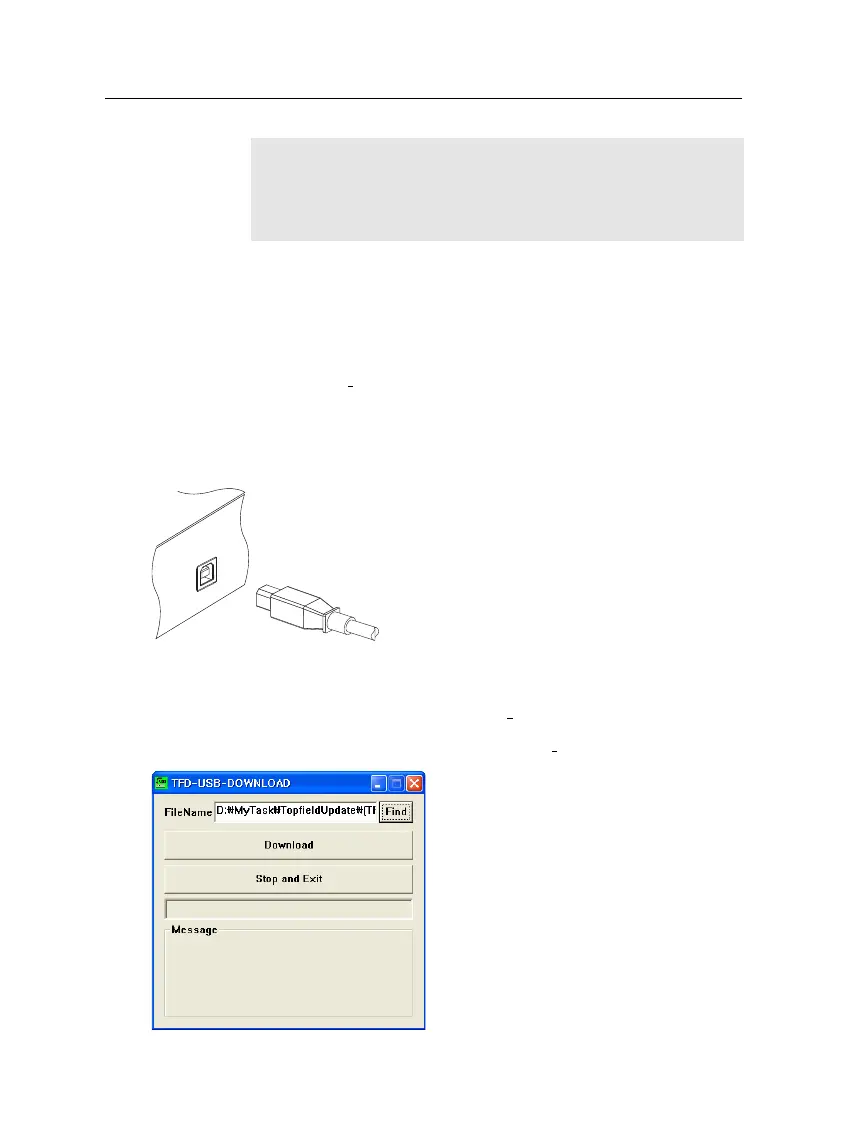
The instructions on how to use TFDN USB are as follows:
1.
Press the Find button to select the
new firmware file.
2.
Press the download button, and then
restart the digital receiver to start the
file transfer.
3.
A countdown will be displayed on
screen
4.
Restart the digital receiver once
more when the file transfer is com-
plete.














 To Next Page