5.2 Watching television 31
•
To add the highlighted service into a favourite group,
select the Add to Fav option; then the favourite groups
will be displayed. Put the highlight bar on a desired
group and press the
OK
button.
•
You can additionally sort the services list with the Sorting
option as follows:
Default by service number
Alphabetic by service name
FTA–CAS from free services to pay services
CAS–FTA from pay services to free services
Fav–NoFav
from favourite services to unfavourite ser-
vices.
•
To delete the highlighted service, select the Delete option;
then you are asked for confirmation. If you select Yes, it
will be deleted. If you want to restore it as before, you
have to perform service search again.
See § 6.1 for how to edit the services list.
5.2.2 The favourite services list
You can select a service to watch on a favourite list as well as
on the services list.
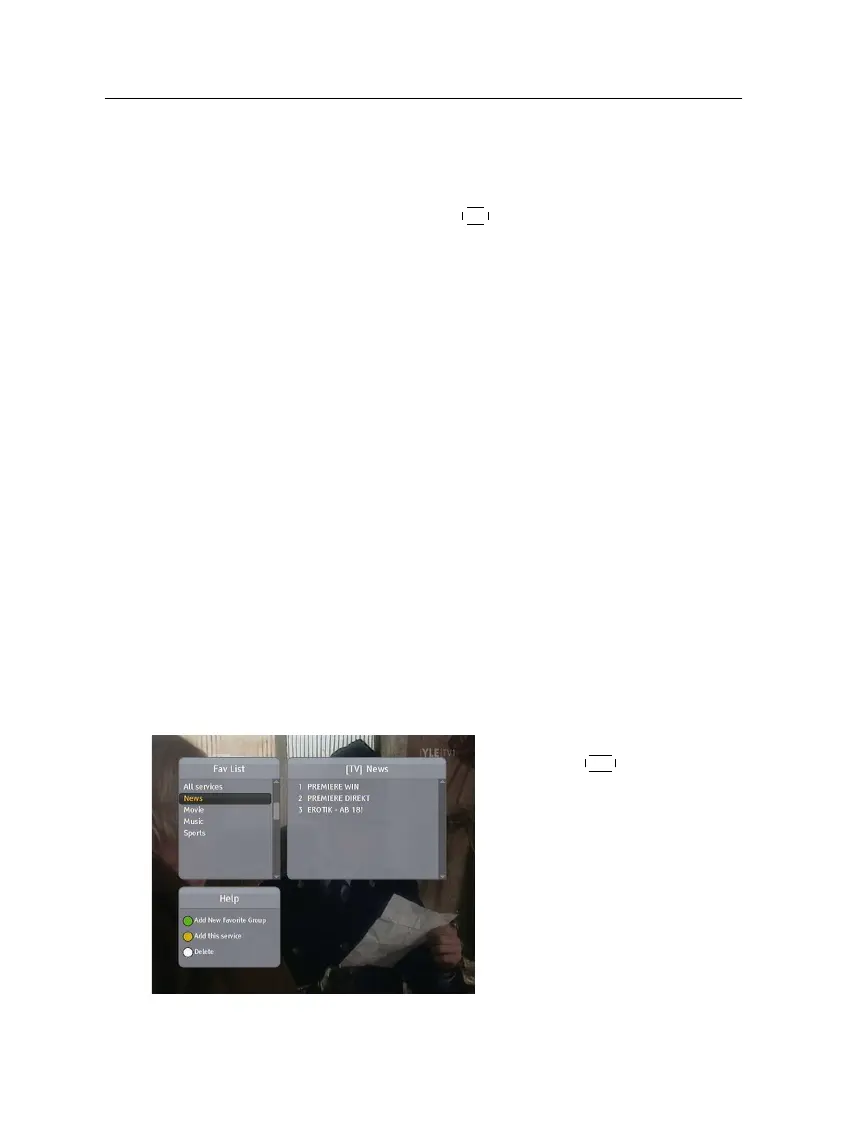
To display the favourite lists,
press the
FAV
button. You
should see a screen like the left
figure. As you move the high-
light bar up or down on the
favourite group list at the left
box, favourite services belong-
ing to the highlighted group are
listed on the right box.
For how to edit the favourite lists, refer to § 6.2.














 To Next Page