EasyManua.ls Logo

Tork DZS200 - User Manual

Tork DZS200
36 pages
Print Icon
To Next Page IconTo Next Page
Loading...
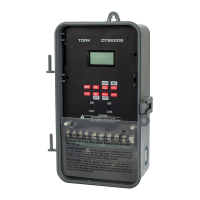
TORK MODEL DZS200
ASTRONOMIC CONTROLLER
Installation & Operation
INTRODUCTION
Model DZS200 is a microprocessor based time switch.
This astronomic unit is used for sunrise/sunset control
of outdoor lighting, providing two independent chan-
nels with 365 day scheduling. The unit is user settable
in 1 degree steps from 10 degrees to 60 degrees for
Northern or Southern latitudes.
In addition, the unit can be set to turn on or off from 1
to 99 minutes before or after actual sunrise or sunset
times. This compensates for longitudinal time differ-
ences and provides for more controlled lighting time
due to physical obstructions of natural light or other
special conditions.
The DZS200 may be utilized so that channel 1 pro-
vides astronomic settings for sunset to sunrise for all
night security lighting. At the same time, channel 2 can
be used for combination astronomic/straight time set-
tings.
For example,
store window lighting or “open and
closed” signs may be set to come on at sunset but off
during the night when no longer needed.
A unique feature of this TORK model is its momentary
contact capabilities which can be used to set each
channel individually for a user adjustable duration of 1-99
seconds. This feature is most useful for ringing school
bells, factory buzzers, sirens, or for automatic correc-
tion of clocks. Or, both channels can be used together
providing pulse output for mechanically-held contac-
tors or low voltage latching type relays – channel one
to close and channel two to open.
Up to 16 individual holiday dates can be set for special
schedules or to omit operations entirely. Likewise, 5
(continued)
TORK
1 GROVE STREET, MT. VERNON, NY 10550 TEL: 914-664-3542
FAX: 914-664-5052
MLI-79(E)
®
different holiday blocks can be set in addition, with
unrestricted durations. These blocks can be used for 3
day weekends, 2 week vacation shutdowns, July-
August school closing, etc.
A 6th Block is available for user selectable date of start
and end of daylight savings time where needed.
INSTRUCTIONS FOR INSTALLING TORK
®
NORYL
®
TIME SWITCH ENCLOSURE
ENCLOSURE INSTALLATION
1. Five combination 1/2” and 3/4” knockouts are pro-
vided on this enclosure.
2. Remove the 1/2" (inner) knockout by inserting a
screwdriver in the slot provided and pound screw-
driver handle with a hammer. Remove slug with pliers
and smooth hole edges with file or knife if neces-
sary. When the 3/4” outer knockout is required, place
screwdriver in groove and pound screwdriver handle
with hammer. Remove loose slug with pliers and
smooth hole edges with file or knife if necessary.
3. When attaching conduit to enclosure, exercise care to
align and support conduit in order to prevent unneces-
sary stress on enclosure.
GROUNDING
National Electrical Code
requires that grounding
must be continuous and in
proper electrical contact in
all grounding conductors,
metallic conduits and
grounding terminals. When
metallic conduits
are
installed, use approved
grounding bushings or
order KN500 (two 1/2) or
KN750 (two 3/4) grounding
bushing kit from TORK. When using metal conduits,
install the proper size approved grounding bushings.
The minimum size copper grounding conductors must
be #10 AWG if the circuit breaker or fuse is 30 or 40
amp, #12 AWG if 20 amps, and #14 AWG if 15 amp.
NOTE: USE ONLY U.L. LISTED RAINTIGHT HUBS FOR
OUTDOOR INSTALLATION
.
2
GROUNDING
BUSHING
METAL CONDUIT
CONNECTOR
LOCK NUT
GROUNDING
CONDUCTOR
METAL
RIGID OR FLEXIBLE CONDUIT
DIGITAL
http://waterheatertimer.org/Tork-Digital-timers-and-manuals.html#DZS
Question and Answer IconNeed help?

Do you have a question about the Tork DZS200 and is the answer not in the manual?

Summary

Tork DZS200 Controller Installation and Operation

Introduction to the DZS200

Overview of the DZS200 microprocessor-based astronomic time switch for outdoor lighting control.

Enclosure Installation Instructions

Steps for installing the Noryl time switch enclosure, including knockout usage.

Grounding Requirements and Procedures

Details on proper grounding methods for electrical installations according to the National Electrical Code.

Key Definitions and Specifications

Key Button Definitions

Explanation of the RUN/SET, ENTER, and ADVANCE keys and their functions.

Unit Dimensions

Physical dimensions of the DZS200 unit.

DZS200 Description and Installation

DZS200 Features and Capabilities

Lists the key features and functionalities of the DZS200 controller.

DZS200 Unit Installation Guide

Step-by-step instructions for installing the DZS200 unit into its enclosure.

Initial Setup and Time;Date Configuration

Power-Up Check Procedure

How to perform a power-up check to ensure proper display and microprocessor function.

Setting Time and Day

Instructions for setting the current time and day of the week on the DZS200.

Date and Time Adjustment

Changing Time and Day Settings

Guide on how to modify the already set time and day of the week.

Setting the Date

Instructions for setting the current date (month, day, year) on the DZS200.

Date and Daylight Savings Configuration

Changing Date Settings

Guide on how to modify the already set date.

Setting Daylight Savings Dates

Procedure for setting the start and end dates for daylight saving time.

Adjusting Daylight Savings Dates

Changing Daylight Savings Dates

Instructions on how to modify the previously set daylight savings dates.

Standard Schedule Programming

Setting Standard ON;OFF Schedules

Guide for programming fixed ON/OFF times for the channels.

Signal Timer Configuration

Setting Signal Duration for Momentary Contact

How to set the duration (1-99 seconds) for momentary signal outputs.

Signal Scheduling

Scheduling Signals

Instructions for programming schedules for signal timer outputs.

Astronomical Operations Setup

Setting Sunset ON;Sunrise OFF

How to configure channels for automatic ON at sunset and OFF at sunrise.

Sunset ON and Time OFF Configuration

Setting Sunset ON;Time OFF for Channels

How to set a channel to turn ON at sunset and OFF at a specific time.

Holiday Management

Setting Single-day Holidays (H1)

Procedure for programming single-day holidays (H1).

Schedule Management

Scheduling for Holidays Only

How to set schedules that only apply on specific holidays.

Managing Schedules (Add, Review, Delete, Modify)

Instructions for performing operations on existing schedules.

Holiday Operations and Management

Managing Holidays (Add, Review, Delete, Modify)

How to manage single-day (H1) and block (H2) holidays.

Sunrise;Sunset Time Adjustments

Reviewing;Modifying Sunrise;Sunset Times

How to view or adjust sunrise/sunset times and offsets.

Override Functionality

Using the Override Function

How to manually turn channels ON or OFF, overriding scheduled times.

Control Flow Diagram

Block Diagram Overview

Visual representation of the DZS200's mode transitions and functions.

Tork DZS200 Specifications

General IconGeneral
BrandTork
ModelDZS200
CategoryTimer
LanguageEnglish

Related product manuals