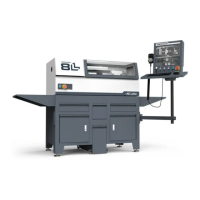
The Tormach 8L Lathe PathPilot Operator Console is an essential interface designed to provide users with intuitive control and monitoring capabilities for their 8L Lathe. This console serves as the central hub for operating the lathe, integrating various control elements and a display to streamline the machining process. Its primary function is to translate user inputs into machine commands, allowing for precise control over lathe operations, while also providing critical feedback on the machine's status and ongoing processes.
Function Description
The console's core function revolves around the PathPilot operating system, a proprietary control software developed by Tormach. This system offers a user-friendly graphical interface that simplifies complex machining tasks. Through the console, operators can:
- Program and Execute Machining Operations: Users can input G-code programs, modify existing ones, and initiate machining cycles directly from the console. The PathPilot software provides tools for program editing, simulation, and verification, ensuring that operations are executed as intended.
- Real-time Machine Control: The console features a touchscreen display, allowing for direct interaction with the PathPilot interface. This enables real-time adjustments to feed rates, spindle speeds, and other critical parameters during a machining operation. Physical knobs for RPM, Feed Override, and Max Velocity provide tactile control for quick and precise adjustments, enhancing the operator's ability to fine-tune processes on the fly.
- Emergency Stop Functionality: A prominent Emergency Stop button is integrated into the console, providing an immediate and accessible means to halt all machine operations in case of an emergency. This is a critical safety feature, ensuring operator protection and preventing potential damage to the machine or workpiece.
- Jogging and Manual Control: The console includes a jog pendant, allowing operators to manually move the lathe's axes with precision. This is invaluable for setting up workpieces, performing manual operations, and verifying machine movements before automated cycles begin.
- System Monitoring and Diagnostics: The display provides comprehensive information about the lathe's status, including axis positions, spindle speed, program progress, and error messages. This allows operators to monitor the machine's performance and quickly identify and troubleshoot any issues that may arise.
- Connectivity and Data Management: The console is equipped with USB and Ethernet ports, facilitating the transfer of programs and data. USB ports support the connection of peripherals such as keyboards, mice, and WiFi dongles, expanding the console's functionality and connectivity options. The Ethernet port enables network connectivity, allowing for remote access, software updates, and data sharing.
Usage Features
The 8L Lathe PathPilot Operator Console is designed with the user experience in mind, incorporating several features that enhance usability and operational efficiency:
- Ergonomic Design: The console is mounted on a controller arm, allowing for flexible positioning to suit the operator's preference and workspace. The monitor bracket can be rotated and adjusted to achieve an optimal viewing angle, reducing strain during long operating periods. The keyboard tray provides a stable surface for input devices, further contributing to an ergonomic setup.
- Intuitive PathPilot Interface: The PathPilot software is known for its simplicity and ease of use. Its clear layout and logical menu structure minimize the learning curve for new operators, while advanced features are readily accessible for experienced users. The touchscreen functionality allows for direct manipulation of on-screen elements, making navigation quick and efficient.
- Physical Control Elements: Beyond the touchscreen, the console incorporates physical buttons and knobs for frequently used functions. The Cycle Start and Feed Hold buttons provide immediate control over machining processes, while the RPM, Feed Override, and Max Velocity knobs offer tactile feedback and precise adjustments, which are often preferred over touchscreen inputs for critical real-time control.
- Robust Construction: The console is built to withstand the demanding environment of a machine shop. Its components are designed for durability, ensuring reliable operation over extended periods. The mounting system is robust, securely attaching the console to the machine stand, minimizing vibrations and ensuring stability.
- Expandability: The inclusion of multiple USB ports allows for the connection of various accessories, such as a mouse for enhanced navigation, a keyboard for easier text input, or a WiFi dongle for wireless network access. This expandability ensures that the console can adapt to different operational needs and preferences.
- Cable Management: The design includes provisions for routing and securing cables, helping to maintain a tidy and safe workspace. Cable tie holes and internal routing channels prevent cables from interfering with machine operation or posing a tripping hazard.
Maintenance Features
Maintaining the 8L Lathe PathPilot Operator Console is straightforward, with several design considerations aimed at simplifying troubleshooting and component replacement:
- Modular Design: Key components, such as the control board and power supply, are designed to be accessible for inspection and replacement. This modularity simplifies repairs, reducing downtime and the need for specialized tools.
- Troubleshooting Guide: The provided documentation includes a comprehensive troubleshooting section that addresses common issues such as unresponsive touchscreens, power problems, and non-functional control knobs or buttons. This guide offers step-by-step instructions for diagnosing and resolving problems, empowering operators to perform basic maintenance.
- Diagnostic Indicators: The console incorporates diagnostic indicators, such as the green LED on the power brick and the green ring around the power button, which provide visual cues about the system's power status. These indicators help in quickly identifying power-related issues.
- Accessibility for Inspection: The rear panel of the console can be removed to access internal wiring and connections, such as those for the ribbon cable connecting the knobs and the USB cable to the control board. This accessibility facilitates visual inspection and continuity testing, crucial for diagnosing connectivity issues.
- Software Updates: The PathPilot software is regularly updated, and the console's connectivity features (Ethernet, WiFi) enable easy installation of these updates. Keeping the software current ensures optimal performance, access to new features, and resolution of any known bugs.
- CMOS Battery Access: In cases of display configuration problems, the documentation suggests checking and potentially replacing the CMOS battery, indicating that this component is designed to be accessible for maintenance.
- Jumper Wire for Safety: The installation process highlights the importance of removing a specific jumper wire ("Remove to Install Console") from the electrical cabinet. This safety feature ensures that the console's Emergency Stop button functions correctly, and its clear labeling aids in proper installation and maintenance.
- Component Replacement Guidance: The troubleshooting section provides part numbers for common replacement components, such as the Feed Hold Button, Cycle Start Button, and control board, simplifying the process of ordering and replacing faulty parts.
In summary, the Tormach 8L Lathe PathPilot Operator Console is a robust, user-centric control system that enhances the functionality and safety of the 8L Lathe. Its thoughtful design, combining intuitive software with tactile controls and comprehensive troubleshooting support, makes it an indispensable tool for precision machining operations.

 Need help?
 General

 To Next Page