PURPOSE
PURPOSE
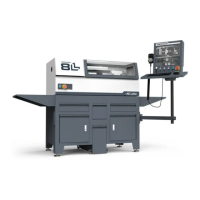
This document gives instructions on installing the 8LLathe PathPilot Operator Console.
PRODUCT INFORMATION
Product: 8LLathe PathPilot Operator Console (PN50926)
Quantity Description
1 Console Controller (PN 50365)
1 Keyboard Tray (PN 50475)
1 Controller Arm (PN 38791)
1 Power Cable (PN38906)
1 Ethernet Cable (PN38391)
1 8LEmergency Stop Extension Cable (PN 51011)
Note: If any items are missing, we can help. Create a support ticket with Tormach Technical Support at
tormach.atlassian.net/servicedesk for guidance on how to proceed.
INSTALL THE CONTROLLER ARM
Tools and Items Required
l 4 mm hex wrench
l 6 mm hex wrench
l 8 mm hex wrench
l 17 mm hex wrench
l 17 mm socket wrench
l 21 mm wrench
l Dead-blow hammer (or similar)
l Phillips screwdriver
l Pry bar
CAUTION! Sharp Objects Hazard: Before opening the shipping crate, you must put on work gloves and
safety eyewear that meets ANSI Z87+. If you don't, the shipping crate and steel straps could cut you, causing
serious injury.
1. Put on work gloves and eye protection.
2. Open the Controller Arm crate with a pry bar.
Page 2
©Tormach® 2023
Specifications subject to change without notice.
tormach.com
TD10788: Installation Guide: PathPilot Operator Console Assembly for 8L (0123A)



 To Next Page