24-EN T100 R
Start pulse (menu item60)
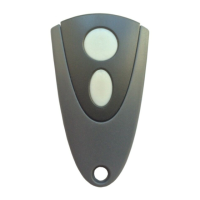
1. Select "Program hand-held transmitter start button" in menu
item60.
2. Actuate the button of the hand-held transmitter for opening
the door.
ð When the code has been programmed, the dot display
on the LED display blinks 5times.
3. Go to Exit to complete the setting process.
½ door opening (menu item61)
1. Select "Program hand-held transmitter 1/2button" in menu
item61.
2. Actuate the button of the hand-held transmitter for the
½door opening.
ð When the code has been programmed, the dot display
on the display blinks 5times.
3. Go to Exit to complete the setting process.
Light function (menu item62)
Select menu item62 and actuate the light function button of the
hand-held transmitter. When the code has been programmed, the
dot display on the display blinks 5times.
Deleting radio codes (menu item63)
To delete all codes programmed, proceed as follows:
1. Select menu item63.
2. Press and hold the button for 5seconds.
When all codes have been deleted, the dot display on
the display blinks 5times.
Selecting the hand-held transmitter operating mode (menu
item64)
In menu item64 you can temporarily disable the taught-in hand-
held transmitters and select the desired operating mode for the
start button.
Menu7 drive settings
Start pulse (menu items70 - 72)
To achieve smooth door movement, set a soft start under menu
items 70 and 72 and a soft stop under menu item 71 before
reaching the upper end position.
Wireless RadioBand closing edge
Prior to every operational cycle, the RadioBand system checks
the system function by a test signal and complies with PLc as per
EN13849-1.
Insert the module to J14 and select the value4 in menu item35
and the value 5 in menu item53. The function of terminalJ3 is
disabled. Also follow the directives given in the instructions for the
RadioBand.
WARNING
Crush hazard and risk of being struck by the
closing door
Observe that sensors connected to J3 do not
have any function.
Test run
When programming has been completed, carry out a test run by
executing all operating functions. When all operating functions
have been executed correctly, the connected door system is
ready for operation.


 To Next Page
 Loading...