3 INSTALLING PRINTER DRIVERS FOR WINDOWS
126 Uninstalling Printer Drivers
Windows Server 2003
Follow the steps below to uninstall a printer driver from Windows Server 2003.
To perform uninstallation, you must log onto Windows with the “Administrator” account.
1
Click [Start] and click [Printers and Faxes] to open the [Printers and Faxes] folder.
2
Right click on the printer to be deleted and select [Delete] from the menu displayed.
When the confirmation dialog box for deletion is displayed, click [Yes].
3
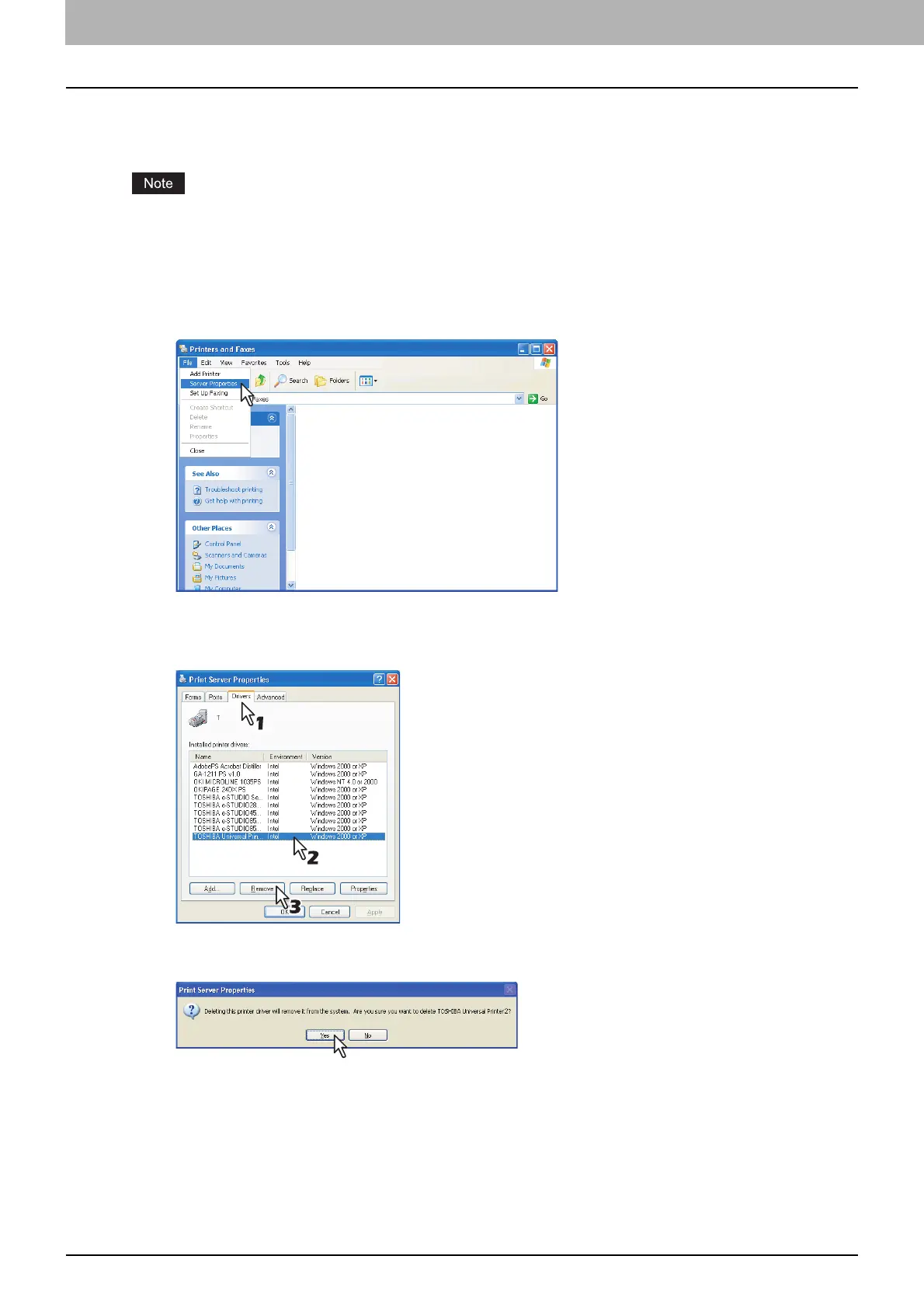
Click the [File] menu and select [Server Properties].
The [Print Server Properties] dialog box appears.
4
Select the [Drivers] tab. Select the printer drivers that you want to delete, and click
[Remove].
The [Print Server Properties] dialog box appears.
5
Click [Yes].
The printer driver is completely deleted.



 To Next Page
 Loading...











