4.INSTALLING PRINTER DRIVERS FOR MACINTOSH
Installing the Printer on Mac OS X 10.4.x to Mac OS X 10.10.x 163
4 INSTALLING PRINTER DRIVERS FOR MACINTOSH
6
Click [Continue].
The printer is added to the Printer List.
Configuring Bonjour printing (Mac OS X 10.4.x)
1
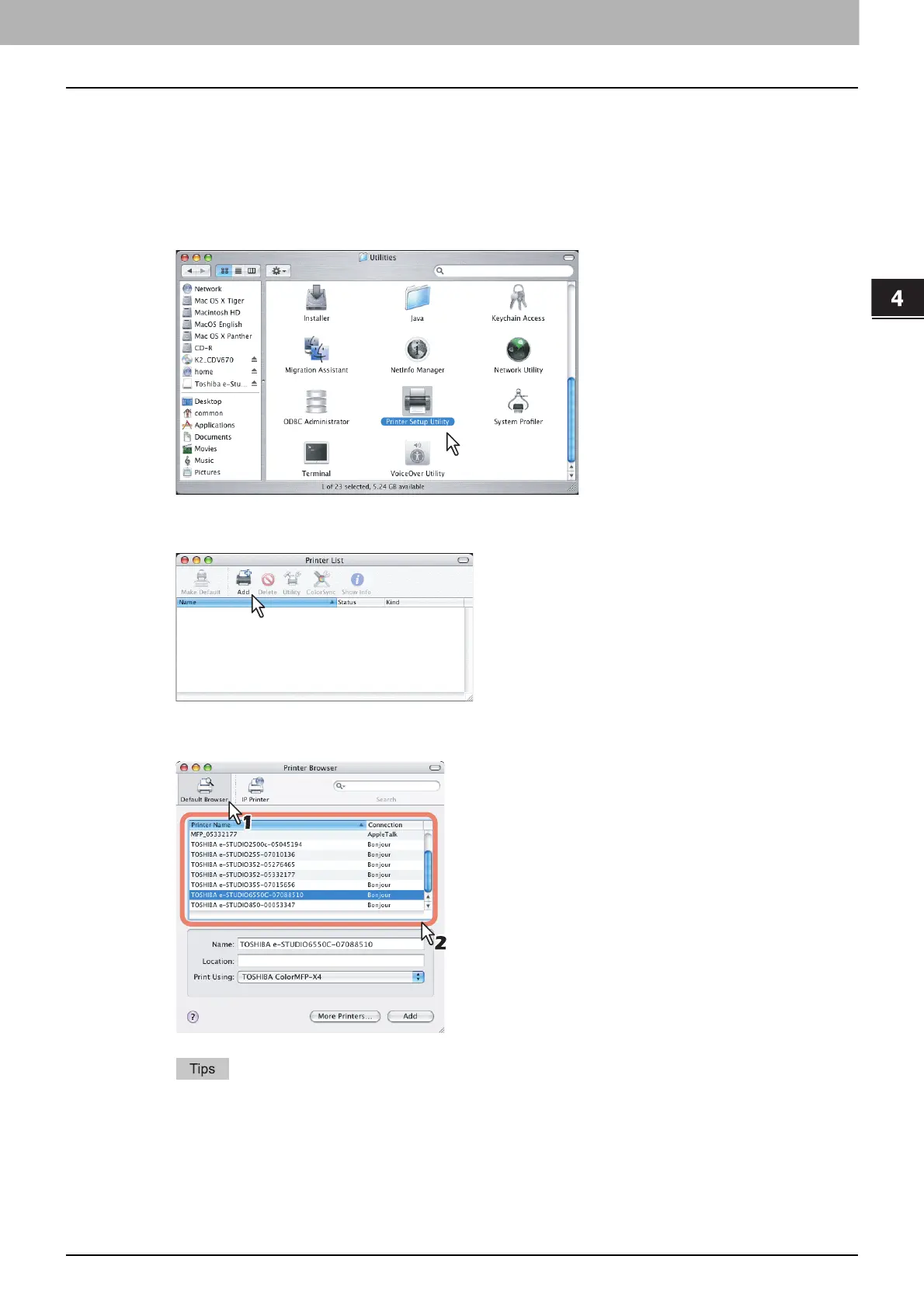
Start the Printer Setup Utility located in the “Applications/Utilities” folder in the Boot
Disk.
The [Printer List] dialog box appears.
2
Click [Add].
3
Click [Default Browser] and select the equipment of the Bonjour connection displayed
in the list.
In the [Name] box, the device name that you selected in the list is automatically displayed.
When you select the equipment in the list, the correct PPD (For North America: TOSHIBA
xxxxxMFP-X4 USA / For the UK: TOSHIBA xxxxxMFP-X4) file is automatically selected in the
[Print Using] box. If the correct PPD is not automatically selected, select [TOSHIBA] in the [Print
Using] box and choose the PPD file displayed in the list.
* The "xxxxx" part of the file name is replaced in "Color" or "Mono" depending on the installed PPD file.



 To Next Page
 Loading...











