3.INSTALLING PRINTER DRIVERS FOR WINDOWS
Installing the Printer Drivers 75
3 INSTALLING PRINTER DRIVERS FOR WINDOWS
7
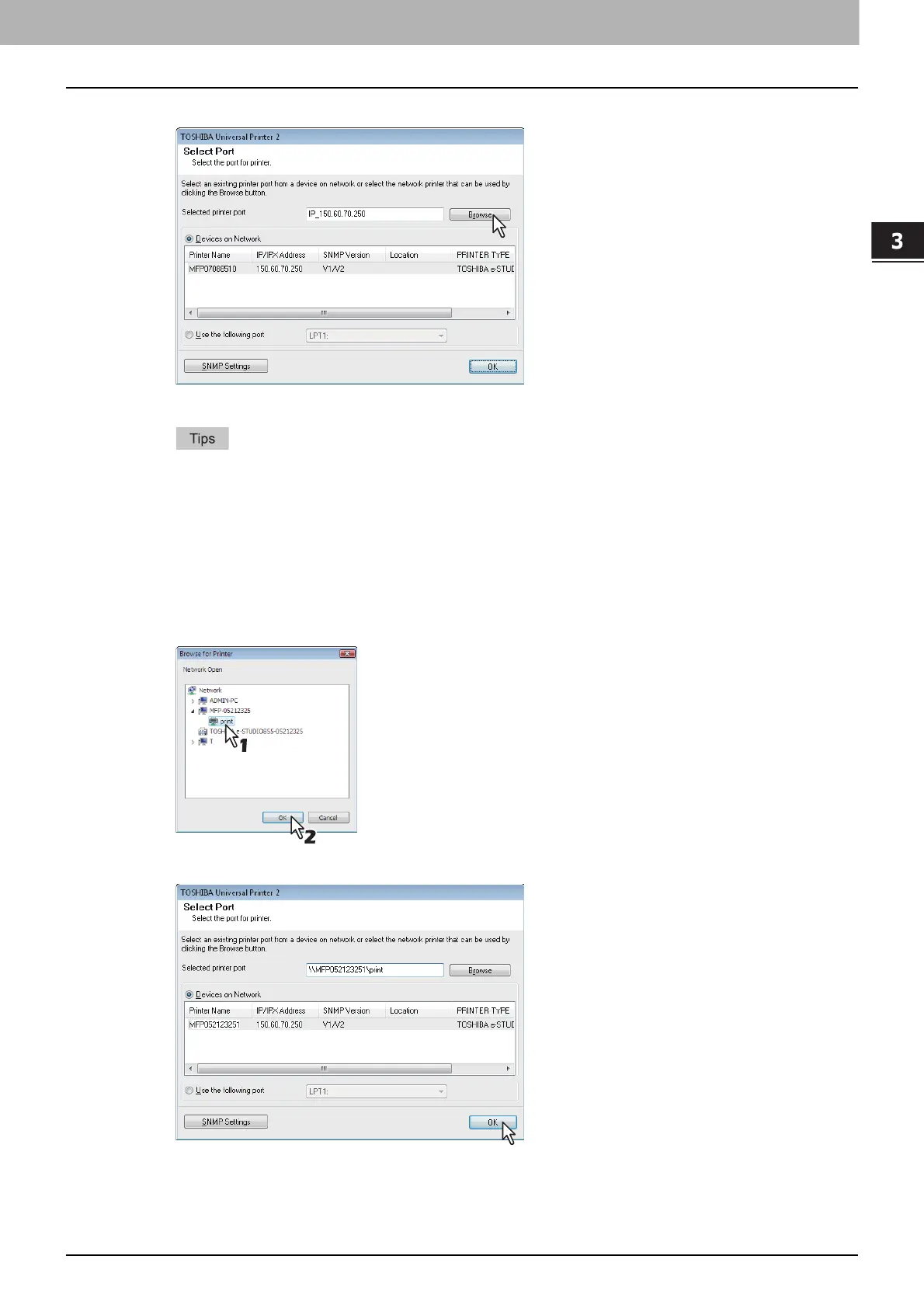
Click [Browse].
The [Browse for Printer] dialog box appears.
If you know the IP address or the host name of this equipment, you can specify a printer port with
the direct entry from the keyboard instead of clicking [Browse]. Enter a network path shown
below in [Selected printer port], and then go to step 9.
\\<IP address or host name>\print
You may not be able to open the target MFP port via [Browse] button in OS such as Windows7,
Windows Vista depending on the network environment. In this case, enter a network path shown
below in [Selected printer port], and then go to step 9.
\\<IP address or host name>\print
8
Select “print” for this equipment and then click [OK].
9
Click [OK].
The Ready to Install the Program screen is displayed.



 To Next Page
 Loading...











