3.INSTALLING PRINTER DRIVERS FOR WINDOWS
Other Installations 87
3 INSTALLING PRINTER DRIVERS FOR WINDOWS
9
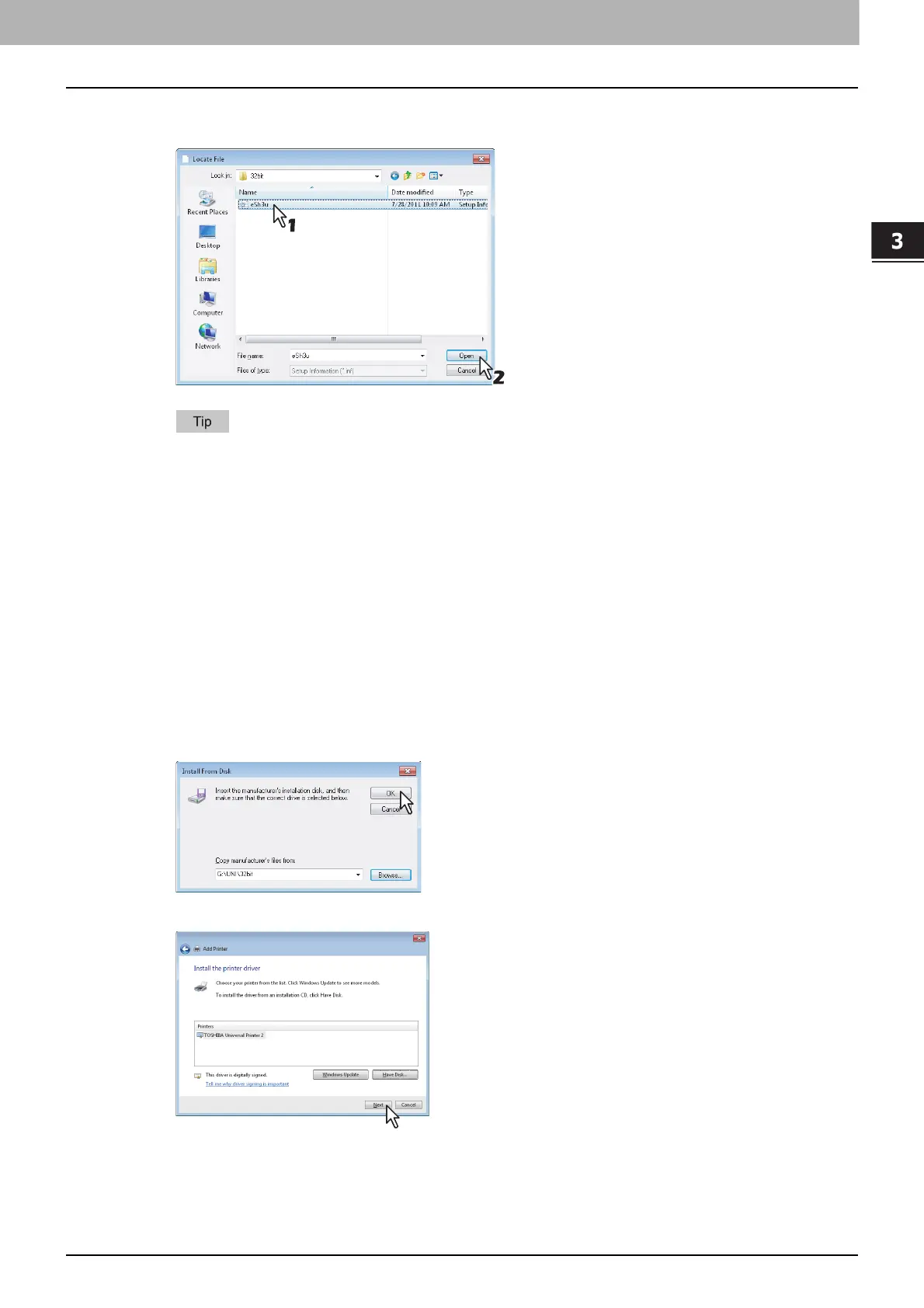
Locate the directory where the preferred printer driver is saved, select the .inf file, and
then click [Open].
When installing the printer driver using the Install Disc, select the following folder:
For the Windows computer 32-bit edition
- Universal Printer 2 driver
[Install Disc]:\Client\Drivers\UNI\32bit
- Universal PS3 printer driver
[Install Disc]:\Client\Drivers\PS\32bit
- Universal XPS printer driver
[Install Disc]:\Client\Drivers\XPS\32bit
For the Windows computer 64-bit edition
- Universal Printer 2 driver
[Install Disc]:\Client\Drivers\UNI\64bit
- Universal PS3 printer driver
[Install Disc]:\Client\Drivers\PS\64bit
- Universal XPS printer driver
[Install Disc]:\Client\Drivers\XPS\64bit
10
Confirm the file path and click [OK].
11
Confirm the correct driver has been selected and click [Next].



 To Next Page
 Loading...











