Need help?
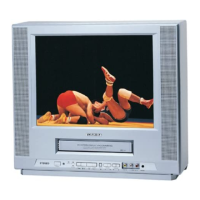
Do you have a question about the Toshiba MV13K2 and is the answer not in the manual?
Important notes on universal remotes and TV/CATV mode setup.
Cautions regarding electric shock, user-serviceable parts, and environmental hazards.
Details on FCC rules for digital devices and measures to mitigate radio frequency interference.
Instructions on reading manuals, cleaning, attachments, water, accessories, and ventilation.
Guidelines for selecting power sources and understanding grounding procedures for safe operation.
Precautions for power cords, lightning, overloading, object entry, and servicing requirements.
Information on outdoor antenna grounding and conditions that necessitate professional service.
Procedures for safety checks, wall/ceiling mounting, heat avoidance, and CATV system installer guidance.
Features like HQ Picture Technology, Frequency Synthesized Tuner, and 181 Channel Tuner.
Includes Closed Caption Decoder, Programmable Timer, Auto Clock Set, and On-Screen Display.
Procedures for handling moisture condensation on the unit to prevent operational issues.
Advice on avoiding static discharge, extreme temperatures, moisture, dust, and ensuring proper ventilation.
Warnings against inserting objects, using in vibrating environments, liquid spills, and proper shutdown.
Instructions for using the polarized AC power cord and outlet, including troubleshooting.
Identification and description of controls on the front panel of the TV/VCR.
Identification and description of input/output jacks located on the rear panel.
Explains the function of each button on the remote control for TV and VCR operations.
Details specific remote functions like SET/TR, CANCEL, TIMER REC, FF, CLOSED CAPTION, DIGITAL TRACKING.
Instructions for installing batteries and important precautions for their use in the remote.
Information on the effective operating distance and environmental factors affecting remote control performance.
Instructions for connecting VHF/UHF antennas using coaxial cable or twin-lead wires with transformers.
Step-by-step guide for inserting and adjusting a telescopic indoor antenna for optimal reception.
Instructions for connecting to basic cable TV service using a coaxial cable directly to the unit.
Guidance for connecting to services requiring a converter/descrambler or splitter and A/B switch.
Procedure to select the on-screen display language from English, Spanish, or French via menu.
Explanation of how the auto clock automatically sets time via broadcast signal when the unit is off.
Steps to turn off auto clock and manually set the standard time zones for accurate timekeeping.
Instructions for setting Daylight Saving Time automatically or manually based on local rules.
Procedure to manually set the date and time for timer recordings and other functions if auto-set fails.
How to turn on the unit, adjust volume, and select the TV or CATV reception mode.
Guide to selecting channels using direct number entry for TV and CATV modes.
How to mute sound and navigate through channels using the remote control's dedicated buttons.
Using the CALL button to display current time, channel, tape counter, and VCR status on screen.
How to set the sleep timer and use the closed captioning feature for text display.
Using the CHANNEL RETURN button to switch back to the previously viewed channel.
Explains how closed captioning displays text for hearing impaired viewers or translations.
Important notes regarding CC performance, potential issues, and compatibility with cable/antennas.
How to select the TV or CATV mode before programming channels into memory.
Guide to programming channels into memory, including the typical CATV channel allocation chart.
Procedure to start the automatic channel memorization process for available channels.
How to add new channels or delete existing ones from the TV/VCR's memory.
Instructions for registering a password to enable and secure the V-Chip rating system.
How to set TV and Movie ratings to restrict content based on age or parental guidance.
Steps to select desired movie ratings and activate the V-Chip protection.
Steps for changing the existing V-Chip password for security or preference.
Detailed instructions for setting the TV/VCR to turn on automatically at a specific time and channel.
Detailed instructions for setting the TV/VCR to turn off automatically at a specific time.
Guide to adjusting the brightness and contrast of the picture for optimal viewing.
Instructions for adjusting the color intensity, tint, and sharpness of the picture.
How to use the CANCEL button to revert picture adjustments to factory preset levels.
Step-by-step guide for inserting a VHS cassette into the TV/VCR.
Instructions on how to eject a video cassette from the unit, including automatic eject.
How to prevent accidental erasure and prepare for re-recording by covering the tab hole.
Information on different tape speeds (SP, SLP) and their maximum recording/playback times.
Instructions for starting playback of a prerecorded tape and stopping it.
How to quickly rewind or fast forward the tape to locate specific points.
Using digital tracking for clear playback and the TV MONI. button to view channels during playback.
How to perform visual searches and display a still picture from the tape.
Using the Skip Search feature to quickly advance through segments of the tape.
Instructions to set the TV/VCR to play a cassette tape repeatedly.
Steps for turning on the unit, loading a tape, selecting speed, and setting TV/CATV mode for recording.
How to select the channel to record and initiate the recording process using the REC button.
How to temporarily pause recording using the PAUSE/STILL button and resume it.
Instructions for stopping the recording process using the STOP button.
Guide to setting up a one-touch timed recording for a specified duration.
Steps to program unattended recordings by setting program position, date, start/end times, and channel.
How to set daily or weekly recording schedules for timer programs.
How to view the list of programmed timer recordings using the PROG. button.
Instructions on how to select and cancel an unwanted programmed timer recording.
How to display the real time tape counter and reset it to zero.
Instructions for using the zero return function to quickly return the tape to the starting point.
Guide to connecting the TV/VCR to another VCR or camcorder for duplicating tapes.
Descriptions and causes of common TV interference like ignition, ghosts, snow, RFI, and size variation.
Instructions for cleaning the TV/VCR cabinet and plastic parts safely.
Solutions for common problems like no power, poor picture, no color, and picture wobbling.
Troubleshooting for TV shut-off, closed caption activation, recording, playback, and remote control problems.
Information on video head clogging, its symptoms, and instructions for cleaning or replacement.
Technical specifications for the television and VCR components, including dimensions and power.
Details on the 90-day, 1-year, and 2-year limited warranties for parts and picture tube.
Outlines owner responsibilities and general limitations of the warranty.
Instructions on how to contact Toshiba for warranty service and prepare the product for shipment.
Legal disclaimers regarding implied warranties, liability, and notices for Canadian consumers.
 General
| Brand | Toshiba |
|---|---|
| Model | MV13K2 |
| Category | TV VCR Combo |
| Screen Size | 13 inches |
| Screen Type | CRT |
| Tuner | NTSC |
| Aspect Ratio | 4:3 |
| Audio Output | Mono |
| Remote Control | Yes |
| Inputs | Composite |
| Outputs | Composite |


 To Next Page