Need help?
Do you have a question about the Toshiba MW24FM1 and is the answer not in the manual?
General handling, placement, cleaning, and moisture condensation advice for safe operation.
Guidelines for handling, cleaning, storing, and copyright information for discs.
Instructions for connecting various types of VHF/UHF antennas.
Connecting basic, scrambled, or premium cable TV services.
Steps to connect the unit to an audio system for sound output.
Connecting to amplifiers with Dolby Digital, DTS, or MPEG2 decoders.
How to select the on-screen display language (English, Spanish, French).
Setting the unit's clock via auto or manual methods for accurate timekeeping.
Powering on, volume adjustment, and channel selection using the remote.
Setting the unit to turn off automatically after a preset time.
How to silence the unit's sound temporarily.
Navigating channels using the memory settings.
Returning to the previously selected channel.
Displaying text for hearing impaired viewers or translations.
Automatic channel scanning and memory setup.
Setting age-based content restrictions using a password.
Programming the unit to turn on automatically at a specific time.
Programming the unit to turn off automatically at a specific time.
Adjusting brightness, contrast, color, and sharpness for optimal picture.
Adjusting bass, treble, and balance settings for audio output.
Instructions for inserting and removing VHS tapes from the unit.
Basic playback controls: play, stop, rewind, fast forward.
Picture search, still, slow motion, and frame-by-frame playback.
Repeat playback and using the real-time tape counter.
Quickly returning the tape to the starting point (00:00:00).
Instructions for cleaning video heads to improve picture quality.
Recording a TV program while viewing or simultaneously.
Methods to stop the recording process, temporarily or permanently.
Simple timed recording by pressing REC multiple times for desired duration.
Programming unattended recordings for future TV programs.
Handling stereo broadcasts and Separate Audio Program (SAP) channels.
Copying recorded video tapes from another VCR or Camcorder.
Recording material from DVD or CD discs onto a video tape.
Basic steps to play DVD, VCD, or CD discs.
Tips for better picture quality, including sharpness adjustment.
Scanning discs at various speeds for fast searching.
Advancing the picture one frame at a time for detailed viewing.
Playing discs at reduced speeds for detailed viewing.
Continuing playback from where it was previously stopped.
Directly accessing specific titles, chapters, or tracks on a disc.
Playing titles, chapters, or tracks repeatedly or randomly.
Setting A-B points for repeat playback of a specific segment.
Programming a custom playback sequence of titles, chapters, or tracks.
Magnifying specific areas of the picture for closer viewing.
Changing camera angles on discs with multiple recorded views.
Choosing subtitle language or turning them on/off.
Choosing preferred audio tracks and output formats.
Viewing operational status and accessing features via on-screen menus.
Changing default settings for performance customization.
Adjusting picture size to match the TV aspect ratio.
Selecting sound output format for system connection.
Adjusting faint sounds for easier listening at low volumes.
Turning vocal output on/off during DVD KARAOKE playback.
Selecting preferred language for on-screen displays.
Selecting preferred language for disc menus.
Selecting preferred language for the sound track.
Selecting preferred language for subtitles.
Turning operational status display on/off.
Selecting background color or picture for menus.
Turning the screen saver on or off.
Selecting resolution for still pictures.
Enabling parental lock based on content ratings.
Stopping playback automatically after a title completes.
Using menus for PBC-featured VIDEO CDs.
Installing the initial system settings for the unit.
List of language abbreviations for menu and audio settings.
Troubleshooting common VCR and DVD issues and their solutions.
Identifying and fixing common TV interference issues like ignition, ghosts, and snow.
Technical details, input/output, and supplied accessories for the unit.
Details of product warranty coverage, terms, and conditions.
 General
| Brand | Toshiba |
|---|---|
| Model | MW24FM1 |
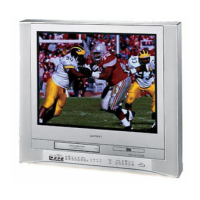
| Product Type | TV VCR Combo |
| Screen Size | 24 inches |
| Display Technology | CRT |
| Screen Type | Flat |
| Resolution | 480i |
| Tuner | NTSC |
| VCR Playback | Yes |
| Remote Control | Yes |
| Inputs | Composite |


 To Next Page