EasyManua.ls Logo

Toshiba PC-E70 - Adjustments; Record;Playback Head Adjustment; Erase Head Height Adjustment

Toshiba PC-E70
18 pages
Print Icon
To Next Page IconTo Next Page
To Previous Page IconTo Previous Page
Loading...
PC-E70
5.
ADJUSTMENTS
S|
R428
TP24R
~
TP24L
Z602_
nase
©]
zao2
R427
|
=)
[Q]
z401
Q419
fe
sit
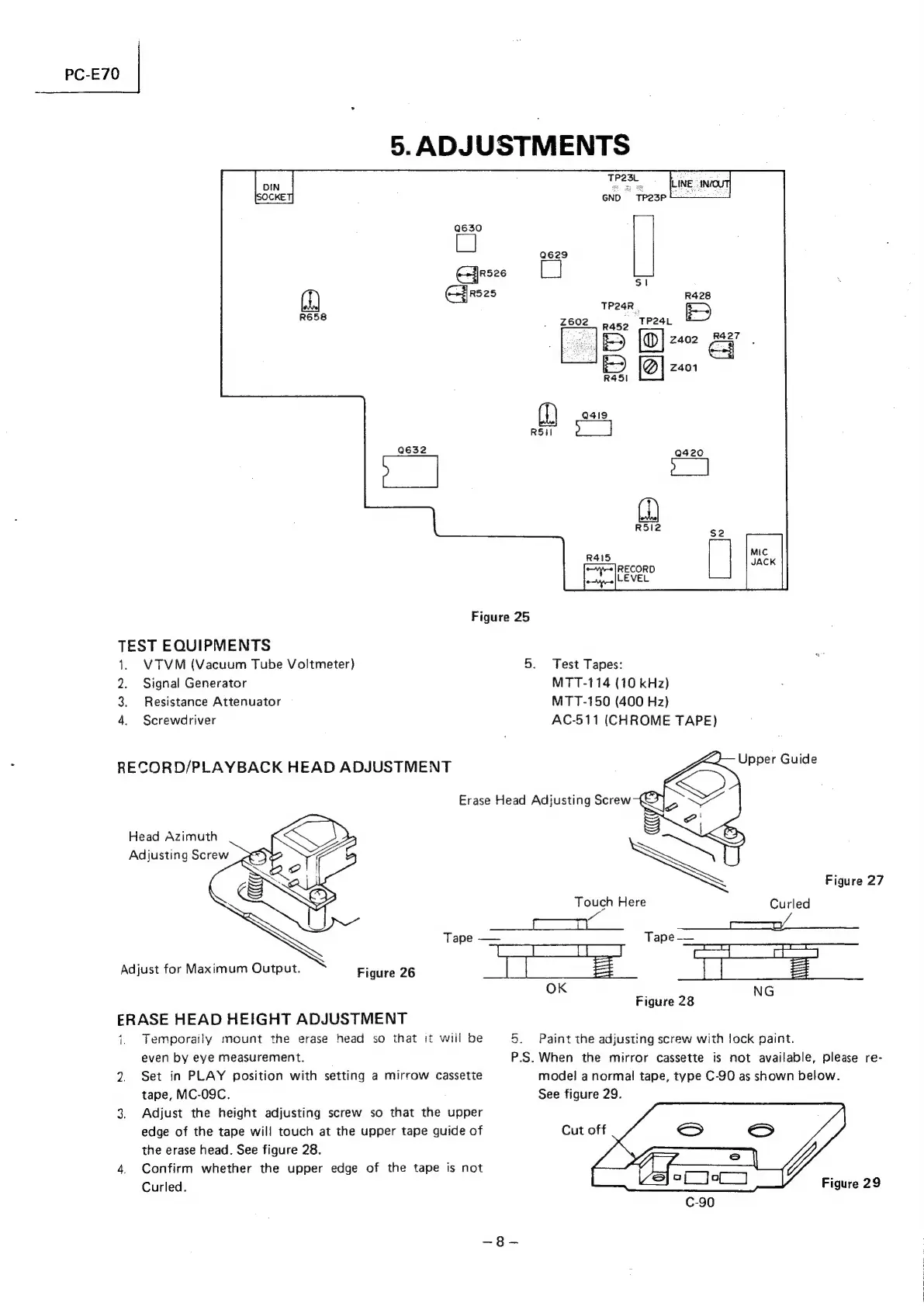
Figure
25
TEST
EQUIPMENTS
1.
VTVM
(Vacuum
Tube
Voltmeter)
2.
Signal
Generator
3.
Resistance
Attenuator
4.
Screwdriver
RECORD/PLAYBACK
HEAD
ADJUSTMENT
Erase
Head
Adjusting
Screw
Head
Azimuth
Adjusting
Screw
Adjust
for
Maximum
Output.
Figure
26
ERASE
HEAD
HEIGHT
ADJUSTMENT
1.
Temporaily
mount
the
erase
head
so
that
it
will
be
even
by
eye
measurement.
2.
Set
in
PLAY
position
with
setting
a
mirrow
cassette
tape,
MC-09C.
3,
Adjust
the
height
adjusting
screw
so
that
the
upper
edge
of
the
tape
will
touch
at
the
upper
tape
guide
of
the
erase
head.
See
figure
28.
4.
Confirm
whether
the
upper
edge
of
the
tape
is
not
Curled.
5.
Test
Tapes:
MTT-114
(10
kHz)
MTT-150
(400
Hz)
AC-511
(CHROME
TAPE)
Upper
Guide
Figure
27
Touch
Here
Curled
Tape
——
Sith
=
1.
Tape
——
Exon
ae
Figure
28
OK
5.
Paint
the
adjusting
screw
with
lock
paint.
P.S.
When
the
mirror
cassette
is
not
available,
please
re-
model
a
normal
tape,
type
C-90
as
shown
below.
See
figure
29.
Figure
29

Related product manuals