EasyManua.ls Logo

Toshiba PC-E70 - Page 7

Toshiba PC-E70
18 pages
Print Icon
To Next Page IconTo Next Page
To Previous Page IconTo Previous Page
Loading...
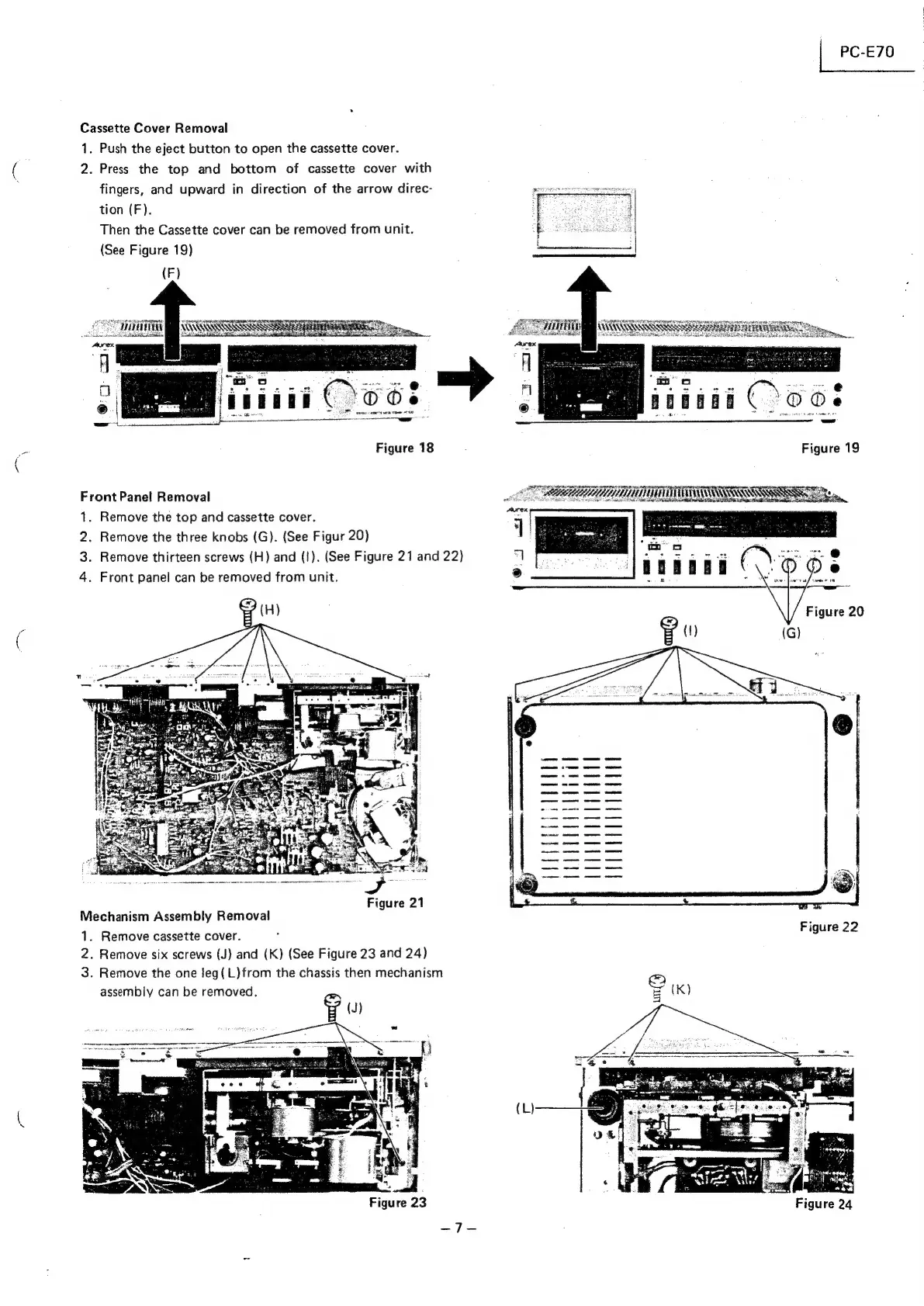
Cassette
Cover
Removal
1.
Push
the
eject
button
to
open
the
cassette
cover.
2.
Press
the
top
and
bottom
of
cassette
cover
with
fingers,
and
upward
in
direction
of
the
arrow
direc-
tion
(F).
Then
the
Cassette
cover
can
be
removed
from
unit.
(See
Figure
19)
aibidi
(
OO8
Figure
18
Figure
19
TATA
ITIL
WARS
eae
SSR
owt
tl
SE
a
A
eh
ORS
NE
ners
ree
=
Front
Panel
Removal
of
1.
Remove
the
top
and
cassette
cover.
a
2.
Remove
the
three
knobs
(G).
(See
Figur
20)
z
:
3.
Remove
thirteen
screws
(H)
and
(I).
(See
Figure
21
and
22)
*
4.
Front
panel
can
be
removed
from
unit.
®
(H)
g
()
(G)
Figure
21
Mechanism
Assembly
Removal
Figure
22
1.
Remove
cassette
cover.
2.
Remove
six
screws
(J)
and
(K)
(See
Figure
23
and
24)
3.
Remove
the
one
leg(L)from
the
chassis
then
mechanism
assembly
can
be
removed.
g
(J)
(L)
Figure
24

Related product manuals