EasyManua.ls Logo

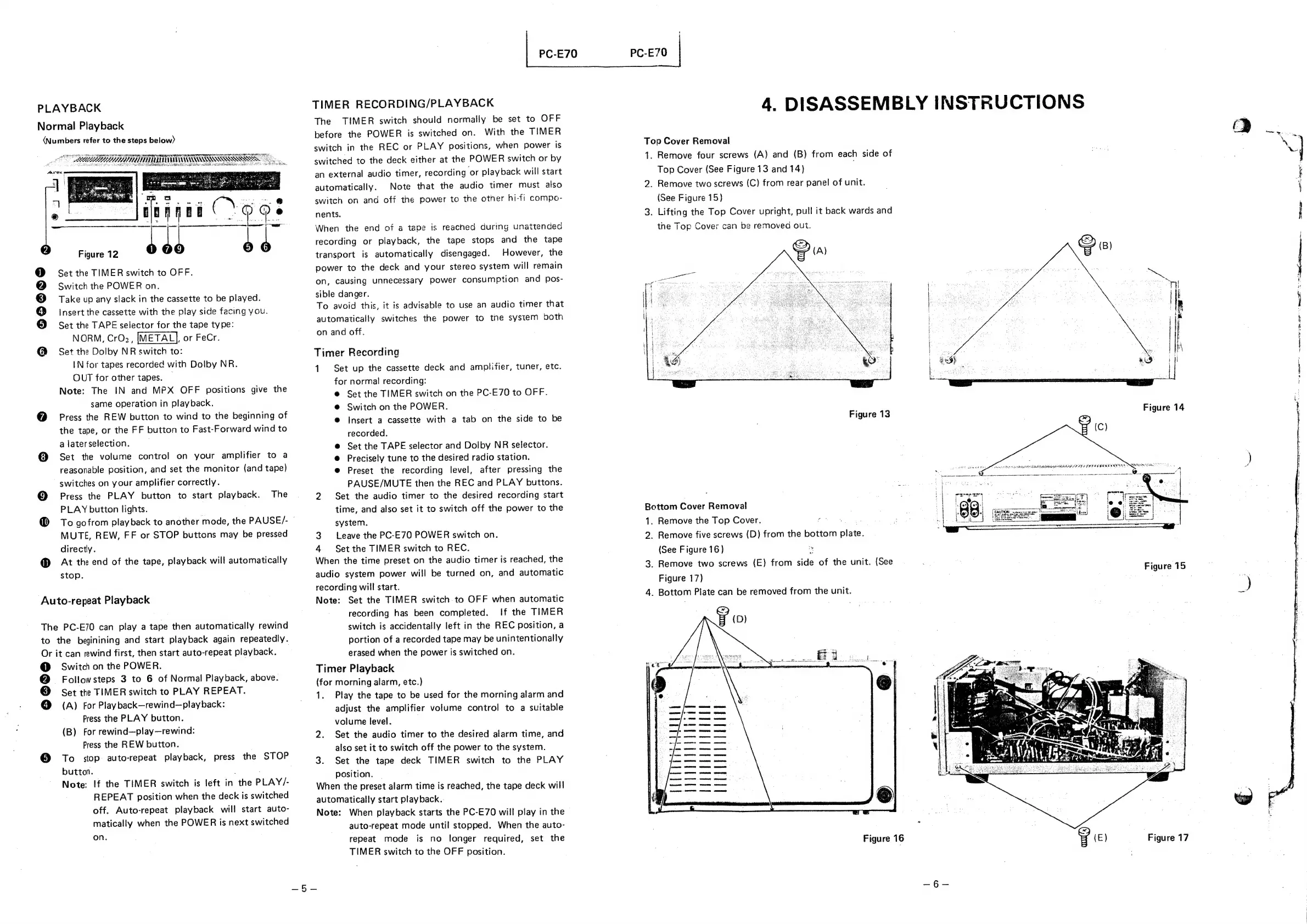
Toshiba PC-E70 - Disassembly Instructions; Top Cover Removal; Bottom Cover Removal

Toshiba PC-E70
18 pages
Print Icon
To Next Page IconTo Next Page
To Previous Page IconTo Previous Page
Loading...
PLAYBACK
Normal
Playback
(Numbers
refer
to
the
steps
below)
OO
EET
TOTTORI
ESS
he
i
ei
a
AC
Figure
12
b6
de
@
Set
the
TIMER
switch
to
OFF.
@
Switch
the
POWER
on.
©
Take
up
any
slack
in
the
cassette
to
be
played.
@
insert
the
cassette
with
the
play
side
facing
you.
@
Set
the
TAPE
selector
for
the
tape
type:
NORM,
CrO2,
[METAL],
or
FeCr.
@
Set
the
Dolby
NR
switch
to:
IN
for
tapes
recorded
with
Dolby
NR.
OUT
for
other
tapes.
Note:
The
IN
and
MPX
OFF
positions
give
the
same
operation
in
playback.
@
Press
the
REW
button
to
wind
to
the
beginning
of
the
tape,
or
the
FF
button
to
Fast-Forward
wind
to
a
later
selection.
@
Set
the
volume
control
on
your
amplifier
to
a
reasonable
position,
and
set
the
monitor
(and
tape)
switches
on
your
amplifier
correctly.
@
Press
the
PLAY
button
to
start
playback.
The
PLAY
button
lights.
@
To
gofrom
playback
to
another
mode,
the
PAUSE/-
MUTE,
REW,
FF
or
STOP
buttons
may
be
pressed
directly.
@
At
the
end
of
the
tape,
playback
will
automatically
stop.
Auto-repeat
Playback
The
PC-E70
can
play
a
tape
then
automatically
rewind
to
the
beginining
and
start
playback
again
repeatedly.
Or
it
can
rewind
first,
then
start
auto-repeat
playback.
@
Switch
on
the
POWER.
@
Followsteps
3
to
6
of
Normal
Playback,
above.
©
set
the
TIMER
switch
to
PLAY
REPEAT.
@
(A)
For
Playback—rewind—playback:
Press
the
PLAY
button.
(B)
For
rewind—play—rewind:
Press
the
REW
button.
To
stop
auto-repeat
playback,
press
the
STOP
button.
;
:
Note:
If
the
TIMER
switch
is
left
in
the
PLAY/-
REPEAT
position
when
the
deck
is
switched
off.
Auto-repeat
playback
will
start
auto-
matically
when
the
POWER
is
next
switched
on.
PC-E70
TIMER
RECORDING/PLAYBACK
The
TIMER
switch
should
normally
be
set
to
OFF
before
the
POWER
is
switched
on.
With
the
TIMER
switch
in
the
REC
or
PLAY
positions,
when
power
is
switched
to
the
deck
either
at
the
POWER
switch
or
by
an
external
audio
timer,
recording
or
playback
will
start
automatically.
Note
that
the
audio
timer
must
also
switch
on
and
off
the
power
to
the
otner
hi-fi
compo-
nents.
When
the
end
of
a
tape
is
reached
during
unattended
recording
or
playback,
the
tape
stops
and
the
tape
transport
is
automatically
disengaged.
However,
the
power
to
the
deck
and
your
stereo
system
will
remain
on,
causing
unnecessary
power
consumption
and
pos-
sible
danger.
To
avoid
this,
it
is
advisable
to
use
an
audio
timer
that
automatically
switches
the
power
to
tne
system
both
on
and
off.
Timer
Recording
1
Set
up
the
cassette
deck
and
amplifier,
tuner,
etc.
for
normal
recording:
@
Set
the
TIMER
switch
on
the
PC-E70
to
OFF.
@
Switch
on
the
POWER.
@
Insert
a
cassette
with
a
tab
on
the
side
to
be
recorded.
@
Set
the
TAPE
selector
and
Dolby
NR
selector.
©
Precisely
tune
to
the
desired
radio
station.
@
Preset
the
recording
level,
after
pressing
the
PAUSE/MUTE
then
the
REC
and
PLAY
buttons.
2
Set
the
audio
timer
to
the
desired
recording
start
time,
and
also
set
it
to
switch
off
the
power
to
the
system.
3.
Leave
the
PC-E70
POWER
switch
on.
4
Set
the
TIMER
switch
to
REC.
When
the
time
preset
on
the
audio
timer
is
reached,
the
audio
system
power
will
be
turned
on,
and
automatic
recording
will
start.
Note:
Set
the
TIMER
switch
to
OFF
when
automatic
recording
has
been
completed.
If
the
TIMER
switch
is
accidentally
left
in
the
REC
position,
a
portion
of
a
recorded
tape
may
be
unintentionally
erased
when
the
power
is
switched
on.
Timer
Playback
(for
morning
alarm,
etc.)
1.
Play
the
tape
to
be
used
for
the
morning
alarm
and
adjust
the
amplifier
volume
control
to
a
suitable
volume
level.
2.
Set
the
audio
timer
to
the
desired
alarm
time,
and
also
set
it
to
switch
off
the
power
to
the
system.
3.
Set
the
tape
deck
TIMER
switch
to
the
PLAY
position.
When
the
preset
alarm
time
is
reached,
the
tape
deck
will
automatically
start
playback.
Note:
When
playback
starts
the
PC-E70
will
play
in
the
auto-repeat
mode
until
stopped.
When
the
auto-
repeat
mode
is
no
longer
required,
set
the
TIMER
switch
to
the
OFF
position.
PC-E70
|
4.
DISASSEMBLY
INSTRUCTIONS
2
en
Top
Cover
Removal
.
1.
Remove
four
screws
(A)
and
(B)
from
each
side
of
a
:
Top
Cover
(See
Figure
13
and
14)
2.
Remove
two
screws
(C)
from
rear
panel
of
unit.
(See
Figure
15)
3.
Lifting
the
Top
Cover
upright,
pull
it
back
wards
and
the
Top
Cover
can
be
removed
out.
e
(A)
¢
net!
met
gee
ee
wee
OS
mm
5
anna
Figure
14
Figure
13
Ceca
eeystid
Satie
teh
gh
aha
OH OF
DP
RERE
PAREN
ELSE
IRN
,
Bottom
Cover
Removal
1.
Remove
the
Top
Cover.
:
:
2.
Remove
five
screws
(D)
from
the
bottom
plate.
(See
Figure
16)
2
3.
Remove
two
screws
(E)
from
side
of
the
unit.
(See
:
F
Figure
15
Figure
17)
4.
Bottom
Plate
can
be
removed
from
the
unit.
Figure
16
F
(E)
Figure
17

Related product manuals