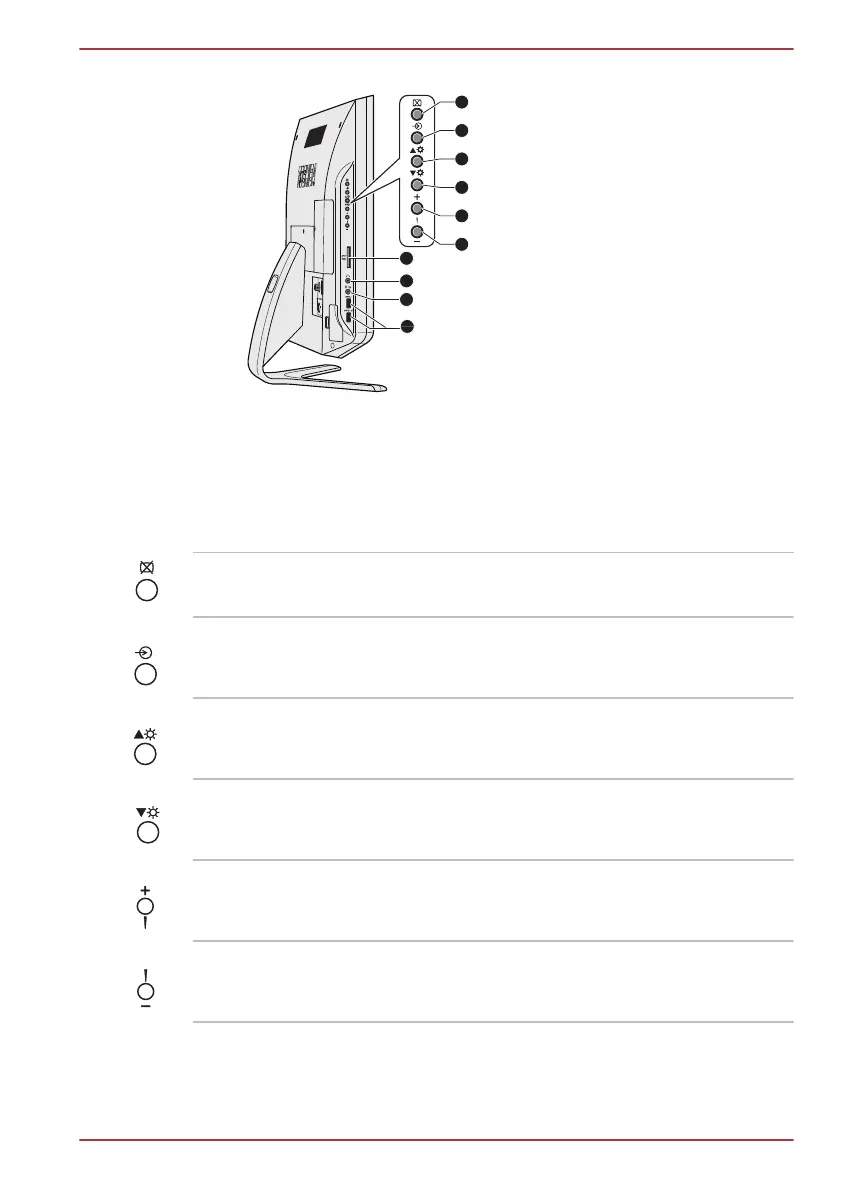
Figure 2-2 The left side of the computer
1. Display off button 6. Volume down button
2. AV select button 7. Memory media slot
3. Brightness up button 8. Headphone jack
4. Brightness down button 9. Microphone jack
5. Volume up button 10.Universal Serial Bus (USB 3.0) ports
Product appearance depends on the model you purchased.
Display off button Press this button to turn off the computer’s
display panel.
AV select button Press this button to switch the AV input mode.
Brightness up button Press this button to increase the computer’s
display panel brightness.
Brightness down but-
ton
Press this button to decrease the computer’s
display panel brightness.
Volume up button Press this button to increase the computer’s
volume.
Volume down button Press this button to decrease the computer’s
volume.
TOSHIBA DX730/DX735/Qosmio DX730 Series
User's Manual 2-
4



 To Next Page
 Loading...







