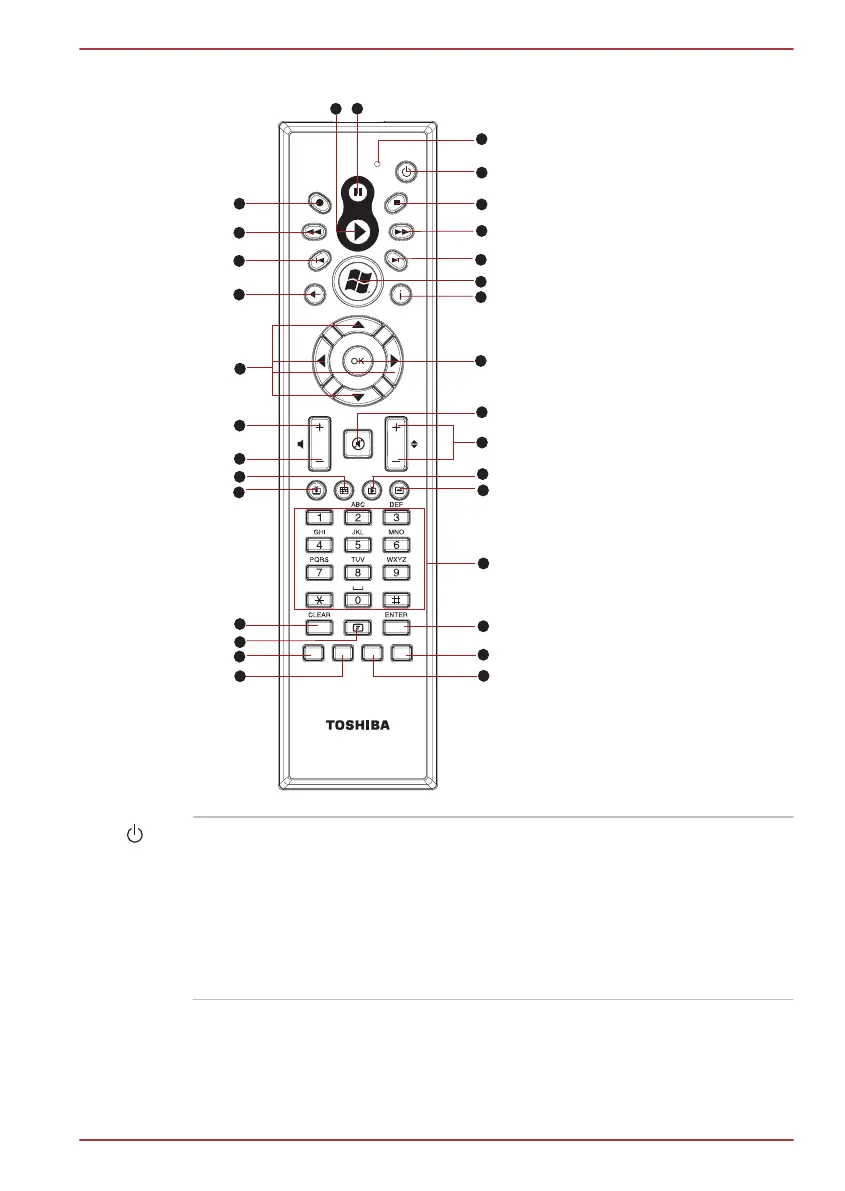
Figure 2-9 Remote controller
27
28
29
30
31
23
24
25
1
2
3
4
5
6
7
8
9
26
22
10
18
19
20
21
11
12
13
14
16
17
15
1. Play
2. Pause
3. Access indicator
4. Power
5. Stop
6. Fast Forward
7. Skip
8. Start
9. More info
10. OK
11. Mute
12. Channel/Page up (+)
and down (-)
13. Live TV
14. DVD Menu
15. Numbers
16. Enter
17. Clear
18. Recorded TV
19. Guide
20. Volume -
21. Volume +
22. Arrows
23. Back
24. Replay
25. Rewind
26. Record
27. Blue
28. Yellow
29. Green
30. Red
31. Teletext
Power Starts or terminates the operating system. This
button functions like the Power button of your
computer. By default, the Sleep Mode is
equivalent to the Power Off state of your
computer. To change the setting, click Start ->
Control Panel
-> System and Security ->
Power Options. The following four options are
available: Do nothing, Sleep and Hibernate.
TOSHIBA DX730/DX735/Qosmio DX730 Series
User's Manual 2-13



 To Next Page
 Loading...







