43
Playback
Recording
Editing
Others
Introduction
Function Setup
Recording
Programming a recording (EPG)
Electronic programme guide (EPG) system enables you to programme a recording much easier. You
only choose a programme and enter the selection!
Preparation
• When you record on a DVD-RAM/R/RW, load it into the recorder.
• When you record on a DVD-R/RW (Video mode) or when you record contents which will be copied to a DVD-R/
RW (Video mode), make the necessary settings (
page 34).
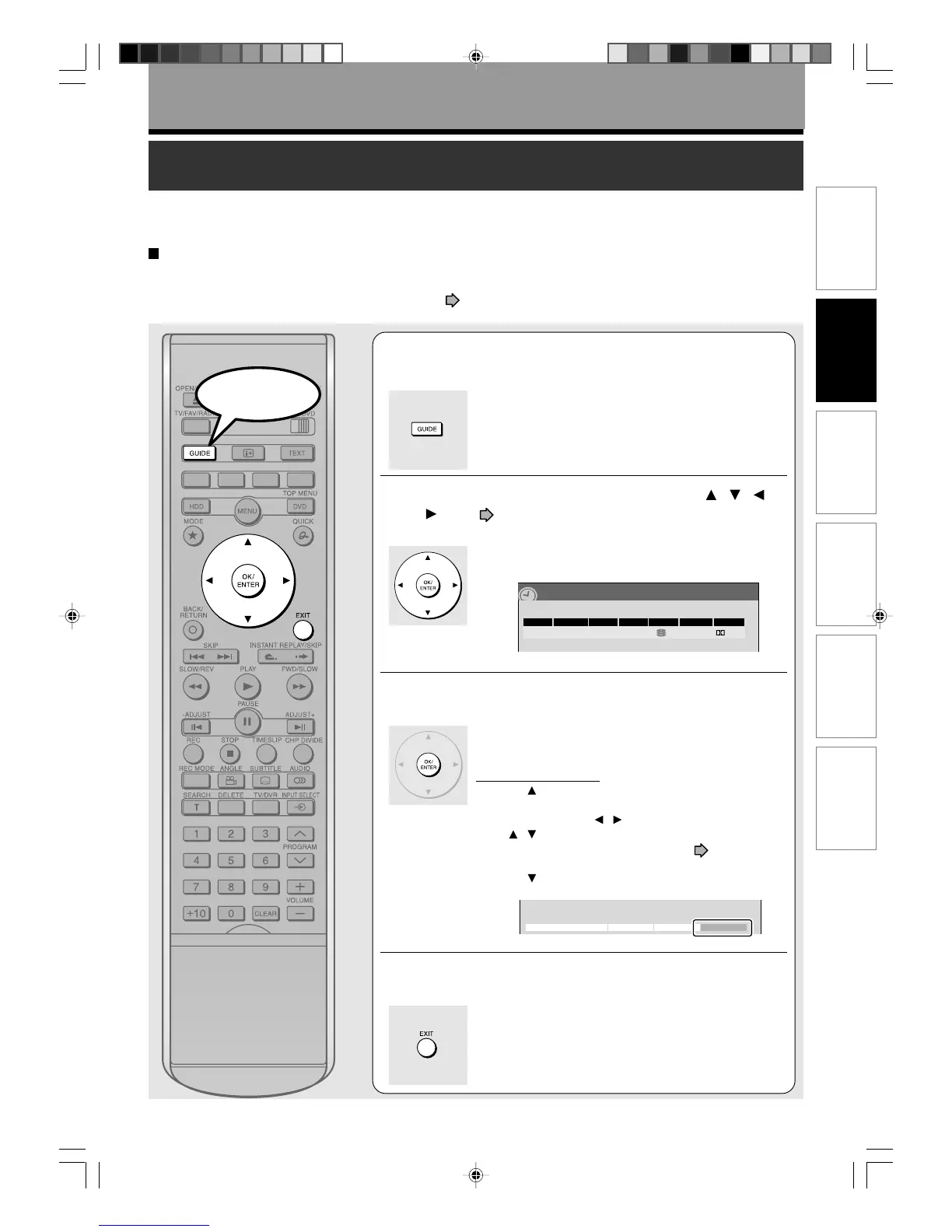
1
Press GUIDE.
Electronic programme guide (EPG) appears.
2
Select a programme to record using / / /
(see page 24 for details), then press
OK/ENTER.
REC MENU appears to show the programming data of
the selected programme.
3
Confirm the programming data, and press
OK/ENTER.
Programming is complete.
The programme guide (EPG) returns.
If you correct the data:
1) Press
repeatedly until the programming data is
selected, then press OK/ENTER.
2) Select the item by
/ , then change the parameter
by
/ (or ADJUST -/+).
For details of the setting items, see
page 39.
3) When complete, press OK/ENTER.
4) Press
to select “Set timer”, then press OK/ENTER
to exit.
4
To programme others, repeat steps 2 and 3.
To finish programming, press EXIT.
The current programme returns.
4/23(Su)17:50
Basic
REC
MENU
Ch Date
Rec time –h ––m/ HDD remaining (excluding above) 51h 24m
Start End Media Pict. Audio
1 SP 4.6 D/M14/30(Su) 7 00 8 30
HDD
e.g.
Edit title name Advanced Cancel Set timer
Start
RD-85DT_Ope_E_p031-044 3/27/06, 19:4043



 To Next Page
 Loading...










