English - 7 -
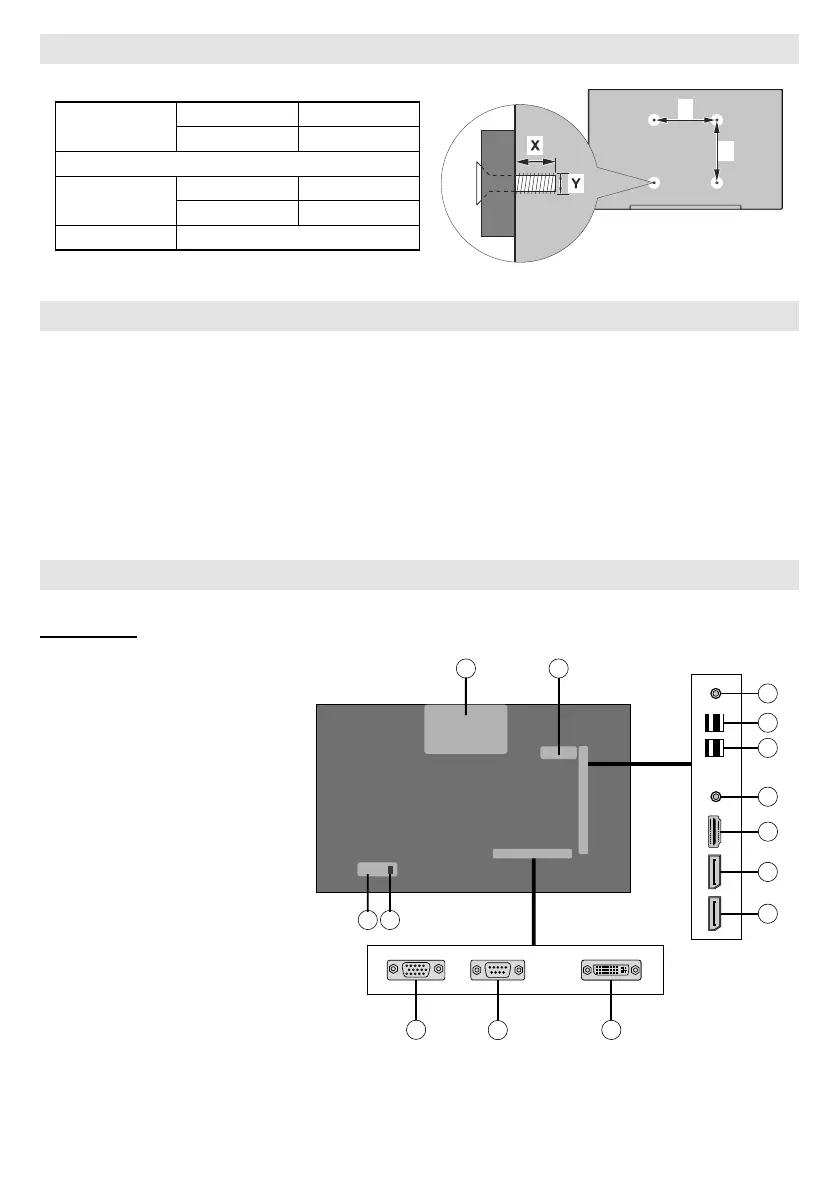
Vesa Wall Mount Measurements
Hole Paern
Sizes (mm)
W H
400 400
Screw Sizes
Length (X)
min. (mm) 7
max. (mm) 21
Thread (Y) M6
When Using a Wall Bracket
Please use a wall bracket appropriate for the size and weight of the LCD display and two people are required
for the installation.
(1) Unplug and remove any cables and/or other component connectors from the rear of the LCD display.
bracket(s) are attached to the wall and the back of the display as described in the instructions provided with
the wall bracket.
Do not install the product on a ceiling or inclined Wall.
Connecting to external equipment
Rear Side (1)
1. VGA
2.
Port
3. DVI
4.
5.
6. HDMI 1
7. Headphone
8. USB (2.0)
9. USB (3.0)
10.
11. OPS Slot
12.
model)
13.
14. AC Inlet
4
6
8
7
9
10
11
1
3
12
5
14


 To Next Page