English - 23 -
case the Display will use the date and time information
stored in RTC.
• All time sources are able to override RTC date/time.
• Display tries to connect to the NTP server period-
ically (6 hours after last update) to get the current
date and time information. If the Display successfully
updates itself and RTC with the received date and
Display uses RTC time and date to update itself.
• The RTC battery provides power to the integrated
real-time clock and the calendar. Without any
a minimum of 14 days.
•
time set is enabled from Date/Time option in the
System>Settings menu.
local time should be used. Summer / Winter time
correction will be automatic.
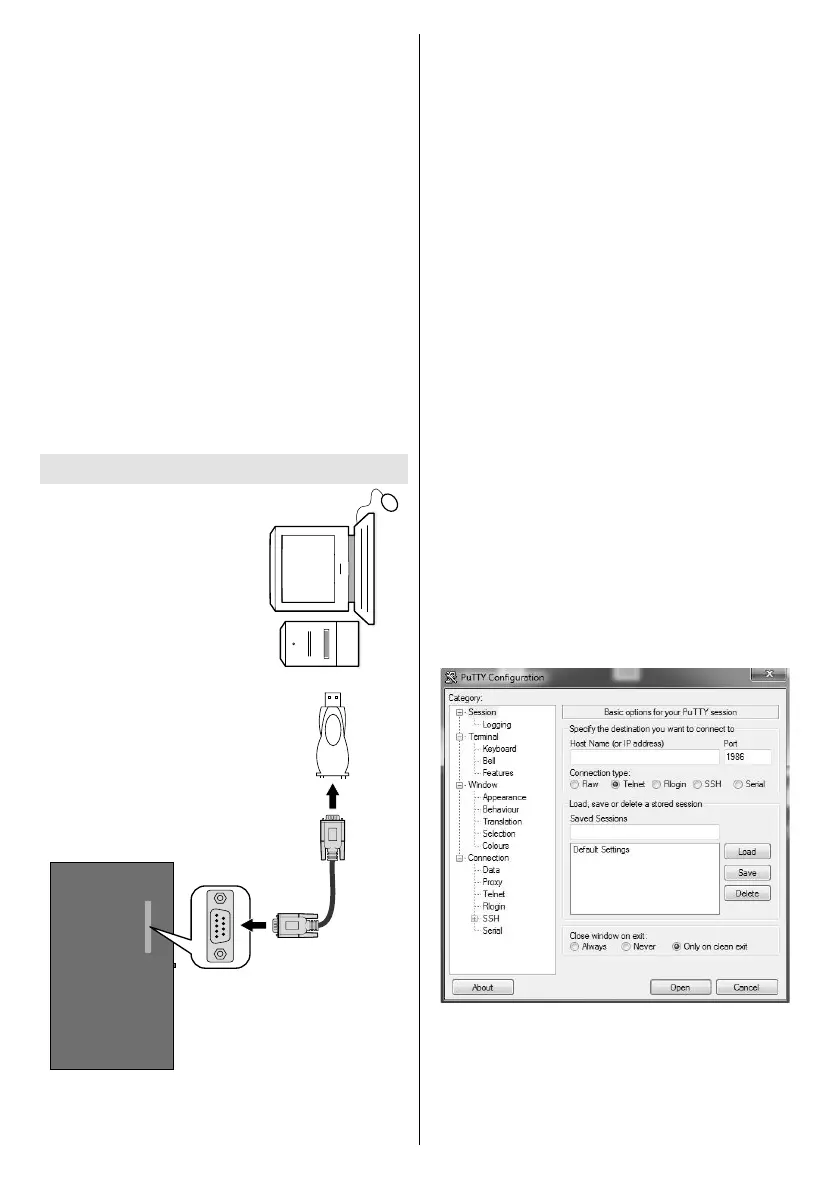
RS-232
Input Socket
To COM port
RS-232 to
USB Adaptor
PC
You can control the product from an external PC via
RS-232 (COM port or LAN(Ethernet port)) on the
RS-232 from remote computer. When a command is
according to the received command and sends a
response message to the PC.
Equipment/Tools:
• RS-232 (female) to RS-232(male) cable or LAN
cable (connected via router).
• USB to RS-232(male) cable
• Notebook or PC which has USB port or LAN
• Installed program on remote PC to send commands:
operating the implemented functions via serial port
and utility a suitable utility can be used such as
described below.
Connecting to the Display LAN port
Download and install the PuTTY software from the
Host Name1986
PortTelnetConnection
type and click the Open button.
Note: Refer to the Connectivity section of this manual for
information on connecting the Display to a network and
displaying the IP address of the Display.
Use the commands in the RS232 Command Table
which can be found on Toshiba website.For
current volume level should be displayed on the putty
window as shown in the pictures below.



 To Next Page