EasyManua.ls Logo

Toshiba TD-E653 - Connectivity

Toshiba TD-E653
35 pages
Print Icon
To Next Page IconTo Next Page
To Previous Page IconTo Previous Page
Loading...
English - 19 -
Connectivity

to the     
System>Settings menu.
Wired Connectivity
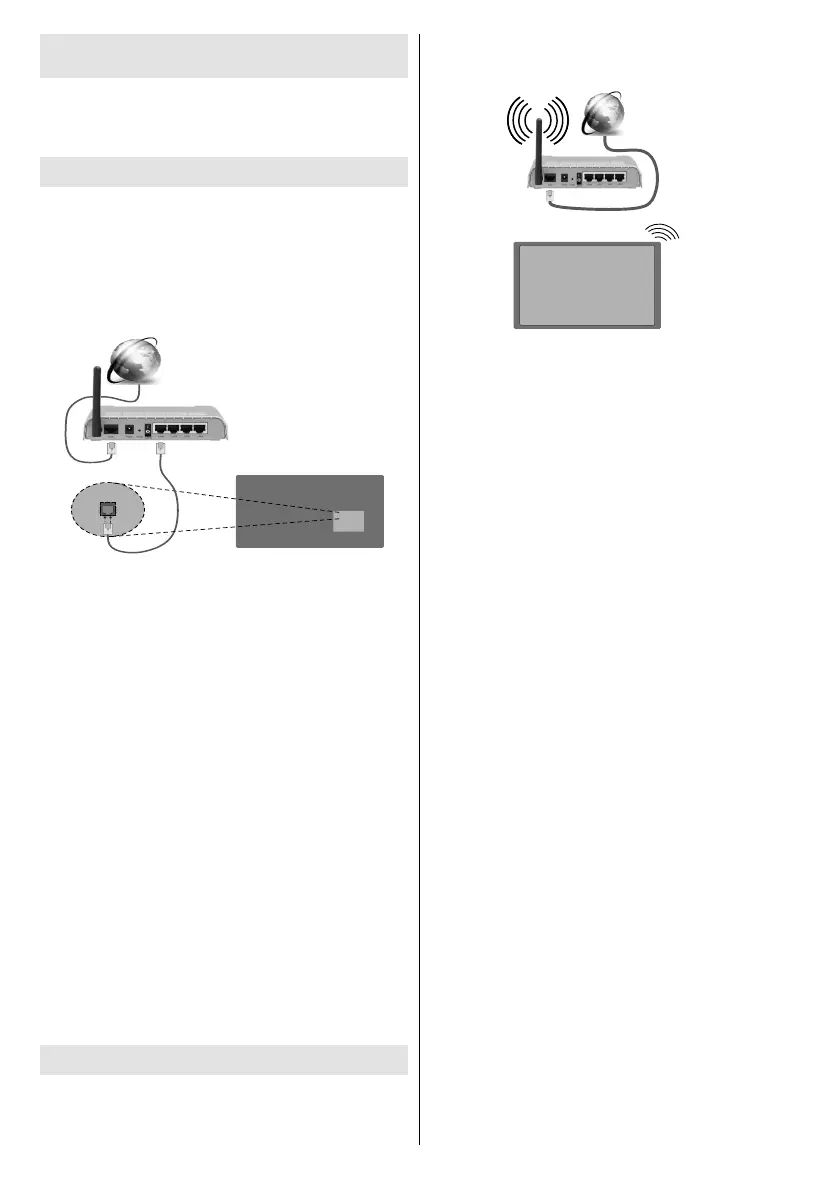
To Connect to a Wired Network
You must have a modem/router connected to an




Broadband ISP connection
LAN (ethernet) cable
LAN input on the rear
side of the Display

Network Type
The Network Type can be selected as Wired Device,
Wireless Device or Disabled   
active connection to the Display. Select this as Wired
Device if you are connecting via an ethernet.
Internet Speed Test
 Internet Speed Test and press the OK
     

Advanced Settings
Advanced  and press the OK but-
ton. On the next screen you can change the IP and


from  to Manual. Now you can enter the
Manual IP and / or Manual DNS values. Select the
         

Press the OK
Wireless Connectivity
To Connect to a Wireless Network
The Display cannot connect to the networks with a
hidden SSID (wireless network name). To make your


Broadband
ISP
connection
A Wireless-N router (IEEE 802.11a/b/g/n) with
simultaneous 2.4 and 5 GHz bands is designed
to increase bandwidth. These are optimized for
      
transfers.
      
the area.
     

     






        




        





  



Open the  menu and select
Network Type as 
process.



Note: If the modem supports N mode, you should set N
mode settings.

Related product manuals