E6581090
F-25
6
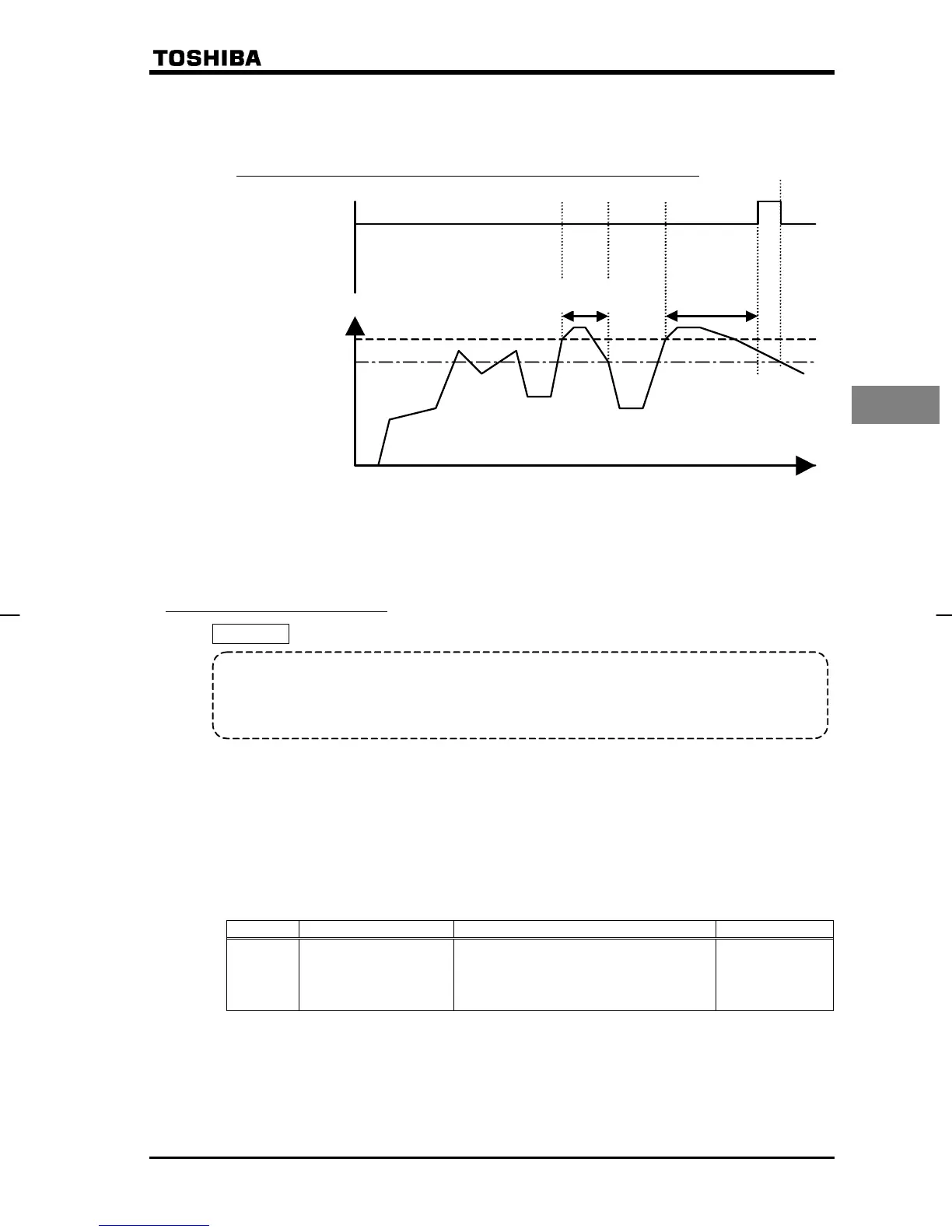
<Example of operation>
1) If function 12 (OT: over-torque detection) is assigned to the FM/OUT terminal,
using the output terminal selection parameter H
H (FM/OUT terminal selection 1): 12 (OT: over-torque detection)
Time (sec)
*H
-10%
H
Torque current (%)
Over-torque-
detection signal
P15-FM/OUT
H
ON
O
FF
OFF
*The VF-nC1 inverter has 10% of hysteresis to prevent the occurrence of over-torque hunting.
Therefore, the over-torque signal is turned off at a level lower than the setting of
H
by
10% (hysteresis).
Less than
H
-set value
6.14.8 Undervoltage trip
H
: Under voltage trip selection
• Function
This parameter is used to select the control mode activated when an undervoltage is
detected. The error message “
WR
” will be displayed if the inverter trips because of an
undervoltage.
H= : Disabled ・・・・The inverter shuts down but not trip. (FL relay not activated) The
inverter shuts down if the voltage drops below 64% of the rated
voltage.
H= : Enabled ・・・・・The inverter shuts down. It trips if the voltage drops below 64% of
the rated voltage. (FL relay activated)
H= : Disabled ・・・・The inverter shuts down but not trip. (FL relay not activated) The
inverter shuts down if the voltage drops below 50% of the rated
voltage. When setting H to , be sure to install the input
reactor of an option.
Title FunctionAdjustment rangeDefault setting
H
Under voltage trip
selection
0: Disabled
1: Enabled (shutdown below 64%,
FL relay activated)
2: Disabled (shutdown below 50%,
FL relay not activated)
0


 To Next Page
 Loading...








