16
3. GETTING STARTED
1.
2.
3.
4.
5.
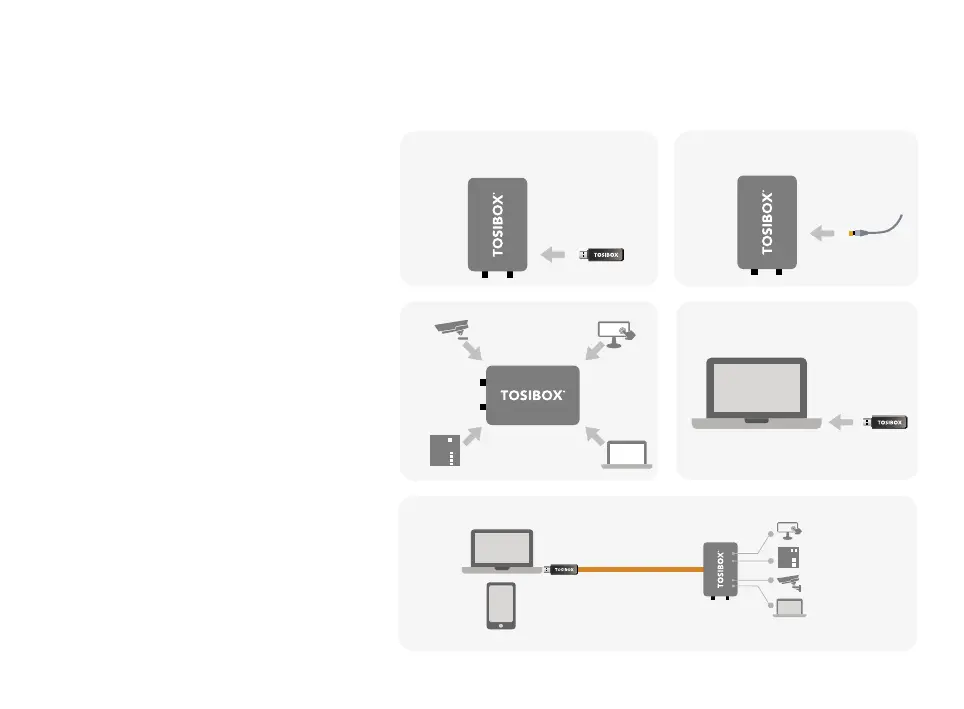
1. Make sure the Lock is powered before
proceeding to matching the Key with the Lock.
Insert the Key into the USB port of the Lock.
When the LED on the Key turns off, the matching
is complete (approximately 10 seconds). Remove
the Key from the Lock. You can also match
additional Locks to the same Key.
2 - 3. Connect the Lock to your network according to
your use case. Remember to make sure that the
Lock has a working internet connection.
4. Connect the Key to your computer and install the
Key software. Follow the section ”Deploying the
Key”.
5. Secure TOSIBOX
®
connection is now ready to
be used for controlling and monitoring devices
remotely.
THE FIRST DEPLOYMENT


 To Next Page
 Loading...