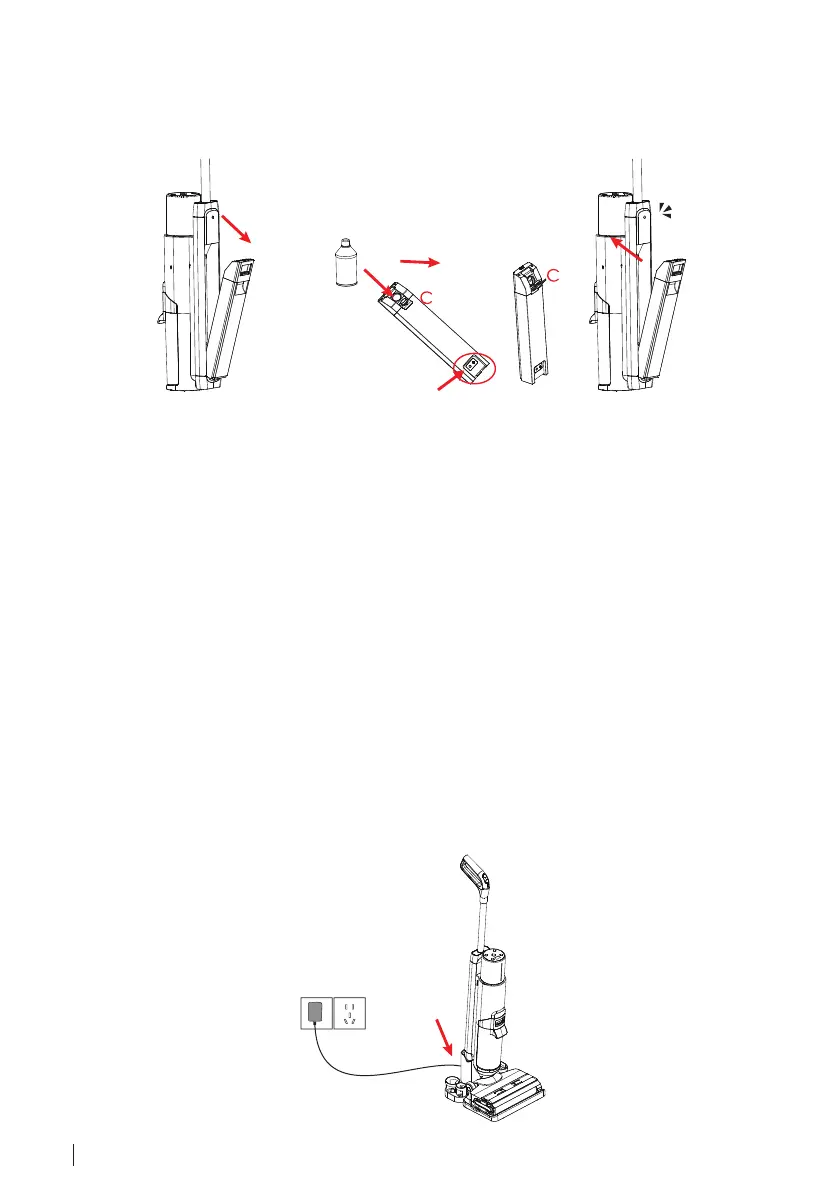
Filling up the Clean Water Tank
1. The clean water tank is located on the back of the main body, hold the clean water tank
holder and press the clean water tank release button, pull it outwards and take out the
water tank.
Electrolytic Electrode
2. Open the clean water tank lid "C", add clean water or mixed detergent, then put
back the water tank lid and attach it back to H1.
• Please keep the electrolytic electrodes of the clean water tank and its cavity clean and
dry.
• Users can also add some non-corrosive or non-flammable cleaning solutions to clean the
floor, DO NOT add corrosive solution, flammable liquid, or dirty water into the clean water
tank.
• It is normal if there is some water in the water tank at the first use, tests and inspections
have proceeded before goods leave the factory.
Charging H1
1. Connect the external charging cord to the charging base and plug the adapter into the
wall outlet.
2. Please place H1 on the charging station against the wall during charging, otherwise, you
may trip over the machine.
3. Place the H1 on the charging station vertically, H1 will say "Charging Starts", and users
can see the battery status on the digital display.
16 ENGLISH



 To Next Page