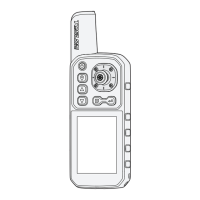
1) Power On / Off the unit.
2) Exit the selction or Menu.
Power / Exit
Used to quickly enter into waypoint list or go home by one-button pushing.
Waypoing List
1) Move up menu or increase value of an option.
2) Shortcut key for user defined function (please refere to page32. )
1) Move down menu or decrease value of an option.
2) Shortcut to mark current pisition as Home point.
1) Used to switch between main pages.
2) Keep pressing 2s to open Menu settings.
3) Exit the current menu and back to previous menu.
1) Finalizes menu selections; confirm a setting.
2) ENTER key is also used to quickly save Home point.
Up
Down
Menu / Page
Enter
5


 To Next Page