18
Cooking Functions:
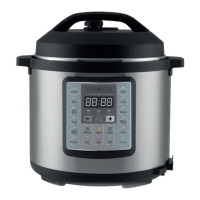
The control panel also allows you to select the specic cooking functions, including types of
certain types of food. Please see the table below:
WARNING! NEVER
deep fry or pressure fry in the unit with oil. It is dangerous and may
cause re or serious damage.
Function Instruction
CANCEL 1. Press the “Cancel” button to stop the current function of the Express
Pot and return to standby mode.
WARM 1. Under standby mode, press the “Warm” button to keep food warm.
The “Warm” indicator light will come on and the display screen will
show “0H”. 1 hour later the screen will show “1H” and 2 hours later it
will show “2H”.
SEAR 1. Under standby mode, press the “Sear” button. The indicator light
will come on and the display screen will show the default working
time. The selected function will begin If no button is pressed after 10
seconds or if the “Start” button is pressed. This will start a 30 minute
countdown and enter into standby mode when nished.
Note: The pressure for this mode cannot be adjusted.
SLOW
COOK
1. In the Standby state, press the “Slow Cook” button. The indicator
light will come on and the display screen will show the default
working time. Press “+” or “-” buttons to adjust the working time.
The selected function will begin If no button is pressed after 10
seconds or if the “Start” button is pressed. The display screen will
start the countdown and the unit will begin “Slow Cook” mode. When
it nishes the appliance will enter “Warm” mode.
Note: The pressure for this mode cannot be adjusted once it has started
the cooking process.
MANUAL 1. In the standby state, press the “Manual” button. The indicator light
will come on and the display screen will show the default working
time. Press “+” or “-” buttons to adjust the pressure working time.
The selected function will begin If no button is pressed after 10
seconds or if the “Start” button is pressed. The display screen will
start the countdown as soon as the pressure rises to a working
pressure. The Express Pot will enter into “Warm” mode when it
nishes working.
2. Preset cooking: Before the program starts, press the “Delay” button.
The screen will show the preset beginning time. Press “+” or “-”
buttons to adjust the delay time. Then press the “Hours/Minutes”
buttons to change length of time. The unit will start the delay
countdown 10 seconds after the function is set or when the Start
button is pressed. When the countdown nishes the program will
begin.
Note: The pressure for this mode cannot be adjusted.


 To Next Page