134
3-5. Opening, closing the windows and moon roof
*
: If equipped
■
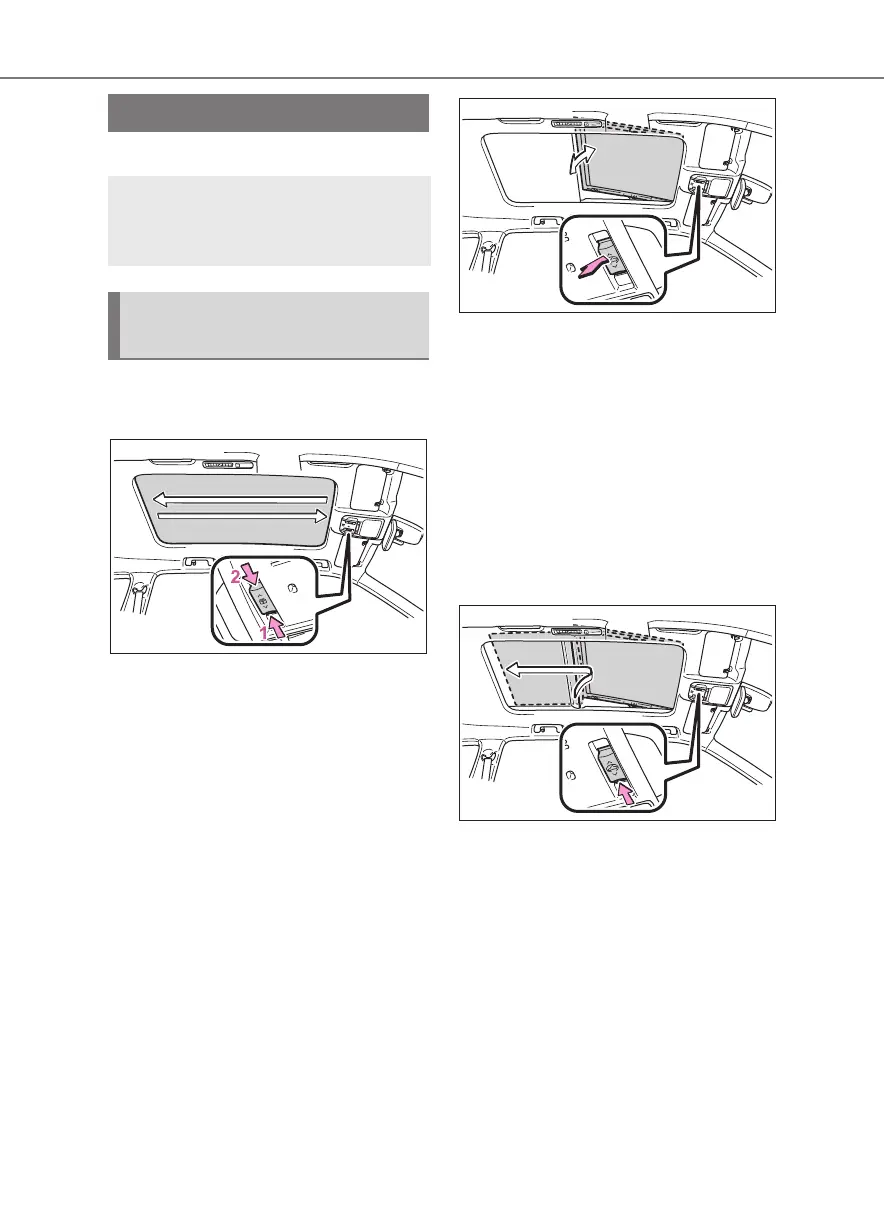
Opening and closing the elec-
tronic sunshade
1 Opens the electronic sunshade
*
2 Closes the electronic sunshade
*
*
: Lightly press either side of the sun-
shade switch to stop the electronic
sunshade partway.
■
Tilting the panoramic moon
roof up and down
Tilt up (press)
*
If the panoramic moon roof is open,
pressing the switch closes it up to the
tilt-up position.
If the shade is closed past the half-open
position when the switch is pressed, it
will open up to the half-open position.
To stop operation partway, quickly slide
and release the switch again.
Tilt down (press and hold)
The panoramic moon roof can be
tilted down only when it is in the
tilt-up position.
■
Opening and closing the pano-
ramic moon roof
Open (slide backward)
*
To stop operation partway, quickly slide
and release the switch again.
Close (slide forward)
*
The panoramic moon roof stops at
the tilt-up position.
Slide and hold the switch again to
fully close the panoramic moon
roof.
To stop operation partway, quickly slide
and release the switch again.
Panoramic moon roof
*
Use the overhead switches to
operate the panoramic moon
roof and electronic sunshade.
Operating the panoramic
moon roof













 To Next Page