72
2-1. Instrument cluster
■
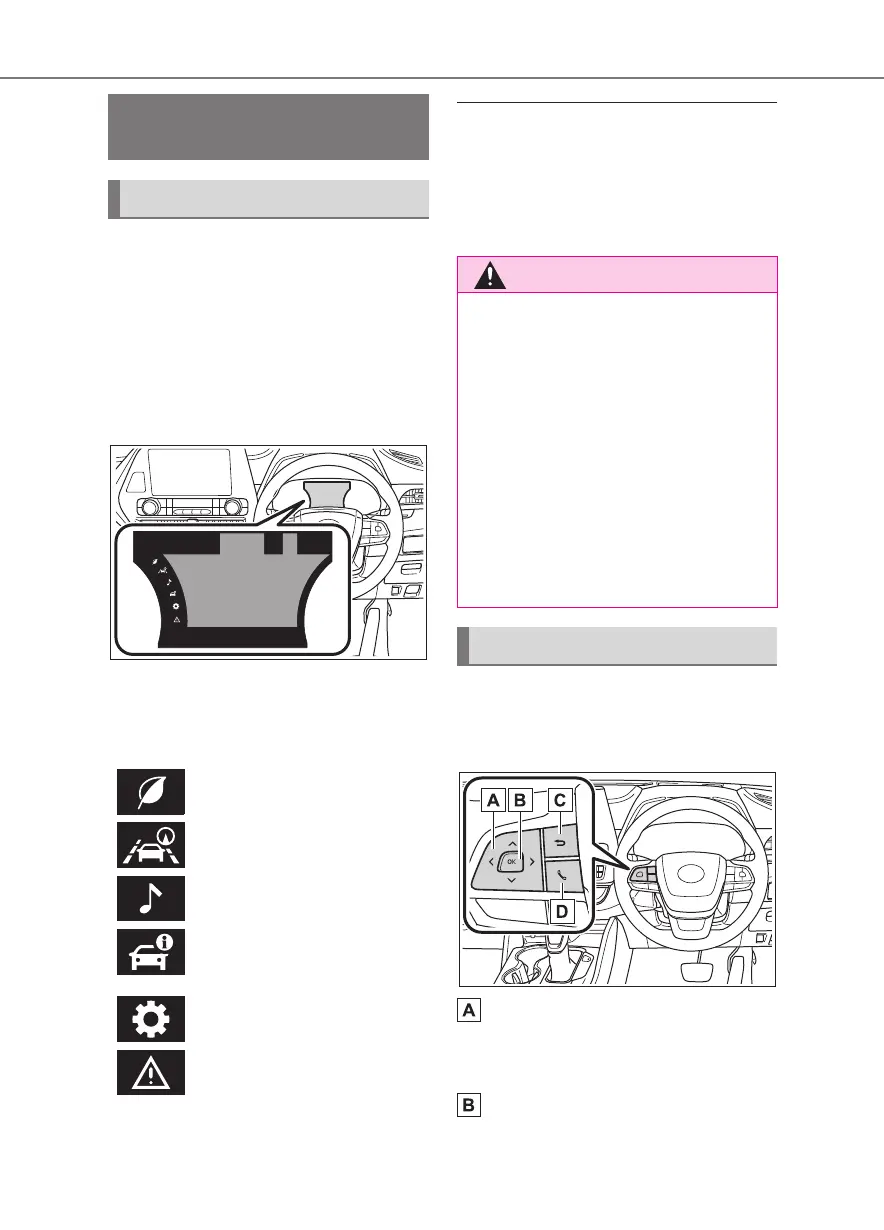
Display
The multi-information display pre-
sents the driver with a variety of
driving-related information.
Warning or suggestion/advice
pop-up displays are also displayed
in certain situations.
■
Menu icons
Select a menu icon to display its
content.
■
Liquid crystal display
Small spots or light spots may appear
on the display. This phenomenon is
characteristic of liquid crystal displays,
and there is no problem continuing to
use the display.
The multi-information display is
operated using the meter control
switches.
Scroll screens
*
, change the dis-
played content
*
and move the
cursor
Press: Enter/Set
Press and hold: Reset/Display
Multi-information display
(7-inch display)
Display and menu icons
Driving information display
(P. 73 )
Driving support system infor-
mation display (P. 7 5)
Audio system-linked display
(P. 75 )
Vehicle information display
(P. 76 )
Settings display (P. 7 6 )
Warning message display
(P. 80 )
■
Caution for use while driving
●
When operating the multi-informa-
tion display while driving, pay extra
attention to the safety of the area
around the vehicle.
●
Do not look continuously at the
multi-information display while driv-
ing as you may fail to see pedestri-
ans, objects on the road, etc. ahead
of the vehicle.
■
The information display at low
temperatures
P.6 2
Changing the meter display










 To Next Page