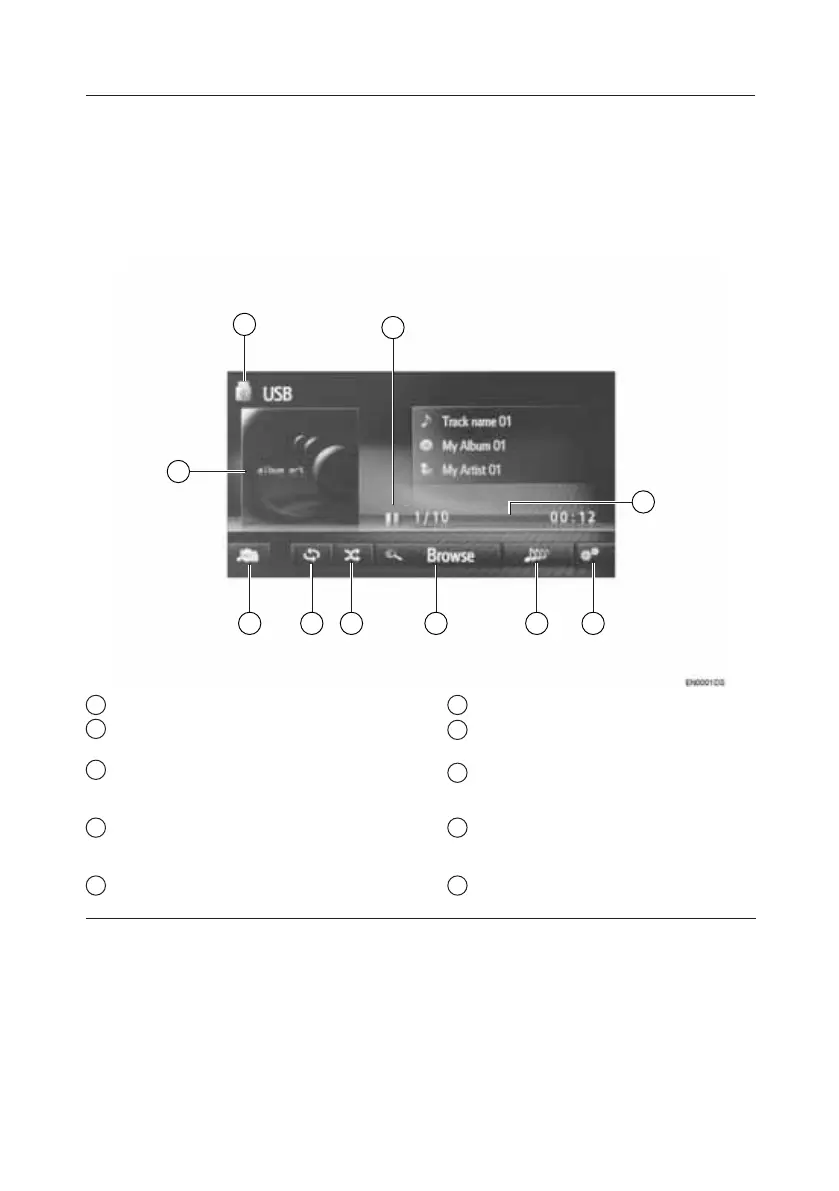
USB Memory
The USB memory operation screen can be reached by the following methods:
• Connecting a USB memory
• Select “USB” on the audio source
selection screen
9
10
1
2
345
6
7
8
1 Shows progress.
2 Select to display the USB options
screen.
3 Select to create a new playlist
containing songs similar to the current
song being played (if equipped).
4 Select to display the browse options
selection screen and then select the
desired item.
5 Select to set random playback.
6 Select to set repeat playback.
7 Select to display the audio source
selection screen.
8 Displays cover art.
• Select to display a track list.
9 Select to switch between “USB1”
and “USB2” when two USB memory
devices are connected.
10 Select to play/pause.
TOUCH-SCREEN MULTIMEDIA
9







 To Next Page